Bootstrap: missing ".dropdown-menu-right" in v4.0.0-beta
In v4.0.0-beta there is no .dropdown-menu-right class.
It was included in v4.0.0-alpha6 and its there in docs.
 mrGibi
All 8 comments
That's right because Dropdown now depend on Popper.js and when you applied .dropdown-menu-right to your Dropdown it will be positionned by Popper.js not by CSS
 Johann-S
on 11 Aug 2017
Johann-S
on 11 Aug 2017
Same here. The menu opens out of page in my right aligned navbar :-(
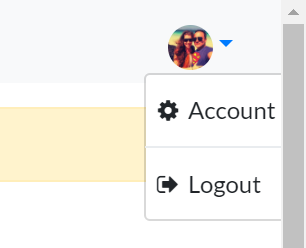
 realtarget
on 12 Aug 2017
realtarget
on 12 Aug 2017
We cannot help you without a live example in a JSBin or Codepen
Johann-S
on 12 Aug 2017
I've copied the example dropdown from getbootstrap.com and now it works for me.
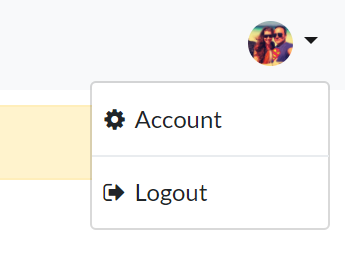
Unfortunately i can't reproduce the error.
realtarget
on 12 Aug 2017
Closing out then. Please make sure y'all are using the latest code from the new beta docs <3.
 mdo
on 12 Aug 2017
mdo
on 12 Aug 2017
I am having the same problem. I have reproduced it here:
 froodley
on 16 Aug 2017
froodley
on 16 Aug 2017
I could not reproduce it: https://www.codeply.com/go/ULpwrXl7R1
But in my project i have also this issue since upgrading from alpha.6 to beta:
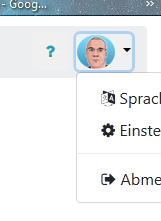
Can't find the difference
Update:
.dropdown-menu-right {
    right: 0;
    left: auto;
}
Inserting this into my .css fixed this issue for me.
 JavanXD
on 17 Aug 2017
JavanXD
on 17 Aug 2017
See my answer here : https://github.com/twbs/bootstrap/issues/23479#issuecomment-323020849
@JavanXD
Johann-S
on 17 Aug 2017
Related issues
 steve-32a
·
3Comments
steve-32a
·
3Comments
 devdelimited
·
3Comments
devdelimited
·
3Comments
 ghost
·
3Comments
ghost
·
3Comments
 IamManchanda
·
3Comments
IamManchanda
·
3Comments
 tiendq
·
3Comments
tiendq
·
3Comments
Most helpful comment
I could not reproduce it: https://www.codeply.com/go/ULpwrXl7R1

But in my project i have also this issue since upgrading from alpha.6 to beta:
Can't find the difference
Update:
.dropdown-menu-right {
    right: 0;
    left: auto;
}
Inserting this into my .css fixed this issue for me.