Bootstrap-table: Different tables which have one the same function (option) but in the different format and with different data
I really have searched but nothing found on this subject.
On the one page I have these two tables:
<table
  id="phones"
  data-toggle="table"
  data-search="true"
  data-detail-view="true"
  data-detail-view-icon="false"
  data-detail-view-by-click="true"
  data-detail-formatter="detailFormatter"
  data-pagination="true"
  data-url="phones.json">
  <thead>
    <tr>
      <th data-field="name">Name</th>
      <th data-field="phones">Phones</th>
    </tr>
  </thead>
</table>
AND
<table
  id="rooms"
  data-toggle="table"
  data-search="true"
  data-detail-view="true"
  data-detail-view-icon="false"
  data-detail-view-by-click="true"
  data-detail-formatter="detailFormatter"
  data-pagination="true"
  data-url="rooms.json">
  <thead>
    <tr>
      <th data-field="id">ID</th>
      <th data-field="number">Number</th>
    </tr>
  </thead>
</table>
In these tables I use the option detailFormatter
  function detailFormatter(index, row) {
    var html = []
    $.each(row, function (key, value) {
      html.push('<p><b>' + key + ':</b> ' + value + '</p>')
    })
    return html.join('')
  }
if I leave as is then these tables will use this option with the same set properties that not needed me.
I need this function (option) but in the different format and with different data and for different tables, for example:
For table with ID phones
  function detailFormatter(index, row) {
    var html = []
    $.each(row, function (key, value) {
      **### Formatting For table with ID  phones ###**
    })
    return html.join('')
  }
AND
For table with ID rooms
  function detailFormatter(index, row) {
    var html = []
    $.each(row, function (key, value) {
      **### Formatting For table with ID  rooms ###**
    })
    return html.join('')
  }
this also applies to others function nameFunction(index, row)
how to divide that functions... I need this function for first table and this function for second table...
How is it to do?
thanks advance
 typo3ua
All 8 comments
@typo3ua As described in the issue template, please provide us an example with your two tables (with data) using our online editor.
 UtechtDustin
on 17 Jun 2020
UtechtDustin
on 17 Jun 2020
Done...
https://live.bootstrap-table.com/code/typo3ua/3489
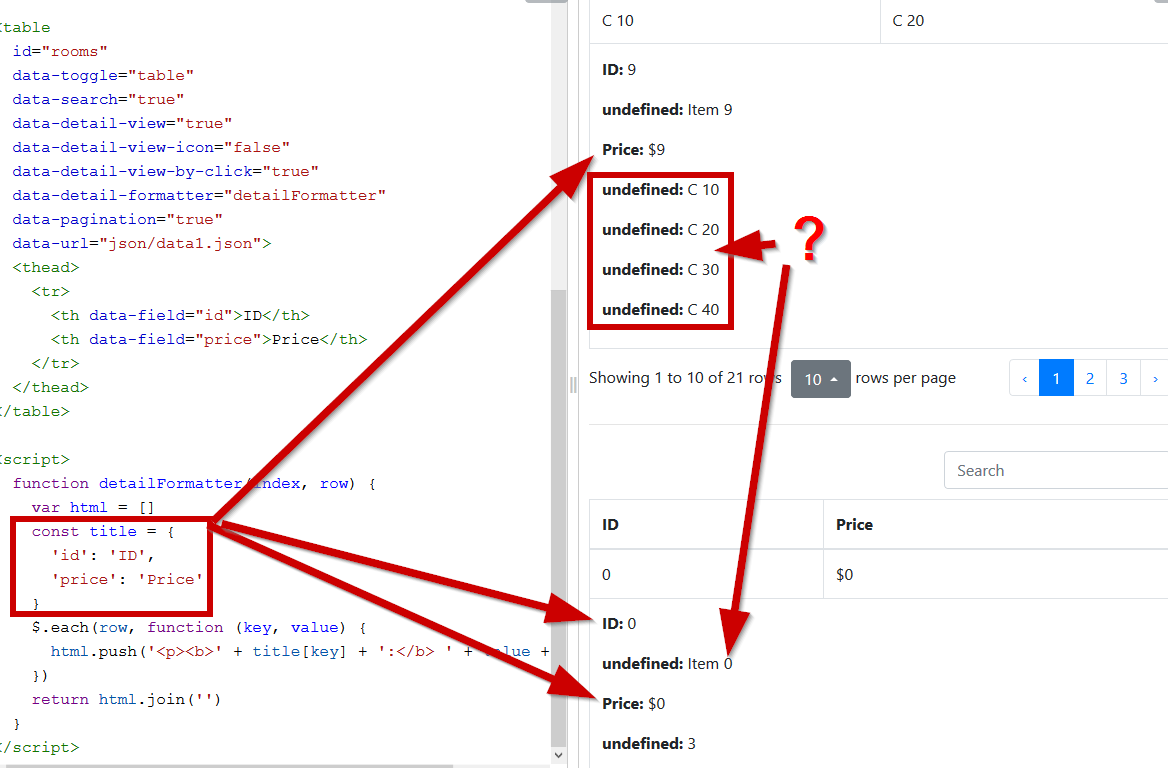
I just do not find another set data but with this set data you can see what happened
I added the function for table with id="rooms" but her using the table with id="phones" and id="rooms"
typo3ua
on 17 Jun 2020
Do you mean something like this: https://live.bootstrap-table.com/code/UtechtDustin/3490 ?
UtechtDustin
on 17 Jun 2020
Not bad ... but ii is very difficult for me understand
Maybe you have something easier?
For example:
It is for table id="rooms"
  function detailFormatter(index, row) {
    var html = []
    const title = {
      'id': 'ID',
      'price': 'Price'
    }
    $.each(row, function (key, value) {
      html.push('<p><b>' + title[key] + ':</b> ' + value + '</p>')
    })
    return html.join('')
  }
AND
It is for table id="phones"
  function detailFormatter(index, row) {
    var html = []
    const title = {
      'col1': 'COL 1',
      'col2': 'COL 2'
    }
    $.each(row, function (key, value) {
      html.push('<p><b>' + title[key] + ':</b> ' + value + '</p>')
    })
    return html.join('')
  }
If table will be more... ? ... return tableId === 'phones' ? phonesDetailFormatter(row) : roomsDetailFormatter(row)
  function detailFormatter(index, row, el) {
    const $table = $(el).parents('table')
    const tableId = $table.attr('id');
    return tableId === 'phones' ? phonesDetailFormatter(row) : roomsDetailFormatter(row)
  }
if will it be many different function?
typo3ua
on 17 Jun 2020
I think ... it would be better if each table have a own name of function (option) detailFormatter or others functions (options) like detailFormatter
typo3ua
on 17 Jun 2020
Im not sure what do you need then, you can define per table different function(name)s.
Example: https://live.bootstrap-table.com/code/UtechtDustin/3493
UtechtDustin
on 17 Jun 2020
wow... it is much easier... you are really cool ... thank you so much .. have a nice night
typo3ua
on 17 Jun 2020
Your welcome :-)
UtechtDustin
on 17 Jun 2020
Related issues
 cgountanis
·
14Comments
cgountanis
·
14Comments
 jesussuarz
·
17Comments
jesussuarz
·
17Comments
 havok2063
·
39Comments
havok2063
·
39Comments
 antonioaltamura
·
15Comments
antonioaltamura
·
15Comments
 hello-code
·
29Comments
hello-code
·
29Comments