Bootstrap-select: Cannot read property 'options' of undefined
GREAT PLUGIN! Thanks for the hard work.
A javascript error is thrown when combining data-live-search="true" with option groups
In _boostrap-select.js_ (line 1363):
if (that.options.liveSearch) $parent = $this.parent().parent();
Example:
<select id="sel_assign"
    class="selectpicker"
    data-width="100%"
    data-size="auto"
    data-live-search="true"
    title="Select an Assignee">
    <optgroup label="Crew Members">
    <option value="1">Smith</option>
    </optgroup>
</select>
Help!
 rmirabelle
All 33 comments
Possibly fixed by adding another call to parent() in _boostrap-select.js_ (line 1300)
So instead of this
$parent = $this.is('input') ? $this.parent().parent() : $this.parent(),
Do this
$parent = $this.is('input') ? $this.parent().parent().parent() : $this.parent(),
Though I have not thoroughly tested to see if this referencing fix would break something else
rmirabelle
on 3 Jul 2015
See guidelines for contributing. Any chance you can link me to a demo or jsfiddle? Have you been able to reproduce this with a reduced test case?
 caseyjhol
on 6 Jul 2015
caseyjhol
on 6 Jul 2015
@rmirabelle Using .parent() and .children() is generally not maintainable as the html structure changes. It's much better to apply a class to those elements and search for it with .closest(class_name) or .find(class_name).
 jtfairbank
on 8 Sep 2015
jtfairbank
on 8 Sep 2015
@jtfairbank This was just an attempt to hack the source of this plugin to make it work. Thanks for the heads up regarding .closest(), which I agree with wholeheartedly. @caseyjhol With apologies, I don't have time to be of further assistance.
rmirabelle
on 13 Sep 2015
still the same issues
 Jesseszhang
on 7 Sep 2016
Jesseszhang
on 7 Sep 2016
bug not fixed
Jesseszhang
on 7 Sep 2016
+1
 fracz
on 23 Nov 2016
fracz
on 23 Nov 2016
I am receiving this error too
Some notes:
- The company I work for is using a framework which has included jquery and bootstrap more than once, this has caused me issues like you cant believe. I don't think this is part of the cause.
- Issue coming from 'keydown'
- Version: 1.12.2
Initialization:
<select class="selectpicker" data-live-search="true">
<option>step 1</option>
<option>step 2</option>
<option>step 3</option>
</select>
$('.selectpicker').selectpicker();
This is what i have managed to find in debugger:
Where the error seems to be coming from:
a,p,w,k,s,e=n(this),v=e.is("input")?e.parent().parent():e.parent(),i=v.data("this"),c=":not(.disabled, .hidden, .dropdown-header, .divider)",b={32:" ",48:"0",49:"1",50:"2",51:"3",52:"4",53:"5",54:"6",55:"7",56:"8",57:"9",59:";",65:"a",66:"b",67:"c",68:"d",69:"e",70:"f",71:"g",72:"h",73:"i",74:"j",75:"k",76:"l",77:"m",78:"n",79:"o",80:"p",81:"q",82:"r",83:"s",84:"t",85:"u",86:"v",87:"w",88:"x",89:"y",90:"z",96:"0",97:"1",98:"2",99:"3",100:"4",101:"5",102:"6",103:"7",104:"8",105:"9"},o,g,y,d;if(i.options.liveSearch&&(v=e.parent().parent()),i.options.container&&(v=i.$menu)

Local
Exception: TypeError: Cannot read property 'options' of undefined at HTMLInputElement.keydown at HTMLDocument.dispatch at HTMLDocument.v.handle
a: undefined
b: Object
c: ":not(.disabled, .hidden, .dropdown-header, .divider)"
d: undefined
e: i.fn.init(1)
g: undefined
h: undefined
i: undefined
k: undefined
l: undefined
o: undefined
p: undefined
r: undefined
s: undefined
t: i.Event
this: input.form-control.valid
u: undefined
v: i.fn.init(1)
w: undefined
y: undefined

Closure
e: function e(i)
f: function f(t)
h: function (n)
i: Object
n: function (n,t)
r: null
s: undefined
t: function (r,u)
u: function (n)
Hope this helps.
 GreggOD
on 19 Jun 2017
GreggOD
on 19 Jun 2017
+1 same problem
 EvgenyVetrov
on 13 Nov 2017
EvgenyVetrov
on 13 Nov 2017
+1
 nosleepfilipe
on 18 Feb 2018
nosleepfilipe
on 18 Feb 2018
+1
 mkelley82
on 27 Feb 2018
mkelley82
on 27 Feb 2018
Instead of posting +1, it would be more helpful if somebody could post an example. Then, I can properly debug and fix the issue.
caseyjhol
on 27 Feb 2018
Example: searchable select inside the popover(same error):
https://jsfiddle.net/zenyn6d9/4/
Click on link -> Try to search -> Got error:
_bootstrap-select.js:1624 Uncaught TypeError: Cannot read property 'options' of undefined
at HTMLInputElement.keydown (bootstrap-select.js:1624)_
 artiomgiza
on 4 Mar 2018
artiomgiza
on 4 Mar 2018
Any fix on this?
 kpace
on 12 Apr 2018
kpace
on 12 Apr 2018
Same Problem when using the tab key to navigate through the form:
1.12.4 version
Uncaught TypeError: Cannot read property '$newElement' of undefined
    at HTMLButtonElement.keydown (bootstrap-select.js:1638)
    at HTMLDocument.dispatch (jquery.js?ver=1.12.4:3)
    at HTMLDocument.r.handle (jquery.js?ver=1.12.4:3)
keydown @ bootstrap-select.js:1638
dispatch @ jquery.js?ver=1.12.4:3
r.handle @ jquery.js?ver=1.12.4:3
After I upgrade to the 13.0.1 version, I got the following error when navigating through the form using tab key:
bootstrap-select.js:2319 Uncaught TypeError: Cannot read property 'findLis' of undefined
 at HTMLButtonElement.keydown (bootstrap-select.js:2319)
    at HTMLDocument.dispatch (jquery.js?ver=1.12.4:3)
    at HTMLDocument.r.handle (jquery.js?ver=1.12.4:3)
 freemh
on 11 May 2018
freemh
on 11 May 2018
@caseyjhol indeed, this issue exists since 2015 and nobody managed to submit a patch...
Thanks to @nosleepfilipe for helping debug this bug.
The parent().parent() workaround is definitely the wrong way of doing this using jQuery, I hope this patch works for everyone, it worked for us.
 hems
on 16 May 2018
hems
on 16 May 2018
@artiomgiza The reason it's not working in your example is because you're simply setting the popover content to be the same as the generated HTML. You need to set the content to be the actual DOM node. Use $("#popover-content").children() instead of $("#popover-content").html() to reference the DOM node: https://jsfiddle.net/zenyn6d9/5/.
@freemh Any chance you can link me to an example?
@hems Any chance you can link me to an example?
@kpace Any chance you can link me to an example?
caseyjhol
on 18 May 2018
@caseyjhol sorry I can't bake an example to you, the best i can is show the snippet from our code!
html:
html
<select id="symbol" name="symbol" class="selectpicker text-align-right" data-live-search="true" data-dropdown-align-right="true" data-style="select-with-transition" data-size="7">
  {{#each symbol in symbols}}
    <option value="{{symbol.symbol}}">{{symbol.symbol}}</option>
  {{/each}}
</select>
js:
js
...
      $('.selectpicker').selectpicker()
...
Although i can't setup an example properly, i'm pretty sure the hack that was there isn't the correct approach to finding a parent and you must jQuery's .closest method instead as i pointed out!
I'm pretty sure my patch is surely backwards compatible as well.
We have that patch applied on our application and it's running smooth since then, no console errors or unexpected behaviour on the component.
hems
on 18 May 2018
I'll definitely look into it. I just always like to have an example of the issue so I can confirm any "fix" does indeed fix it. I have no doubt your patch fixes the issue on your end, but I need to verify it won't cause more issues for anybody else.
Is there anything special about your setup or implementation that would throw that error? Any other plugins? Is your select inside a modal or a popover? The code you've included is pretty standard and doesn't throw any errors for me on any browser.
caseyjhol
on 18 May 2018
@caseyjhol it does generate an error when you try to click the "input field" and start typing the name of one of the options. then the errors are thrown and things get funny.
Also, apologies for the honesty here but it's pretty clear this implementation is buggy and will give errrors:
js
$this.is('input') ? $this.parent().parent() : $this.parent()
and using jQuery's .closest would be the correct way of looking for a parent that you are unsure about how many levels up it will be.
On our implementation i used the selector div.dropdown-menu which i believe is the default selector you library uses but i'm not sure, you have to double check if that's the selector for the parent you are looking for on that line.
Regarding fixing the bug, just look for the amount of people reporting the same error and look at the line where the error is happening, it's pretty clear that the current implementation is wrong/buggy and whoever coded that were not aware of jQuery's .closest function.
Unfortunately i can't provide you a full example as i can't extract the code from the application we are developing and put it on a public place.
hems
on 18 May 2018
@hems Here is a live version of the code you provided: https://plnkr.co/edit/7FV7x0YtZ01c31TtIGxk?p=preview. It appears to be working correctly. Only 1 person in 3 years has been able to provide me with an example of the bug (and using closest wouldn't have resolved the issue in his case) - clearly this is difficult to create a reduced test case for (which is what leads me to believe there is something else truly causing the issue).
I'm aware of the line of code throwing the error. I'm not aware of why the error is being thrown, and that's really what I'd like to figure out. In this case, using closest would make more sense and allow for more future proofing if/when the HTML structure changes. Can you provide me any additional information about your setup?
caseyjhol
on 18 May 2018
@caseyjhol my setup is exactly the one i sent you, i just copied and pasted code from it.
The code is running inside of a customised version of this dashboard template and it's running inside of a Meteor app.
The error only happened when clicking the input field and typing.
I just tried the link you sent and it actually worked for me too!
On our case the .parent() was one or two levels up, so it would need something such as .parent().parent.().parent() ( or maybe 4x ).
I'm not sure why this is happening and also i'm not aware of any special configuration or customisation we are doing, i asked the frontend dev on the project and he said he didn't customise anything other than CSS, so who knows, it might have to do with some CSS tags modifying the DOM.
Still if you change that workaround and use .closest your example will still work and also if we update to a newer version of the library the error wouldn't happen for us as well, so it's a win-win situation ( :
🍻
hems
on 18 May 2018
Agreed - I'll be implementing closest in the next release. Thanks for your help!
caseyjhol
on 18 May 2018
@caseyjhol thanks!
Also please check the other commit of my pull request, that returns and aborts the function in case the element isn't found.
We had this problem because of some keyboard even that happen when we pressed ESC on the input field, as we have pop ups that will close when pressing ESC and they were destroying the DOM cause the element you were looking for to no be there anymore.
It's just a failsafe to don't throw errors in case the element isn't found
hems
on 19 May 2018
Thanks for the heads up. Also, please be sure to star and follow https://github.com/snapappointments/bootstrap-select instead, as that's where all of my development will be from now on.
caseyjhol
on 19 May 2018
@hems The reason I've used .parent() instead of .closest() is because the selector should not always always .dropdown-menu, depending on whether the menu is open or closed (that's also why you're getting an error when the menu is closed and you press a key, hence the return false). With the .parent() implementation, you can focus the button and press an arrow key to open the menu and start highlighting different options, or you can simply start typing a letter key to highlight matching options. By simply using .closest('.dropdown-menu') with a return false if the element doesn't exist, this functionality is lost. .closest() is still superior, it just needs some additional logic depending on what the focused element is.
In any case, the only way I've been able to replicate this issue, and the only way it makes sense that this would ever be an issue, is if bootstrap-select is not properly initiated (like in @artiomgiza's example or if the rendered dropdown element is simply cloned).
caseyjhol
on 28 May 2018
@caseyjhol it might be the case the object was cloned or moved from somewhere in our application as we using "modals" with dynamic content.
hems
on 29 May 2018
@hems Awesome - that is exactly the type of extra information I was looking for that will help me to recreate this issue. Thanks!
caseyjhol
on 29 May 2018
@caseyjhol sorry I didn't think this would be an issue, I didn't even remember this was inside of a modal/popup ( as i'm not the frontend dev on the job ).
But now that you said about "being cloned" or "copied" then I thought might have been the case because of the way templates and modals/popups are created on our platform.
@nosleepfilipe can confirm but i think that's exactly the case, when we open pops they "borrow" ( maybe even clone as you said ) the DOM from some hidden DOM element.
hems
on 29 May 2018
hi, i updated the version with the patch and i got the next error
Uncaught TypeError: that.isVirtual is not a function bootstrap-select.js:2348
my code
<select class="selectpicker" data-live-search="true">
   <option data-tokens="ketchup mustard">Hot Dog, Fries and a Soda</option>
   <option data-tokens="mustard">Burger, Shake and a Smile</option>
   <option data-tokens="frosting">Sugar, Spice and all things nice</option>
</select>
$('.selectpicker').selectpicker();
anyone can help me. thanks
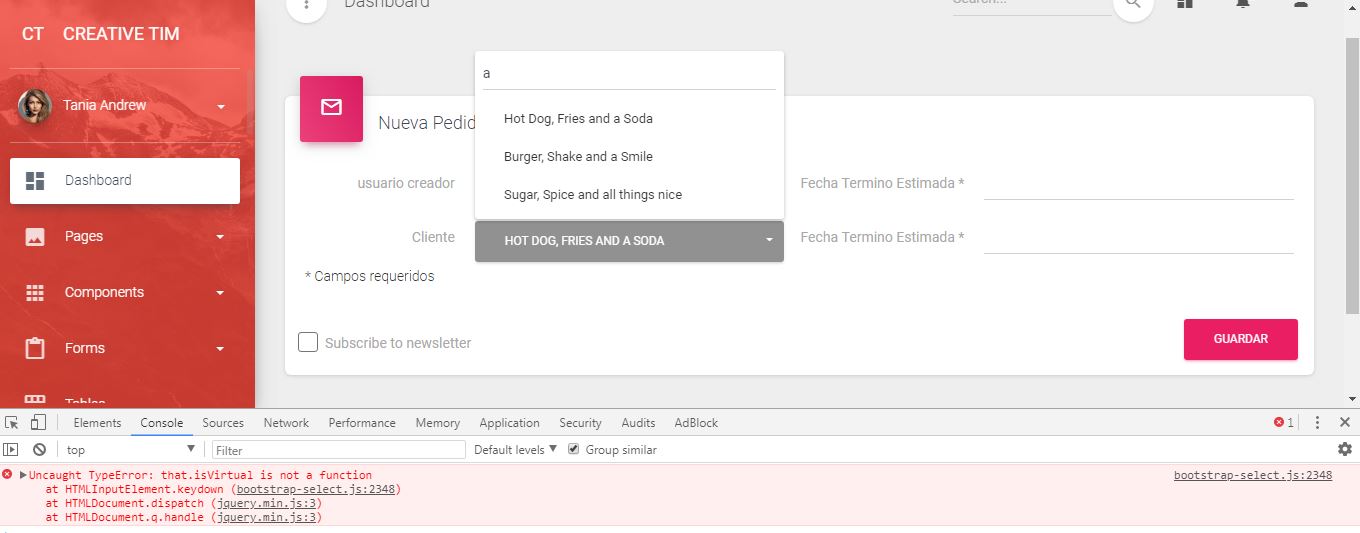
 noe23
on 30 May 2018
noe23
on 30 May 2018
@noe23 I need more information about your setup (and a link to a live example would be great) in order to figure out your issue.
caseyjhol
on 26 Aug 2018
I am sorry and I know its too late. But the same issue occurred to me when I use the version 1.13.2 with bootstrap 3.3.7. After I switched to version 1.12.1, no any errors.
 thasneem077
on 25 Jan 2019
thasneem077
on 25 Jan 2019
I have also the same error, is there a way to fix it in the meantime?
 4URGB
on 6 Nov 2020
4URGB
on 6 Nov 2020
Related issues
 dw00001
·
3Comments
dw00001
·
3Comments
 AndreasPresthammer
·
3Comments
AndreasPresthammer
·
3Comments
 anton164
·
4Comments
anton164
·
4Comments
 Khrysller
·
3Comments
Khrysller
·
3Comments
 Godrules500
·
4Comments
Godrules500
·
4Comments
Most helpful comment
Thanks for the heads up. Also, please be sure to star and follow https://github.com/snapappointments/bootstrap-select instead, as that's where all of my development will be from now on.