Bootstrap-select: Option list is empty for bootstrap 4
I did a simple HTML document with bootstrap 4 and the latest bootstrap select. The options list is empty then:
<!DOCTYPE html>
<html>
<head>
    <link rel="stylesheet" href="https://maxcdn.bootstrapcdn.com/bootstrap/4.0.0-alpha.6/css/bootstrap.min.css" integrity="sha384-rwoIResjU2yc3z8GV/NPeZWAv56rSmLldC3R/AZzGRnGxQQKnKkoFVhFQhNUwEyJ" crossorigin="anonymous">

<link rel="stylesheet" href="dist/css/bootstrap-select.min.css">

    <script src="https://code.jquery.com/jquery-3.1.1.slim.min.js" integrity="sha384-A7FZj7v+d/sdmMqp/nOQwliLvUsJfDHW+k9Omg/a/EheAdgtzNs3hpfag6Ed950n" crossorigin="anonymous"></script>
    <script src="https://cdnjs.cloudflare.com/ajax/libs/tether/1.4.0/js/tether.min.js" integrity="sha384-DztdAPBWPRXSA/3eYEEUWrWCy7G5KFbe8fFjk5JAIxUYHKkDx6Qin1DkWx51bBrb" crossorigin="anonymous"></script>
    <script src="https://maxcdn.bootstrapcdn.com/bootstrap/4.0.0-alpha.6/js/bootstrap.min.js" integrity="sha384-vBWWzlZJ8ea9aCX4pEW3rVHjgjt7zpkNpZk+02D9phzyeVkE+jo0ieGizqPLForn" crossorigin="anonymous"></script>
<script src="dist/js/bootstrap-select.min.js"></script>
</head>
<body>

<form>
    <select class="selectpicker">
        <option>Option 1</option>
        <option>Option 2</option>
    </select>
</form>

</body>
</html>

 Defcon0
All 29 comments
Yea, because .dropdown-menu is hidden by default :(
Also dropdown have wrong styles...
http://joxi.ru/BA04X5NtBMBoyA
 projct1
on 28 Jun 2017
projct1
on 28 Jun 2017
I've faced the same issue & after some researches I've got the theory that the primary source of that fault is the fundamental upgrade of the markup for dropdowns in bootstrap 4 (please take a look at the screenshot below)

 juliyvchirkov
on 2 Jul 2017
juliyvchirkov
on 2 Jul 2017
bootstrap-select does not yet support Bootstrap 4 (as it's still in alpha). Please follow #1135.
 caseyjhol
on 12 Jul 2017
caseyjhol
on 12 Jul 2017
Hello caseyjhol,
Bootstrap 4 is now in beta version. Has this issue been resolved with a solution? I am having the exact same problem.
 krystyna93
on 1 Sep 2017
krystyna93
on 1 Sep 2017
Incompatibility still present December 26, 2017.
Some fix available on this ticket : #1135
 ghost
on 26 Dec 2017
ghost
on 26 Dec 2017
Incompatibility still present January 16, 2017.
 bartclaeys
on 17 Jan 2018
bartclaeys
on 17 Jan 2018
Incompatibility still present February 5, 2018.
 arpitux
on 5 Feb 2018
arpitux
on 5 Feb 2018
Well, Bootstrap has now exceeded the Beta version, so its definitely high time to make it compatible now....
krystyna93
on 5 Feb 2018
Bootstrap 4 support has officially been added as a part of v1.13.0-beta, available here: https://github.com/snapappointments/bootstrap-select/releases/tag/v1.13.0-beta. Please post any issues in that repo from now on.
caseyjhol
on 13 Feb 2018
Hi,
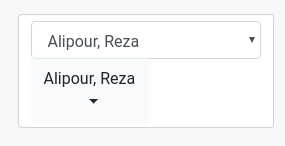
it doesn't work for me, see screenshots.
It doesnt't matter whether i have class="form-control selectpicker" or class="selectpicker"
Best,
Torsten

 toho64
on 14 Feb 2018
toho64
on 14 Feb 2018
Can you link me to an example?
caseyjhol
on 14 Feb 2018
Hi,
sure:
https://schulung.suttertools.de/tmp/bootstrap-select.html
Best,
Torsten
Am 14.02.2018 um 15:09 schrieb Casey Holzer:
Can you link me to an example?
—
You are receiving this because you commented.
Reply to this email directly, view it on GitHub
https://github.com/silviomoreto/bootstrap-select/issues/1745#issuecomment-365617823,
or mute the thread
https://github.com/notifications/unsubscribe-auth/ASlSiSBzxGl-9rV4Lq8uxlbJY47q8Acuks5tUukqgaJpZM4N_xAc.
toho64
on 14 Feb 2018
@toho64 You're not loading the bootstrap-select CSS.
caseyjhol
on 16 Feb 2018
sorry, you're right. It works great now.
toho64
on 16 Feb 2018
Hi,
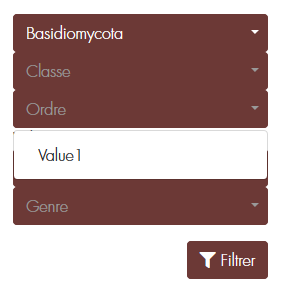
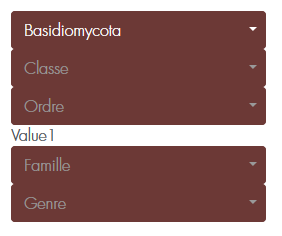
Why when I add option from ajax, it's refreshed and put the item but it appended too below the select ! Like as this sreenshoot
 mikalofy
on 21 Feb 2018
mikalofy
on 21 Feb 2018
@mikalofy Please open a new issue: https://github.com/snapappointments/bootstrap-select/issues.
See guidelines for contributing.
Bug reports
A bug is a _demonstrable problem_ that is caused by the code in the repository.
Good bug reports are extremely helpful - thank you!
Guidelines for bug reports:
Use the GitHub issue search. Check if the issue has already been
reported.Check if the issue has been fixed. Try to reproduce it using the
latestmasteror development branch in the repository.Provide environment details. Provide your operating system, browser(s),
jQuery version, Bootstrap version, and bootstrap-select version.Create an isolated and reproducible test case. Create a reduced test
case.Include a live example. Use this Plunker debugging template to share your isolated test cases. You can also make use of jsFiddle or jsBin.
A good bug report shouldn't leave others needing to chase you up for more
information. Please try to be as detailed as possible in your report. What is
your environment? What steps will reproduce the issue? What browser(s) and OS
experience the problem? What would you expect to be the outcome? All these
details will help people to fix any potential bugs.
Example:
Short and descriptive example bug report title
A summary of the issue and the browser/OS environment in which it occurs. If
suitable, include the steps required to reproduce the bug.
- This is the first step
- This is the second step
- Further steps, etc.
<url>- a link to the reduced test caseAny other information you want to share that is relevant to the issue being
reported. This might include the lines of code that you have identified as
causing the bug, and potential solutions (and your opinions on their
merits).
caseyjhol
on 21 Feb 2018
Bootstrap 4 support has officially been added in v1.13.0!
caseyjhol
on 19 Apr 2018
I am trying to use this plugin with Bootstrap 4 (ASP.NET CORE / Razor) but get the same problem where there is an empty space when the dropdown is hovered on:
<select class="selectpicker">
        <option>AAA</option>
        <option>BBB</option>
</select>
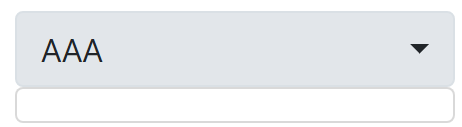
This is what I am using:
`< link rel="stylesheet" href="https://cdnjs.cloudflare.com/ajax/libs/bootstrap-select/1.13.1/css/bootstrap-select.min.css" integrity="sha256-sJQnfQcpMXjRFWGNJ9/BWB1l6q7bkQYsRqToxoHlNJY=" crossorigin="anonymous" />
`
Any advice?
Also, how do you style the selectpicker dropdown so it matches the standard Bootstrap 4 controls (white background / blue highlight border on focus)? Thanks
 jeanmarc3
on 17 Sep 2018
jeanmarc3
on 17 Sep 2018
@jeanmarc3 Please include a live demo of the problem. Per our contributing guidelines, please create a reduced test case via Plunker, jsFiddle, CodePen or JS Bin, and report back with your link, Bootstrap version, bootstrap-select version, and specific browser and OS details.
caseyjhol
on 18 Sep 2018
I figured out that it broke because I had a different style defined as:
<style>
.dropdown:hover > .dropdown-menu {
display: block;
margin: 0px;
}
</style>
This style is used to automatically open other menu items on hover, but this breaks the selectpicker.
Also, maybe I am missing something but the selectpicker does not appear to be selectable by keyboard...
jeanmarc3
on 29 Sep 2018
There is an issue when i click on select it doesn't show me dropdown with items. Any idea how to fix this?
 dejooo13
on 16 Nov 2018
dejooo13
on 16 Nov 2018
Hi
I am using also same plugin but all the option is not showing, means my data is nore than 1000 but in the dropdown it is showing limited. Please see the screen shot
 webexpert889
on 28 Nov 2018
webexpert889
on 28 Nov 2018
I have the same issue as @webexpert889. Is this resolved? I have 1032 options but dropdown shows only limited ones.
 yrohit299
on 18 Mar 2020
yrohit299
on 18 Mar 2020
Having the same issue as @jeanmarc3. ASP.Net Core, Razor. Options are not showing. The version I am using is 1.13.9. This is what my head tag looks like:
`
<meta name="viewport" content="width=device-width" />
<title>@ViewBag.Title</title>

<!-- Fontawesome-->
<link href="~/lib/fontawesome/css/all.min.css" rel="stylesheet" />

<!-- Roboto Font -->
<link href='https://fonts.googleapis.com/css?family=Roboto' rel='stylesheet'>

<!-- JQuery -->
<link rel="stylesheet" href="//code.jquery.com/ui/1.12.1/themes/base/jquery-ui.css">
<script src="https://code.jquery.com/jquery-1.12.4.js"></script>
<script src="https://code.jquery.com/ui/1.12.1/jquery-ui.js"></script>
<script src="https://code.jquery.com/jquery-3.2.1.slim.min.js" integrity="sha384-KJ3o2DKtIkvYIK3UENzmM7KCkRr/rE9/Qpg6aAZGJwFDMVNA/GpGFF93hXpG5KkN" crossorigin="anonymous"></script>
<script src="https://cdnjs.cloudflare.com/ajax/libs/popper.js/1.11.0/umd/popper.min.js" integrity="sha384-b/U6ypiBEHpOf/4+1nzFpr53nxSS+GLCkfwBdFNTxtclqqenISfwAzpKaMNFNmj4" crossorigin="anonymous"></script>

<!-- Font Awesome -->
<link rel="stylesheet" href="https://cdnjs.cloudflare.com/ajax/libs/font-awesome/5.13.0/css/all.min.css" />
<script src="https://cdnjs.cloudflare.com/ajax/libs/font-awesome/5.13.0/js/all.min.js"></script>

<!-- Bootstrap 4.4.1 -->
<link href="~/lib/bootstrap/dist/css/bootstrap.min.css" rel="stylesheet" />

<!-- Bootstrap select -->
<link  rel="stylesheet" href="~/lib/bootstrap-select-1.13.9/dist/css/bootstrap-select.min.css"/>
<script src="~/lib/bootstrap-select-1.13.9/dist/js/bootstrap-select.min.js"></script>

<link rel="stylesheet" href="~/css/authorized/authroized.css" />
`
 meJevin
on 14 Apr 2020
meJevin
on 14 Apr 2020
@meJevin Please try the latest release to see if your problem is resolved.
caseyjhol
on 12 May 2020
@caseyjhol, the problem was solved!
meJevin
on 20 May 2020
I am still having this issue in version
 <link rel="stylesheet" href="//unpkg.com/[email protected]/dist/css/bootstrap-select.min.css" type="text/css" />
<script src="https://cdn.jsdelivr.net/npm/[email protected]/dist/js/bootstrap-select.min.js"></script>
The menu options wont show for me the options just the first item
|
 davidbuckleyni
on 11 Aug 2020
davidbuckleyni
on 11 Aug 2020
@davidbuckleyni You're using bootstrap-select v1.12.4 CSS, which does not work with Bootstrap 4. Please ensure you are using the same version of CSS and JS.
caseyjhol
on 11 Aug 2020
@caseyjhol Ok that worked but a new issue the dropdown is only showing the name part I am using asp.net core mvc and I have my results as a selectlist.
     <select asp-for="Enf_Cat"
             asp-items="@(new SelectList(ViewBag.UsersForSharingCase,"Value","Text"))" class="selectpicker">
            <option disabled>Share Case</option>
        </select>


    public void GetUsersForSharing() {
        string currentUser = GetCurrentTennantId().Result.ToString();

        List<SelectListItem> list = new List<SelectListItem>();
        var items = _context.Users.Where(sm => sm.Id != currentUser).ToList();
        foreach (var item in items) {
            list.Add(new SelectListItem { Text = item.FirstName + " " +item.LastName, Value = item.Id.ToString() });
        }

      ViewBag.UsersForSharingCase= list;

    }
As u see I told it to use text and value but when I look at the name html all i see is the name how is the id sent back using ur list ?. I should see the value somewhere to be able to catch it in the code behind in c# but I dont

davidbuckleyni
on 11 Aug 2020
Related issues
 M1chae1
·
3Comments
M1chae1
·
3Comments
 didip
·
4Comments
didip
·
4Comments
 anton164
·
4Comments
anton164
·
4Comments
 Cruyjun
·
3Comments
Cruyjun
·
3Comments
 qiyuan4f
·
4Comments
qiyuan4f
·
4Comments
Most helpful comment
Bootstrap 4 support has officially been added as a part of v1.13.0-beta, available here: https://github.com/snapappointments/bootstrap-select/releases/tag/v1.13.0-beta. Please post any issues in that repo from now on.