Bootstrap-select: Programmatically set focus on select
Hello,
How do I set the focus via JS on the bootstrap-select? I tried the focus() function on the select tag, and in the button tag of the generated code (I also tried the div, ul and li, hehehe) but without success. Does anyone know how to set focus on a bootstrap-select?
Thanks
 alvaropag
All 13 comments
I'm currently doing it like this. The focus moves to the select element insde the dropdown...
$("input").selectpicker().parent().find(".selected a").focus();
 Jogai
on 16 Dec 2015
Jogai
on 16 Dec 2015
Doesn't work for me :/ I can't find how to put the focus too.. That's really odd
 Rhend
on 1 Jul 2016
Rhend
on 1 Jul 2016
Use:
$('#select').data('selectpicker').$button.focus();
 caseyjhol
on 1 Jul 2016
caseyjhol
on 1 Jul 2016
Thanks ! Works like a charm !
Rhend
on 4 Jul 2016
Much better, thanks!
Now I'll do it in one step. Example for autocomplete:
$("select.autocomplete").selectpicker().data("selectpicker").$searchbox.focus();
None of the above worked in my case. It focus when selected for the first time after that it's not working. Any Solution ?
 gititmsc
on 26 Feb 2017
gititmsc
on 26 Feb 2017
We were using
$(document).ready(function() {
    $('button[data-id=ENTER_ID_OF_THE_SELECT_ELEMENT]').focus();
});
which seems to be an unambiguous way, because the ID of the select element is used, which contains the selectpicker CSS class.
 axunonb
on 13 Apr 2020
axunonb
on 13 Apr 2020
Focusing on the select element now focuses the button. So you can just do $('#select-id').focus().
caseyjhol
on 12 May 2020
Focusing on the select element now focuses the button. So you can just do
$('#select-id').focus().
@caseyjhol Hm, didn't work for me with v1.13.17, while $('button[data-id=ENTER_ID_OF_THE_SELECT_ELEMENT]').focus(); still does.
axunonb
on 12 May 2020
@axunonb Could you link me to an example of it not working?
caseyjhol
on 12 May 2020
@caseyjhol Yes, here is the JsFiddle for it.
Strange enough, on Firefox there is no focus, while on Chrome it does focus, but displays the 'original' select:
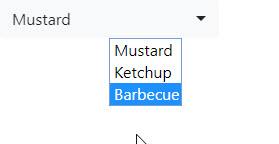
You see the 2 alternatives for focusing at the very bottom of the demo code. My working solution is uncommented.
axunonb
on 15 May 2020
@axunonb I'm not able to recreate the issue where the native select element is displayed, but I am able to recreate the focus issue. It looks like it's not working because of jQuery - changing the jQuery version to 3.3.1 in your example, instead of 3.5.1 fixes it (https://jsfiddle.net/caseyjhol/xvurwn1t/3/). It appears the change was introduced in jQuery 3.4.0.
You'll want to follow this issue: jquery/jquery#4382.
A workaround in the meantime is to use the native focus event:
$('#select-id')[0].focus()
changing the jQuery version to 3.3.1 in your example, instead of 3.5.1 fixes it
Looks like jQuery's 3.5.x versions introduced a couple of issues, like this one with Bootstrap. Unfortunately using jQuery < 3.5 does not seem to be a good idea because of its vulnerabilities.
Thanks a lot, also for the workaround!
axunonb
on 15 May 2020
Related issues
 yCodeTech
·
3Comments
yCodeTech
·
3Comments
 qiyuan4f
·
4Comments
qiyuan4f
·
4Comments
 dw00001
·
3Comments
dw00001
·
3Comments
 bhritch
·
3Comments
bhritch
·
3Comments
 M1chae1
·
3Comments
M1chae1
·
3Comments
Most helpful comment
Use: