Bootstrap-select: Support Bootstrap 4
Bootstrap 4 (currently alpha) has a simplified .dropdown-menu .dropdown-item syntax.
http://v4-alpha.getbootstrap.com/components/dropdowns/
There's also no longer a requirement for the markup to be ul + li elements, so the dropdown menu can be simply a div.dropdown-menu container with a.dropdown-item items inside.
 hubgit
All 77 comments
When will there be support for bootstrap 4?
 pruimmartin
on 27 Nov 2015
pruimmartin
on 27 Nov 2015
I will make Bootstrap 4 a priority after its first official release.
 caseyjhol
on 1 Dec 2015
caseyjhol
on 1 Dec 2015
The fact that this library doesn't yet support bootstrap 4 forces me to use something else which is very disappointing because it is such a nice implementation.
 cubitworx
on 3 Oct 2016
cubitworx
on 3 Oct 2016
@cubitworx Indeed, deal breaker :cry:
 kbtz
on 4 Oct 2016
kbtz
on 4 Oct 2016
Yes, i needed bootstrap v4 support in several month ago, too. Here is a "very simple", just working patch:
bootstrap-select.js:
...
Line 283
-    style: 'btn-default',
+    style: 'btn-secondary',
...
Line 477:
-            (typeof classes !== 'undefined' ? ' class="' + classes + '"' : '') +
+            (typeof classes !== 'undefined' ? ' class="dropdown-item ' + classes + '"' : '') +
...
Line 699:
       divider.className = 'divider';
+     a.className = 'dropdown-item';
My bootstrap-select source is from 15. dec 2015. source lines are not valid now, of course.
I vote for bootstrap v4 support too, because i have a huge need, too. But my patch seems to work for my needs, it's not tested in detail. I use a very small feature set of the plugin.
 arakis
on 30 Oct 2016
arakis
on 30 Oct 2016
Bootstrap 4 is still in alpha, meaning _anything_ can be changed at any time. It also means that nobody should be using it in a production environment. Once it moves to beta I'll take a closer look as to what's required to support it.
caseyjhol
on 4 Nov 2016
For my application I use the filtered select/multiselect using bootstrap-select 1.12.1:
I got filtered select/multiselect working with v4 by adding the following css to my own custom css:
.bootstrap-select.show>.dropdown-menu>.dropdown-menu {
    display: block;
}

.bootstrap-select > .dropdown-menu > .dropdown-menu li.hidden{
    display:none;
}

.bootstrap-select > .dropdown-menu > .dropdown-menu li a{
    display: block;
    width: 100%;
    padding: 3px 1.5rem;
    clear: both;
    font-weight: 400;
    color: #292b2c;
    text-align: inherit;
    white-space: nowrap;
    background: 0 0;
    border: 0;
}
You may be able to get a temporary fix for your use case by simply adding your own css to your css file.
Like caseyjhol said, v4 is in alpha and shouldn't be used for production. Any changes to either bootstrap-select plugin or Bootstrap 4 framework can break any temporary fixes such as the one above.
 devopsjosh
on 25 Jan 2017
devopsjosh
on 25 Jan 2017
What would be great is to be able to tweak it without having to fork the project.
I mean if we could configure the template a little bit (changing the classes, the type of tags...), everybody could use it with any version of Bootstrap
 gtournie
on 3 Feb 2017
gtournie
on 3 Feb 2017
https://github.com/rodrigo-martins/bootstrap-select.git
Hi guys,
I made a small changes in dist/js and dist/css for my application and it is working Okay. I didn't check if it is working for full compatibility on bootstrap 4.
PS.: Fontawesome are requered for multselect
-Inserted dropdown-item on
-Removed dropdown-menu on
Best regards
 rodrigo-martins
on 7 Apr 2017
rodrigo-martins
on 7 Apr 2017
Using this ... @jtesch patch + fix for btn-default
/*
Make bootstrap-select work with bootstrap 4 see:
https://github.com/silviomoreto/bootstrap-select/issues/1135
*/
.dropdown-toggle.btn-default {
  color: #292b2c;
  background-color: #fff;
  border-color: #ccc;
}

.bootstrap-select.show>.dropdown-menu>.dropdown-menu {
  display: block;
}

.bootstrap-select > .dropdown-menu > .dropdown-menu li.hidden{
  display:none;
}

.bootstrap-select > .dropdown-menu > .dropdown-menu li a{
  display: block;
  width: 100%;
  padding: 3px 1.5rem;
  clear: both;
  font-weight: 400;
  color: #292b2c;
  text-align: inherit;
  white-space: nowrap;
  background: 0 0;
  border: 0;
}

.dropdown-menu > li.active > a {
  color: #fff !important;
  background-color: #337ab7 !important;
}

.bootstrap-select .check-mark::after {
  content: "✓";
}

.bootstrap-select button {
  overflow: hidden;
  text-overflow: ellipsis;
}


/* Make filled out selects be the same size as empty selects */
.bootstrap-select.btn-group .dropdown-toggle .filter-option {
  display: inline !important;
}


 grosser
on 15 Apr 2017
grosser
on 15 Apr 2017
I've submitted a new pull request here https://github.com/silviomoreto/bootstrap-select/pull/1748 that works with the Bootstrap4 alpha-6, which you can install as follows.
 infostreams
on 22 Jun 2017
infostreams
on 22 Jun 2017
Hello Everyone, just replace your link and script tags with these to use @infostreams's version with Bootstrap v4-alpha6:
  <!-- bootstrap-select -->
  <link rel="stylesheet" href="https://cdn.rawgit.com/infostreams/bootstrap-select/fd227d46de2afed300d97fd0962de80fa71afb3b/dist/css/bootstrap-select.min.css" />
  <script src="https://cdn.rawgit.com/infostreams/bootstrap-select/fd227d46de2afed300d97fd0962de80fa71afb3b/dist/js/bootstrap-select.min.js"></script>
 trusktr
on 11 Aug 2017
trusktr
on 11 Aug 2017
Works great!
trusktr
on 11 Aug 2017
Hi all,
I don't think it's wise to link directly to the files in my pull request. Referencing them within a package.json is one thing, but referencing them in production code is quite another. What if I decide to delete the pull request once (if ever) it gets merged? That your site then breaks is not on me :-)
Cheers,
Ed
On 11 Aug 2017, at 04:19, Joseph Orbegoso Pea notifications@github.com wrote:
Works great!
—
You are receiving this because you were mentioned.
Reply to this email directly, view it on GitHub, or mute the thread.
infostreams
on 11 Aug 2017
True. Download the files asap and host in your own project
trusktr
on 11 Aug 2017
I'm trying to install with the info from the link info streams provided, but, it does not seem to work.
yarn add silviomoreto/bootstrap-select#1748/head
zsh: no matches found: silviomoreto/bootstrap-select#1748/head
 treaves
on 16 Aug 2017
treaves
on 16 Aug 2017
FYI bootstrap 4 is in beta: https://getbootstrap.com/
gtournie
on 16 Aug 2017
@treaves I don't think #1748/head is a valid ref? I think the format is yarn add silviomoreto/bootstrap-select#<ref> where <ref> is replaced with a commit hash, branch name, or tag name. At least that is the syntax with npm and I think yarn is probably similar.
trusktr
on 22 Aug 2017
Well, I was following the yarn docs. Regardless, even without the '/head', I still get 'no matches found: silviomoreto/bootstrap-select#1748'
treaves
on 26 Aug 2017
Hello @treaves, 1748 is not a commit that exists. Look at the pull request's commits tab and use an existing commit number.
trusktr
on 26 Aug 2017
@treaves did you get it?
trusktr
on 28 Aug 2017
I took @grosser styling and found a few visual differences compare to original version of Bootstrap-Select. So I played with the styling a bit and came out with a near identical look as the original (see below). Also note that I replaced the Glyphicon checkmark with Font-Awesome checkmark icon (using content and unicode value), using Font-Awesome brings the same look and feel of the checkmark in all browser.
Here's the CSS I used (similar to @grosser with a few variances, changed width: auto, font-awesome check icon, added hover color)
/*
Make bootstrap-select work with bootstrap 4 see:
https://github.com/silviomoreto/bootstrap-select/issues/1135
*/
.dropdown-toggle.btn-default {
  color: #292b2c;
  background-color: #fff;
  border-color: #ccc;
}
.bootstrap-select.show > .dropdown-menu > .dropdown-menu,
.bootstrap-select > .dropdown-menu > .dropdown-menu li.hidden {
  display: block;
}
.bootstrap-select > .dropdown-menu > .dropdown-menu li a {
  display: block;
  width: 100%;
  padding: 3px 1.5rem;
  clear: both;
  font-weight: 400;
  color: #292b2c;
  text-align: inherit;
  white-space: nowrap;
  background: 0 0;
  border: 0;
  text-decoration: none;
}
.bootstrap-select > .dropdown-menu > .dropdown-menu li a:hover {
  background-color: #f4f4f4;
}
.bootstrap-select > .dropdown-toggle {
  width: auto;
}
.dropdown-menu > li.active > a {
  color: #fff !important;
  background-color: #337ab7 !important;
}
.bootstrap-select .check-mark {
  line-height: 14px;
}
.bootstrap-select .check-mark::after {
  font-family: "FontAwesome";
  content: "\f00c";
}
.bootstrap-select button {
  overflow: hidden;
  text-overflow: ellipsis;
}

/* Make filled out selects be the same size as empty selects */
.bootstrap-select.btn-group .dropdown-toggle .filter-option {
  display: inline !important;
}
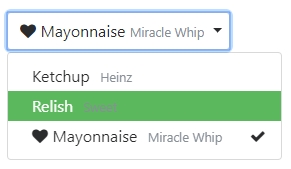
Sample with extra styling and Font-Awesome icon
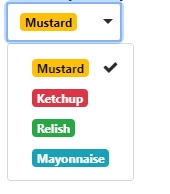
Sample with badge instead of label
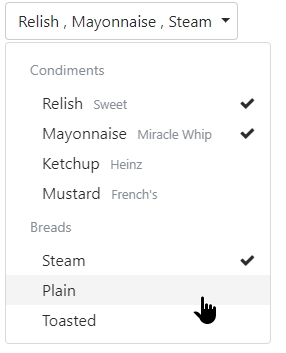
Multi-select with optgroups
 ghiscoding
on 24 Sep 2017
ghiscoding
on 24 Sep 2017
@ghiscoding Total noob at modern grunt / javascript / css packaging here. What file in the bootstrap-select source tree do I overwrite / append to with your .css there? I tried replacing the contents of "less/bootstrap-select.less", but that didn't seem to work after building and running the test.html (with bootstrap 4 included instead).
 pete-woods
on 28 Sep 2017
pete-woods
on 28 Sep 2017
Ah, just realised the idea is you put that in your app's CSS. D'oh! Looks like it nearly works apart from the 'hidden' class having been removed from bootstrap 4. I guess that means the Javascript needs tweaking too.
The .hidden and .show classes have been removed because they conflicted with jQuery’s $(...).hide() and $(...).show() methods. Instead, try toggling the [hidden] attribute, use inline styles like style="display: none;" and style="display: block;", or toggle the .invisible class.
pete-woods
on 28 Sep 2017
Well. FWIW, here's yet another tweaked CSS. This fixes the visibility of elements when searching. I think maybe it was a simple typo in the @ghiscoding 's CSS.
/*
Make bootstrap-select work with bootstrap 4 see:
https://github.com/silviomoreto/bootstrap-select/issues/1135
*/
.dropdown-toggle.btn-default {
  color: #292b2c;
  background-color: #fff;
  border-color: #ccc;
}
.bootstrap-select.show > .dropdown-menu > .dropdown-menu {
  display: block;
}
.bootstrap-select > .dropdown-menu > .dropdown-menu li.hidden {
  display: none;
}
.bootstrap-select > .dropdown-menu > .dropdown-menu li a {
  display: block;
  width: 100%;
  padding: 3px 1.5rem;
  clear: both;
  font-weight: 400;
  color: #292b2c;
  text-align: inherit;
  white-space: nowrap;
  background: 0 0;
  border: 0;
  text-decoration: none;
}
.bootstrap-select > .dropdown-menu > .dropdown-menu li a:hover {
  background-color: #f4f4f4;
}
.bootstrap-select > .dropdown-toggle {
  width: 100%;
}
.dropdown-menu > li.active > a {
  color: #fff !important;
  background-color: #337ab7 !important;
}
.bootstrap-select .check-mark {
  line-height: 14px;
}
.bootstrap-select .check-mark::after {
  font-family: "FontAwesome";
  content: "\f00c";
}
.bootstrap-select button {
  overflow: hidden;
  text-overflow: ellipsis;
}

/* Make filled out selects be the same size as empty selects */
.bootstrap-select.btn-group .dropdown-toggle .filter-option {
  display: inline !important;
}
None of these patch seem to be working for me, clicking the dropdown doesn't remove the display: none; from .dropdown-menu
 joshuaswilcox
on 8 Oct 2017
joshuaswilcox
on 8 Oct 2017
:+1:
 ckosmowski
on 13 Oct 2017
ckosmowski
on 13 Oct 2017
Bootstrap-select v1.12.2
Bootstrap v4.0.0-beta.2
fix style pete-woods.
after click on select i get error:
Uncaught TypeError: Cannot read property 'jquery' of undefined
    at new t (frontend.min.js:5)
    at a.g.toggle (frontend.min.js:6)
    at HTMLButtonElement.<anonymous> (frontend.min.js:6)
    at Function.each (frontend.min.js:1)
    at he.fn.init.each (frontend.min.js:1)
    at he.fn.init.a._jQueryInterface [as dropdown] (frontend.min.js:6)
    at HTMLButtonElement.<anonymous> (frontend.min.js:6)
    at HTMLDocument.dispatch (frontend.min.js:2)
    at HTMLDocument.v.handle (frontend.min.js:2)
old version work correct in Bootstrap 3.x
Can anyone do a working example for b4?
 reimax
on 1 Nov 2017
reimax
on 1 Nov 2017
We created a working shim repository with composer support at https://github.com/heimrichhannot/bootstrap-select if you already need bootstrap 4 support. The markup fits the new bootstrap-4 dropdown requirements. Use the dist/js and dist/css files.
Bower package: bootstrap-select-bs4
Composer package: heimrichhannot/bootstrap-select
 fatcrobat
on 1 Nov 2017
fatcrobat
on 1 Nov 2017
@fatcrobat I wrapped up your fork into a Gem to make it a bit easier to use with Rails here:
https://github.com/karagenit/bootstrap-select-rails
That way you only have to depend on the bootstrap4-select-rails gem instead of messing with npm/bower.
 karagenit
on 14 Nov 2017
karagenit
on 14 Nov 2017
@karagenit Feel free. ;)
fatcrobat
on 14 Nov 2017
Bootstrap Select is part of my essential kit, and I can't work without it! Testament to it's awesomeness... we're in beta for Bootstrap 4 now, so is there any progress on even a beta implementation of bootstrap-select with support for BS4? If there's a way we can contribute... what do you need?
 renhammington
on 15 Nov 2017
renhammington
on 15 Nov 2017
Sorry - I've been swamped with another project lately. I've almost got it ready to go, and I'm hopeful it could be available this week.
caseyjhol
on 22 Nov 2017
yes please @caseyjhol , thanks for your awesome contributions.
 mehran9
on 22 Nov 2017
mehran9
on 22 Nov 2017
How can it work with Bootstrap 4 !
 doaa-altarawy
on 4 Dec 2017
doaa-altarawy
on 4 Dec 2017
@doaa-altarawy I suggest you to read the entire post. You'll most probably find the answer to your question
ghiscoding
on 4 Dec 2017
Sorry, maybe I wasn't clear. When will the support for Bootstrap 4 be pushed?
doaa-altarawy
on 4 Dec 2017
In theory now's the time to do it, with two Bootstrap v4 betas already released. Unfortunately there were breaking changes between the two betas, so it's clearly not actually at beta-level stability. If I were the author of this plugin, frankly I'd wait until v4 gets real. And that's hard to say, because I'm also eagerly awaiting this!
 tomalakgeretkal
on 4 Dec 2017
tomalakgeretkal
on 4 Dec 2017
How long it will take ? or Any estimated date to release with support bootstrap 4 ?
 mkraha
on 8 Dec 2017
mkraha
on 8 Dec 2017
This is how I solved it (using SCSS, bootstrap beta 2):
.bootstrap-select {
  .dropdown-toggle {
    @extend .btn-secondary;
    .pull-left {
      float: none;
    }
  }

  .dropdown-menu.inner {
    display: block;

    > li > a {
      @extend .dropdown-item;
    }
  }
}
 michaelzangl
on 8 Dec 2017
michaelzangl
on 8 Dec 2017
And if you also want Font Awesome 5 support, I made another fork based on @fatcrobat solution:
https://github.com/paramono/bootstrap-select
Not many changes there really, just renamed some classes and wrapped span with another span to make "SVG with JS" method from Font Awesome 5 work.
What I didn't like from their solution (https://github.com/heimrichhannot/bootstrap-select) is that some directories are removed, and so you cannot rebuild css/js with grunt. I didn't remove any data from the original repo, so you can actually build everything the way it was originally intended.
 paramono
on 9 Dec 2017
paramono
on 9 Dec 2017
@tomalakgeretkal - yeah i have noticed the changes between betas have broken certain things. This makes it tricky to update this to BS4. Really sticky situation because i love bootstrap-select. I am using the patch mentioned above but im wary of its stability.
 GreggOrdHume
on 13 Dec 2017
GreggOrdHume
on 13 Dec 2017
@GreggOrdHume For what it's worth, we're currently using the patch in production. YOLO.
tomalakgeretkal
on 14 Dec 2017
The code for Bootstrap 4 support has been written, and will be made available as a part of v1.13.0-beta. Barring any major issues, v1.13.0 will be released shortly after. I'm working on cleaning a few things up, which is why it hasn't been released yet.
caseyjhol
on 14 Dec 2017
@caseyjhol Looking at the v1.13.0-dev branch, I think you still need to change the class of the temporary dropdown nodes in "liHeight" from "open" to "show".
I just spotted that problem in my own (allegedly Bootstrap 4 beta compatible) fork; oddly no problem manifested until I viewed my site over TeamViewer, so I think there may be rendering optimisations masking it ... makes it that much harder to spot.
Heimrich's fork does fix this already (https://github.com/heimrichhannot/bootstrap-select/blame/77935aac7bbddb43f3f94ab17f52aa5efe7cbad6/dist/js/bootstrap-select.js#L865).
tomalakgeretkal
on 19 Dec 2017
As an alternative, we develop a plug-in for bootstrap 4
https://github.com/hardskilled/bootstrap-hardskilled-extend-select
 hinex
on 1 Jan 2018
hinex
on 1 Jan 2018
any news about release date of 1.13?
 matthiasballreich
on 4 Jan 2018
matthiasballreich
on 4 Jan 2018
At least any release about 1.13 (beta) with b4 support?
mkraha
on 10 Jan 2018
Is the dev branch somewhat stable enough to use?
 josheche
on 12 Jan 2018
josheche
on 12 Jan 2018
It's over a month ago that dev said that he was 'cleaning a few things up'. I'm grateful for this plugin but I kinda need to know if we can just wait a little longer or should consider looking for other options...
 Davidvp
on 16 Jan 2018
Davidvp
on 16 Jan 2018
I have been coming here every 2 days since the 10th Dec. I am disheartened that I have to move on from this plugin... but more so that I have to replace every selectpicker across my entire system :(
GreggOrdHume
on 16 Jan 2018
I don't really think that it is kind or the right way to put up some kind of pressure for a dev that provides software that you all use for free. Since it is open source no one prevents you from DIY. And of course if you decide to go with a open source project with one single developer you need to calculate with the risk of the project not getting maintained anymore. My suggestion: Just go with one of the many great solutions provided in this issue for now or fork the project.
ckosmowski
on 16 Jan 2018
@ckosmowski as I stated I can indeed consider other options, I only ask for a status update because a month ago it looked like a few more days before it would work with bs4.
So yes I can DIMS, use one of the many great solutions provided (but this isn't an entire fix!), fork the project or even use something else. I just ask should I consider one of those options or wait a little longer.
Davidvp
on 16 Jan 2018
The following is actually directed to identify some issues on @paramono's solution, so please sorry if I'm cobblering this post.
@paramono, I tried your solution but:
- I couldn't compile with grunt, since you changed the sass, but gruntfile references less (however this could be a limit of mine, I'm not confident with this tool). Thus, launching Grunt, the generated css is the same as the one of the original repo. I think I solved this myself by editing the less, I can post a PR to your repo if you are interested.
- On a multiselect, if I select an option, then click ouside the select, then click again the select, I can't see the tick anymore, albeit the value is actually selected (need to click twice to remove/restore the tick next to the option). I may provide a screencast to show this behaviour if the explanation is not clear enough.
- I would have posted this issue directly on your repo, but I guess you did not activate the Issues panel.
 stevevg
on 17 Jan 2018
stevevg
on 17 Jan 2018
No news yet about 1.13 beta? at least.
mkraha
on 18 Jan 2018
FYI Bootstrap 4.0 official release will land today. It was announced in one of the Bootstrap Github issue.
ghiscoding
on 18 Jan 2018
Sorry for the delay, guys! Hopeful it could be next week (Jan 22-26).
caseyjhol
on 20 Jan 2018
Hi all, adding the following
.open > .dropdown-menu {
    display: block;
}
fixed size issue with bootstrap 4 for me.
 jfm-dnd
on 20 Jan 2018
jfm-dnd
on 20 Jan 2018
Hope for tomorrow!
mkraha
on 25 Jan 2018
I'd be happy to be surprised! :) (apologies to Casey)
pete-woods
on 25 Jan 2018
I thought 1.13 at this year Jan between 22-26.. 👎
mkraha
on 29 Jan 2018
Have you an idea about when Bootstrap v4 support will be added?
 Luca4k4
on 29 Jan 2018
Luca4k4
on 29 Jan 2018
I guess I'm puzzled about where dev for this project happens? The v1.13.0-dev branch doesn't have any activity for 6 months.
pete-woods
on 4 Feb 2018
@caseyjhol Any idea yet?
 Moxh3
on 5 Feb 2018
Moxh3
on 5 Feb 2018
@caseyjhol Checking daily but no news about b4 support..
mkraha
on 8 Feb 2018
This is the only thing holding me back from a BS4 rollout. I'm very excited for bootstrap-select to gain BS4 compatibility, but we all have to understand that it's a volunteer project.
On that note, though, are there any forks supporting BS4? I looked around a little but didn't find any good working ones.
 Undo1
on 8 Feb 2018
Undo1
on 8 Feb 2018
@Undo1 have you tried the patch that I provided (just scroll higher), it works good for me. It's not 100% functional but it might be around 90% there, so it's that far off.
ghiscoding
on 8 Feb 2018
Yep. I definitely appreciate the developer's efforts as this is a volunteer project. I am just hoping to hear of a timeline on BS4 support so that I can plan accordingly if possible.
 jmchauv
on 8 Feb 2018
jmchauv
on 8 Feb 2018
Was having issues with this myself! No patches above worked :(
BUT this worked: http://select2.org/
 pkelleher1984
on 9 Feb 2018
pkelleher1984
on 9 Feb 2018
Bootstrap 4 support has been added as a part of v1.13.0-beta, available here: https://github.com/snapappointments/bootstrap-select/releases/tag/v1.13.0-beta. Please post any issues in that repo from now on.
caseyjhol
on 13 Feb 2018
I will be waiting for the non beta version, thanks.
 krystyna93
on 13 Feb 2018
krystyna93
on 13 Feb 2018
@krystyna93 Or you could help the rest of us test it so that it gets out of beta more quickly.
tomalakgeretkal
on 13 Feb 2018
@tomalakgeretkal that is true.
krystyna93
on 13 Feb 2018
This is how it looks using BS4 and with these attributes: htmlAttributes: new { @class = "selectpicker", multiple = "multiple", data_width = "fit", title = "Select roles" }
Kinda too high I think. Also padding is broken IMO.

Removing "fit" makes it look good.

 mdczaplicki
on 24 Feb 2018
mdczaplicki
on 24 Feb 2018
That is interesting, because I have a similar issue when the text is too short, the tick icon overlaps the text!.. Anyway of fixing this behaviour when the text is short ??
krystyna93
on 25 Feb 2018
why new repository?
 ko06
on 10 Mar 2018
ko06
on 10 Mar 2018
Bootstrap 4 support has officially been added in v1.13.0!
caseyjhol
on 19 Apr 2018
Related issues
 edwolfe807
·
3Comments
edwolfe807
·
3Comments
 M1chae1
·
3Comments
M1chae1
·
3Comments
 dw00001
·
3Comments
dw00001
·
3Comments
 Khrysller
·
3Comments
Khrysller
·
3Comments
 Cruyjun
·
3Comments
Cruyjun
·
3Comments
Most helpful comment
The fact that this library doesn't yet support bootstrap 4 forces me to use something else which is very disappointing because it is such a nice implementation.