Boot2docker: driver vmwarefusion: Error creating machine: IP not found for MAC ... in DHCP leases
On OS X high sierra and on the new mojave (with virtualbox and parallels uninstalled) I am not able to create with docker-machine a boot2docker (v18.09.0-beta3) vm with driver vmwarefusion (or even driver vmware) without these errors:
Macs-MacBook-Pro:~ mac$ docker-machine -D create --vmwarefusion-boot2docker-url=/Users/mac/.docker/machine/cache/boot2docker.iso --driver=vmwarefusion vmware-dev
Docker Machine Version:  0.15.0, build b48dc28d
...
(vmware-dev) DBG | executing: /Applications/VMware Fusion.app/Contents/Public/vmrun start /Users/mac/.docker/machine/machines/vmware-dev/vmware-dev.vmx nogui
(vmware-dev) Waiting for VM to come online...
(vmware-dev) DBG | executing: /Applications/VMware Fusion.app/Contents/Public/vmrun list
(vmware-dev) DBG | MAC address in VMX: 00:0c:29:47:b5:db
(vmware-dev) DBG | Trying to find IP address in configuration file: /Library/Preferences/VMware Fusion/vmnet1/dhcpd.conf
(vmware-dev) DBG | Following IPs found map[00:50:56:c0:00:01:172.16.127.1]
(vmware-dev) DBG | Trying to find IP address in configuration file: /Library/Preferences/VMware Fusion/vmnet8/dhcpd.conf
(vmware-dev) DBG | Following IPs found map[00:50:56:c0:00:08:192.168.173.1]
(vmware-dev) DBG | Trying to find IP address in leases file: /var/db/vmware/vmnet-dhcpd-vmnet1.leases
(vmware-dev) DBG | Trying to find IP address in leases file: /var/db/vmware/vmnet-dhcpd-vmnet8.leases
(vmware-dev) DBG | Not there yet 1/60, error: IP not found for MAC 00:0c:29:47:b5:db in DHCP leases
...
(vmware-dev) DBG | Not there yet 60/60, error: IP not found for MAC 00:0c:29:47:b5:db in DHCP leases
Error creating machine: Error in driver during machine creation: Machine didn't return an IP after 120 seconds, aborting
Macs-MacBook-Pro:cache mac$ docker-machine ls
NAME          ACTIVE   DRIVER         STATE     URL   SWARM   DOCKER    ERRORS
vmware-dev    *        vmwarefusion   Running                 Unknown   IP not found for MAC 00:0c:29:47:b5:db in DHCP leases
On https://github.com/machine-drivers/docker-machine-driver-xhyve/issues/9 I found :
https://github.com/machine-drivers/docker-machine-driver-xhyve/issues/9#issuecomment-307221330 (and the following comments).
I tried to to forcefully start bootpd.plist but that didn't work.
For some reason docker-machine on my macbook with driver vmwarefusion does not get or does not request an IP address for the new vm.
In the VM I am thus not able to access the internet.
Normal VM's like CentOS are able to access the internet.
The boot2docker VM's I created with virtualbox driver could access internet but virtualbox VM's do not have CPU acceleration.
 DieterRogiest
All 16 comments
well, I got internet access working in my vmwarefusion boot2docker vm (see below) but after that I had to give up as my "docker run" command got killed before it could finish downloading butomo1989/docker-android-x86-8.1 and I don't know why.
In The boot2docker VM created with virtualbox I coud run the "docker run ... butomo1989/docker-android-x86-8.1" command and I was able from to access the vnc url in osx that showed me an empty openbox screen without an android emulator running because virtualbox has no support for nested virtualization (CPU acceleration).
So googling "vmware fusion dhcp not working" I found https://communities.vmware.com/thread/578090?start=15&tstart=0 :
No internet in guest, not using NAT or Bridged, despite trying all the manual suggestions in this thread.
VMWare support removed my only network adapter:
Shut down guest, Settings > Network Adapter > Advanced options > Remove Network Adapter.
And added a new adapter, Settings > Add Device > Network Adapter. Changed from NAT to Bridged. Start guest
So I did that:
I copied from existing network adapter the MAC address, I unticked the "Connnect Network Adapter", and added a new device Network Adapter with that MAC address (so I did not generate one)
I set it to Internet Sharing:Share with my Mac (NAT),
booted the vm,
and in it ifconfig showed now an eth0 with ipv4 address.
And "curl http://www.google.com" then worked!
And /var/db/vmware/vmnet-dhcpd-vmnet8.leases finally showed an entry for this vm.
Macs-MacBook-Pro:cache mac$ docker-machine ls
NAME          ACTIVE   DRIVER         STATE     URL   SWARM   DOCKER    ERRORS
vmware-dev    *        vmwarefusion   Running                 Unknown   couldn't find MAC address in VMX file /Users/mac/.docker/machine/machines/vmware-dev/vmware-dev.vmx
I could not figure out that error "couldn't find MAC address in VMX".
DieterRogiest
on 21 Oct 2018
See https://github.com/boot2docker/boot2docker/issues/1315
as it is probably related.
Using the vmware driver fixed my issues.
https://github.com/machine-drivers/docker-machine-driver-vmware
go get -u github.com/machine-drivers/docker-machine-driver-vmware
 kaosagnt
on 8 Nov 2018
kaosagnt
on 8 Nov 2018
nope, I had also tried the vmware driver instead of the vmwarefusion (as I had written before)
DieterRogiest
on 8 Nov 2018
I'm encountering the same issue with VMWare Workstation Pro 15.
If I log into the VM directly I can see that eth0 doesn't exist.
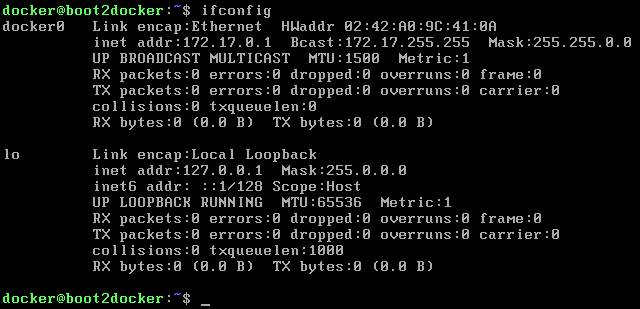
When I instead tried to use the boot2docker.iso in packer, I discovered that I need to set "ethernet0.virtualDev": "e1000" for the eth0 to show up.
This suggests to me that boot2docker is not able to recognise the network card that vmxnet3 emulates. But it does still recognise the more primitive software base NIC emulator.
 MartinSGill
on 11 Nov 2018
MartinSGill
on 11 Nov 2018
MIght be the same issue as #1345
MartinSGill
on 12 Nov 2018
Doh, good catch! I think I've found the source of the issue (and will be making a PR shortly):
$ docker run --rm boot2docker/boot2docker grep -i vmxnet /usr/src/linux/.config
# CONFIG_VMXNET3 is not set
 tianon
on 12 Nov 2018
tianon
on 12 Nov 2018
Can someone here do a build of https://github.com/boot2docker/boot2docker/pull/1350 and verify that it fixes the issue? (I don't have a VMware install to test this on at the moment.)
tianon
on 12 Nov 2018
I've built the boot2docker.iso
https://github.com/StefanScherer/boot2docker/releases/download/v18.09.0-vmxnet3/boot2docker.iso
SHA256 checksum is f48a4ef3641123f26308444b22bea70ac438d714b52dc1fd1fa025f949786412.
If someone wants to try it. I've added my first findings in #1350 and will try it with an older VMware Fusion version tomorrow.
 StefanScherer
on 12 Nov 2018
StefanScherer
on 12 Nov 2018
I diffed the generated Kernel config with my working one. This stands out for VMWare folk.
-# CONFIG_VMWARE_VMCI is not set
+CONFIG_VMWARE_VMCI=m
+CONFIG_VMWARE_BALLOON=m
-# CONFIG_OPENVSWITCH is not set
-# CONFIG_VSOCKETS is not set
-# CONFIG_NETLINK_DIAG is not set
-# CONFIG_MPLS is not set
+CONFIG_OPENVSWITCH=m
+CONFIG_OPENVSWITCH_VXLAN=m
+CONFIG_VSOCKETS=m
+CONFIG_VMWARE_VMCI_VSOCKETS=m
+CONFIG_VIRTIO_VSOCKETS=m
+CONFIG_VIRTIO_VSOCKETS_COMMON=m
+CONFIG_HYPERV_VSOCKETS=m
There is probably others I have missed. I'll keep digging.
kaosagnt
on 13 Nov 2018
@StefanScherer
I've built the boot2docker.iso
https://github.com/StefanScherer/boot2docker/releases/download/v18.09.0-vmxnet3/boot2docker.iso
SHA256 checksum is f48a4ef3641123f26308444b22bea70ac438d714b52dc1fd1fa025f949786412.
If someone wants to try it. I've added my first findings in #1350 and will try it with an older VMware Fusion version tomorrow.
can confirm this iso is working fine with vmwareworkstation-driver.
VMware Workstion Pro 15
 tekook
on 2 Dec 2018
tekook
on 2 Dec 2018
@tekook Thanks!
StefanScherer
on 2 Dec 2018
@StefanScherer
Responded to early. Fails at provisioning docker. Same as in #1350 and (https://github.com/boot2docker/boot2docker/pull/1350#issuecomment-438181741)
docker-machine create --driver=vmwareworkstation --vmwareworkstation-boot2docker-url=https://github.com/StefanScherer/boot2docker/releases/download/v18.09.0-vmxnet3/boot2docker.iso default
Running pre-create checks...
(default) Boot2Docker URL was explicitly set to "https://github.com/StefanScherer/boot2docker/releases/download/v18.09.0-vmxnet3/boot2docker.iso" at create time, so Docker Machine cannot upgrade this machine to the latest version.
Creating machine...
(default) Boot2Docker URL was explicitly set to "https://github.com/StefanScherer/boot2docker/releases/download/v18.09.0-vmxnet3/boot2docker.iso" at create time, so Docker Machine cannot upgrade this machine to the latest version.
(default) Downloading C:\Users\jute\.docker\machine\cache\boot2docker.iso from https://github.com/StefanScherer/boot2docker/releases/download/v18.09.0-vmxnet3/boot2docker.iso...
(default) 0%....10%....20%....30%....40%....50%....60%....70%....80%....90%....100%
(default) Creating SSH key...
(default) Creating VM...
(default) Creating disk 'C:\Users\jute\.docker\machine\machines\default\default.vmdk'
(default) Virtual disk creation successful.
(default) Starting default...
(default) Waiting for VM to come online...
Waiting for machine to be running, this may take a few minutes...
Detecting operating system of created instance...
Waiting for SSH to be available...
Detecting the provisioner...
Provisioning with boot2docker...
Error creating machine: Error running provisioning: Unable to verify the Docker daemon is listening: Maximum number of retries (10) exceeded
tekook
on 2 Dec 2018
@StefanScherer you can try my fork here.
https://github.com/kaosagnt/boot2docker-xfs-ng/releases/tag/18.09.0-v1.0.0
Note: it is slightly different from the official boot2docker. Uses TCL 9.x, and XFS filesystems as the default but you can use it to see what may be missing in the Kernel config.
kaosagnt
on 3 Dec 2018
See https://github.com/boot2docker/boot2docker/releases/tag/v18.09.1-beta1 and https://github.com/boot2docker/boot2docker/releases/tag/v18.09.1-beta2 (which include this fix). :+1:
tianon
on 4 Dec 2018
Thanks @tianon, I can confirm that using the last release fixes this issue
 abdusco
on 3 Jan 2019
abdusco
on 3 Jan 2019
I use the version v18.09.7 but still have the problem "IP not found for MAC in DHCP leases"
 GragonBigX
on 5 Jul 2019
GragonBigX
on 5 Jul 2019
Related issues
 markomitranic
·
7Comments
markomitranic
·
7Comments
 marius311
·
7Comments
marius311
·
7Comments
 aashray-a-chetan
·
3Comments
aashray-a-chetan
·
3Comments
 linux-china
·
15Comments
linux-china
·
15Comments
 rcross
·
6Comments
rcross
·
6Comments
Most helpful comment
See https://github.com/boot2docker/boot2docker/releases/tag/v18.09.1-beta1 and https://github.com/boot2docker/boot2docker/releases/tag/v18.09.1-beta2 (which include this fix). :+1: