Current behavior
There are no tabs for Markdown but there are for snippets. It would be nice to have tabs for both. (I.e. to have multiple Markdown documents in one Markdown note) It will be really helpful feature for systematizing one's stuff (because there are no way of creating subfolders - any plans for that, by the way?)
Expected behavior
Something like that, but for Markdown:

 Dene33
All 4 comments
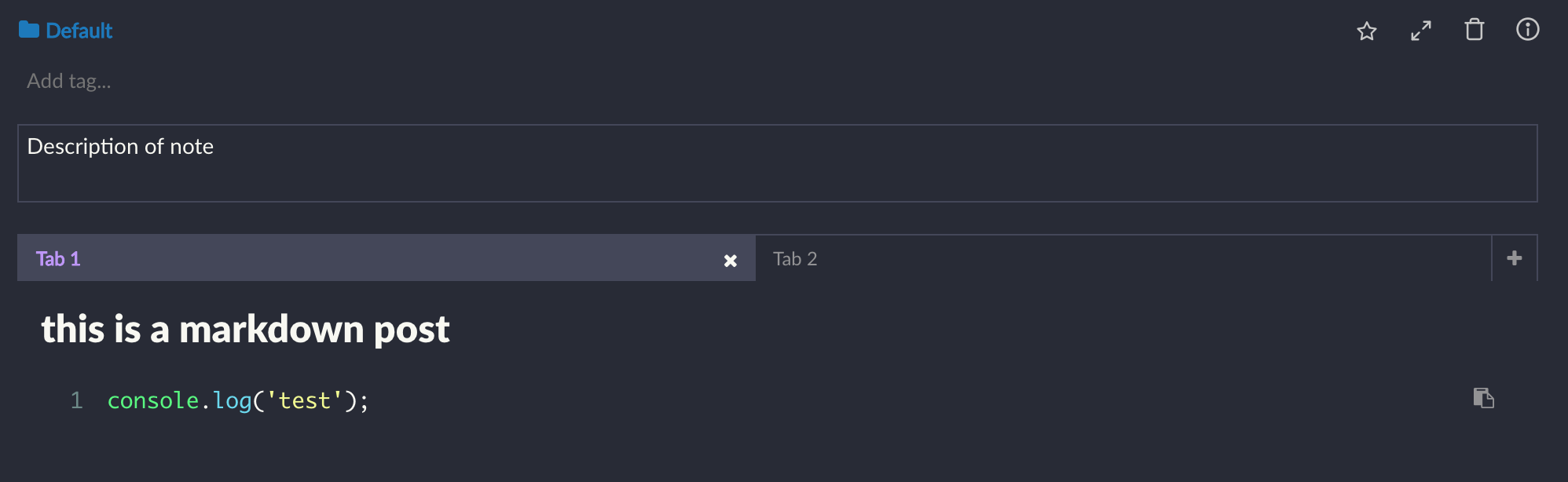
Would be cool, I found a way to kind of use it like that with snippets if you're interested.
General workflow: set preview as default view, right click to edit, default language markdown.
If you write markdown in your snippets in preview mode it will show just like markdown in each tab by default and if you need to edit it you can.
Ends up looking like this:
 dostoevskylabs
on 12 Feb 2019
dostoevskylabs
on 12 Feb 2019
Alternatively, you still can choose snippet note and create some notes with *.md extension.
 drizzersilverberg
on 1 Mar 2019
drizzersilverberg
on 1 Mar 2019
@Dene33 Would this feature still be needed if subfolders were implemented?
 Flexo013
on 27 Jul 2019
Flexo013
on 27 Jul 2019
@Flexo013 Definitely! Tabs are really great.
Dene33
on 27 Jul 2019
Related issues
 aurelkurtula
·
3Comments
aurelkurtula
·
3Comments
 Rokt33r
·
3Comments
Rokt33r
·
3Comments
 dtgay
·
3Comments
dtgay
·
3Comments
 shunchuan
·
3Comments
shunchuan
·
3Comments
 DanielRamosAcosta
·
3Comments
DanielRamosAcosta
·
3Comments
Most helpful comment
Would be cool, I found a way to kind of use it like that with snippets if you're interested.
General workflow: set preview as default view, right click to edit, default language markdown.
If you write markdown in your snippets in preview mode it will show just like markdown in each tab by default and if you need to edit it you can.
Ends up looking like this:
