Boostnote: Inserted images are not displayed
Current behavior
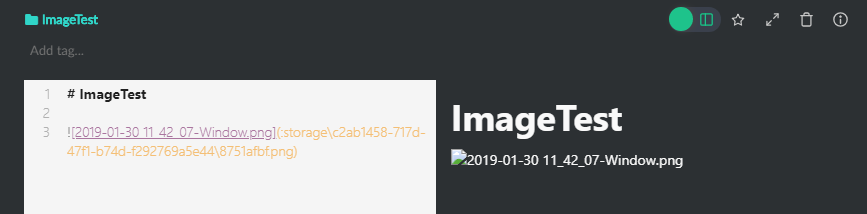
I want to add some images to my note. So I'm drag & drop the file to boostnote and get the following syntax:

Screenshot:
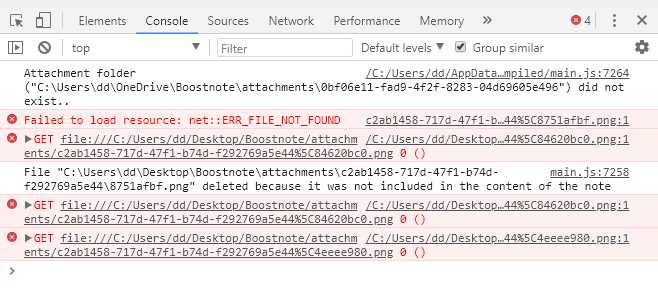
Developer console:
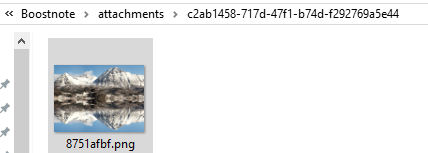
Attachments folder:
Expected behavior
A note with the inserted image
Steps to reproduce
- Create new note (or use an existing one)
- Drag one image into the note
Environment
- Version : 0.11.13
- OS Version and name : Windows 10 Version 1803
 dredav
All 13 comments
Using the element inspector the html for the image is
<p data-line="36"><img src="file:///C:\Users\dd\OneDrive\Boostnote\attachments\f21e142b-1623-44c8-a059-ee54ed6b8d9d%5Ca3f6ec82.png" alt="Konzept.png"></p>
and should be
<p data-line="36"><img src="file:///C:\Users\dd\OneDrive\Boostnote\attachments\f21e142b-1623-44c8-a059-ee54ed6b8d9d\a3f6ec82.png" alt="Konzept.png"></p>
Hi
I can second that, same issue on my system (Windows 10 1809, Boostnote 0.11.13).
Regards
Claudio
 claudiospizzi
on 30 Jan 2019
claudiospizzi
on 30 Jan 2019
Hello,
I think there's a fix coming up soon for this problem, more info in the links.
 Devsper
on 30 Jan 2019
Devsper
on 30 Jan 2019
I just found a simple workaround for this bug:
When adding or dragging image into boostnote, you will see the link getting generated like this 
if you change the all the backward slashes to forward it will work like normal. in the versions before all the slashes where forward by default, but it seems to be a bug in this version that by default all slashes in the image path are backwards.
so change your path slashes to 
now images should be displayed and are also correctly getting saved in your attachment folder
cheers!
 Dhruvjit
on 30 Jan 2019
Dhruvjit
on 30 Jan 2019
We will fix this bug in this week. Hang on a little bit more. 😭 😭 😭
 Rokt33r
on 31 Jan 2019
Rokt33r
on 31 Jan 2019
I'll close this issue because the bug has been reported already.
Rokt33r
on 31 Jan 2019
I have this issue still present
 marcofavale
on 27 Mar 2019
marcofavale
on 27 Mar 2019
I have this issue still present
What version of boostnote are you using? You need to update manually to version 0.11.15 to get this bugfix.
dredav
on 27 Mar 2019
I'm using version 0.11.15 on ubuntu 18.04


marcofavale
on 28 Mar 2019
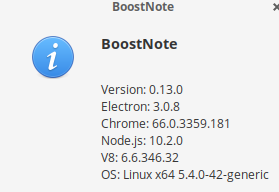
Getting the issue on this version.
 leandrit1
on 15 Nov 2020
leandrit1
on 15 Nov 2020
@xkLander Could you update to 0.16.1 and see if the issue still persists? (Also double check is the attached file actually exists within the path.)
 Flexo013
on 12 Dec 2020
Flexo013
on 12 Dec 2020
Apparently it was due to some attachments missing. However, it is still an issue since I imported from the legacy boost note, and I would say that like half of the attachments have been carried to the new boost note and the other half cant be found in the new location
leandrit1
on 12 Dec 2020
Yeah, that definitely sounds like a problem. Could you add info about it on this issue: https://github.com/BoostIO/BoostNote.next/issues/697
Then we can work on a solution over there. :)
Flexo013
on 12 Dec 2020
Related issues
 NonlinearFruit
·
3Comments
Rokt33r
·
3Comments
NonlinearFruit
·
3Comments
Rokt33r
·
3Comments
 lijinglue
·
3Comments
lijinglue
·
3Comments
 ryochack
·
3Comments
ryochack
·
3Comments
 npeeples
·
3Comments
npeeples
·
3Comments
Most helpful comment
Hello,
I think there's a fix coming up soon for this problem, more info in the links.
issue#2834
pull#2848