Boostnote: AUR cannot install boostnote on Manjaro 18
Current behavior
When trying to install Boostnote with AUR, I'm getting conflicting packages error for node. I am not sure if it is because of packages in my system or because of Boostnote pkgbuild. Please help in resolving this. Thanks.
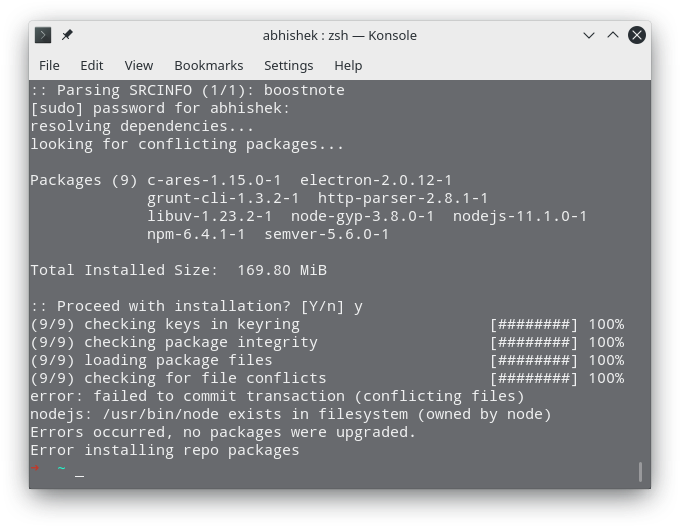
Complete messages:
 yay -S boostnote
:: Checking for conflicts...
:: Checking for inner conflicts...
[Repo: 5]  c-ares-1.15.0-1  http-parser-2.8.1-1  electron-2.0.12-1  libuv-1.23.2-1  nodejs-11.1.0-1
[Repo Make: 4]  semver-5.6.0-1  node-gyp-3.8.0-1  npm-6.4.1-1  grunt-cli-1.3.2-1
[Aur: 1]  boostnote-0.11.11-1

==> Remove make dependencies after install? [y/N] y
  1 boostnote                                (Build Files Exist)
==> Packages to cleanBuild?
==> [N]one [A]ll [Ab]ort [I]nstalled [No]tInstalled or (1 2 3, 1-3, ^4)
==> n
:: PKGBUILD up to date, Skipping (1/1): boostnote
  1 boostnote                                (Build Files Exist)
==> [N]one [A]ll [Ab]ort [I]nstalled [No]tInstalled or (1 2 3, 1-3, ^4)
==> Diffs to show?
==> n
:: Parsing SRCINFO (1/1): boostnote
[sudo] password for abhishek:
resolving dependencies...
looking for conflicting packages...

Packages (9) c-ares-1.15.0-1  electron-2.0.12-1
             grunt-cli-1.3.2-1  http-parser-2.8.1-1
             libuv-1.23.2-1  node-gyp-3.8.0-1  nodejs-11.1.0-1
             npm-6.4.1-1  semver-5.6.0-1

Total Installed Size:  169.80 MiB

:: Proceed with installation? [Y/n] y
(9/9) checking keys in keyring                     [########] 100%
(9/9) checking package integrity                   [########] 100%
(9/9) loading package files                        [########] 100%
(9/9) checking for file conflicts                  [########] 100%
error: failed to commit transaction (conflicting files)
nodejs: /usr/bin/node exists in filesystem (owned by node)
Errors occurred, no packages were upgraded.
Error installing repo packages
Expected behavior
Installation without errors :P
Steps to reproduce
yay -S boostnote
Environment
- Version : 0.11.11-1
- OS Version and name : Manjaro 18
 abhishekbalam
All 9 comments
I don't use AUR so I can't help you with this :cry: Maybe someone else can help you with it.
 ZeroX-DG
on 24 Nov 2018
ZeroX-DG
on 24 Nov 2018
@kazup01 funded this issue with $10. See it on IssueHunt
 IssueHuntBot
on 26 Nov 2018
IssueHuntBot
on 26 Nov 2018
@issuehuntfest has funded $5.00 to this issue. See it on IssueHunt
IssueHuntBot
on 9 Dec 2018
This issue is caused by you having installed node through AUR and is an issue with the package manager. Your node install is in /usr/bin which requires elevated privileges on Arch/Manjaro. Many installers, such as n, install to this location as on most OSes it is not an issue. You need to have your Node install in ~/
Here is how to resolve it.
_remove node_
npm --global remove npm
_install nvm and use it to install npm_
yay -S nvm
echo 'source /usr/share/nvm/init-nvm.sh' >> ~/.bashrc
exec $SHELL
nvm ls-remote
nvm install 9
confirm installation
node -v #should be 9+
npm -v #should be 5+
install yarn globally and Boostnote
npm install -g yarn
echo 'export PATH=$PATH:~/.yarn/bin' >> ~/.bashrc
yay -S boostnote
This solution has been tested on a Manjaro 18 virtual machine.
There will not be anything that can be done to correct this issue from this end as it is an issue with the package manager.
 MiloTodt
on 12 Jan 2019
MiloTodt
on 12 Jan 2019
Thanks for the solution, it works. I have just successfully installed the application. :+1:
abhishekbalam
on 14 Jan 2019
Happy to help, thank you for confirming this solved your problem!
MiloTodt
on 14 Jan 2019
@milotodt has submitted a pull request. See it on IssueHunt
IssueHuntBot
on 14 Jan 2019
@rokt33r has rewarded $13.50 to @milotodt. See it on IssueHunt
- :moneybag: Total deposit: $15.00
- :tada: Repository reward(0%): $0.00
- :wrench: Service fee(10%): $1.50
IssueHuntBot
on 22 Jan 2019
@MiloTodt Interesting that you made an empty pr to submit! haha Anyway, great job!
 Rokt33r
on 22 Jan 2019
Rokt33r
on 22 Jan 2019
Related issues
 shunchuan
·
3Comments
shunchuan
·
3Comments
 aurelkurtula
·
3Comments
aurelkurtula
·
3Comments
 NonlinearFruit
·
3Comments
NonlinearFruit
·
3Comments
 dtgay
·
3Comments
dtgay
·
3Comments
 DanielRamosAcosta
·
3Comments
DanielRamosAcosta
·
3Comments
Most helpful comment
@kazup01 funded this issue with $10. See it on IssueHunt