Boostnote: Inline code is hard to see. Better distinction is needed.
Current behavior
Inline code with backticks does not work for themes other than default and white. For monokai and solarized dark, it looks exactly like issue #208.


Expected behavior
That code is formatted correctly inline.
Steps to reproduce
- Start a markdown node
- Write This is an example of
inline code - Change theme
Environment
- Version : 10.12.6
- OS Version and name : OSx Sierra
 TMorville
All 12 comments
Thanks for reporting, we will fix this asap!
 ZeroX-DG
on 9 Sep 2018
ZeroX-DG
on 9 Sep 2018
It seems that you already have a handle on this issue but I wanted to provide some additional information. I also feel that inline code and unformatted block code is difficult to see when using the dark theme. I tried to correct this with custom CSS and found that some elements are being overridden. Below is my custom CSS for testing:
/*
Dark interface theme overrides custom CSS for some elements.
The below custom CSS properly decorates both inline and block code
for all interface themes except for Dark. When Dark theme is selected:
    * inline code font color and background-color is overridden
    * block code font color is overridden
*/

body[data-theme] code {
 background-color: orange;
 color:white;
}

pre.codemirror {
 background-color: orange;
}
 randman1
on 27 Sep 2018
randman1
on 27 Sep 2018
@randman1 is this issue still exists? if not can you close the issue?
ZeroX-DG
on 29 Oct 2018
Close due to inactivity.
ZeroX-DG
on 28 Jan 2019
The bug is still exist.
 jokera666
on 8 Feb 2019
jokera666
on 8 Feb 2019
The background colour for inline code in dark themes is still too subtle - tested with the Dracula theme, and the bug is still present.
This issue should be re-opened.
 Cursea
on 14 May 2019
Cursea
on 14 May 2019
Yeah, this is still an issue. The change for inline code is essentially invisible for dark themes and is very subtle for the default scheme.


I think even github's coloring is pretty weak.
Would it be possible to get something like slacks:

That would make it a lot more readable.
Thanks for your help!
 brandonfosso
on 23 Jul 2019
brandonfosso
on 23 Jul 2019
Agreed that just changing the font is not enough with the default Dark settings. Something should be changed about the styling of inline code to make it more distinct.
 Flexo013
on 23 Jul 2019
Flexo013
on 23 Jul 2019
Until there is an actual fix in place, I just wanted to mention that the styles can be manually overridden in Preferences > Markdown. Find the CSS for code then just adjust the background-color (and other styles) to something more to your liking.
 jtruman88
on 31 Jan 2020
jtruman88
on 31 Jan 2020
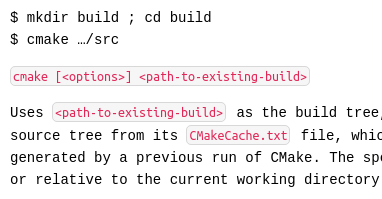
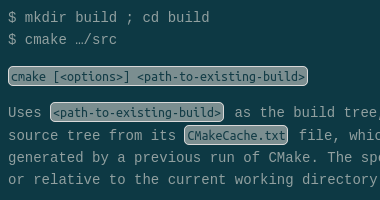
@ZeroX-DG would custom CSS also be an accepted solution? Coincidentially I made a robust solution for this today for myself:
 arcturus140
on 13 Feb 2020
arcturus140
on 13 Feb 2020
@arcturus140 wow that looks cool, yes I think we can put it as a default value for the custom CSS. It would be easier and user can customize it too.
ZeroX-DG
on 13 Feb 2020
ok, I'll add it to my task list for tomorrow.
arcturus140
on 13 Feb 2020
Related issues
 NourEldin275
·
3Comments
NourEldin275
·
3Comments
 shunchuan
·
3Comments
shunchuan
·
3Comments
 ryochack
·
3Comments
ryochack
·
3Comments
 N2ITN
·
3Comments
N2ITN
·
3Comments
 ysshah
·
3Comments
ysshah
·
3Comments
Most helpful comment
ok, I'll add it to my task list for tomorrow.