Boostnote: Option to disable "smart" URL pasting
When an URL is pasted from clipboard, Boostnote fetches the page title and makes a markdown link with it, e.g., [Page Title](http://example.com). This feature may be useful for some people. But it costs network access and CPU load. I mostly just want to paste plain URLs. Please add an option to turn it off.
 heavywatal
All 2 comments
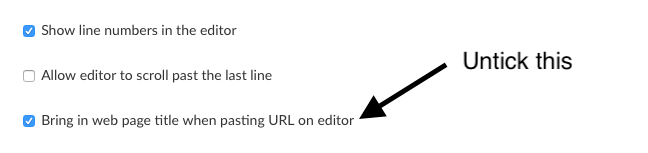
There is already an option to disable this, under Preferences -> Interface it's just not something you're likely to notice (due to the way it's phrased) unless you look twice.
Untick the "Bring in web page title when pasting URL on editor" checkbox, then click Save.
 MrBMT
on 11 Apr 2018
MrBMT
on 11 Apr 2018
👍4
🎉1
Thanks! my bad.
heavywatal
on 11 Apr 2018
🎉1
Was this page helpful?
0 / 5 - 0 ratings
Related issues
 gavvvr
·
3Comments
gavvvr
·
3Comments
 croulibri
·
3Comments
croulibri
·
3Comments
 DanielRamosAcosta
·
3Comments
DanielRamosAcosta
·
3Comments
 louiealmeda
·
3Comments
louiealmeda
·
3Comments
 cyber-arsenull
·
3Comments
cyber-arsenull
·
3Comments
Most helpful comment
There is already an option to disable this, under Preferences -> Interface it's just not something you're likely to notice (due to the way it's phrased) unless you look twice.
Untick the "Bring in web page title when pasting URL on editor" checkbox, then click Save.