Boostnote: After restart lost all folders links to storage location
v0.11.0
I have been using Boostnote for many months now with no issues and mobile still works. But on Mac OS X after restart, I lost link to my storage and my dropbox folder. I cannot add it back, only new empty storage folders and when i copy paste all the info from my dropbox storage folder, they do not show up even after restarting app.
I also lose link to any storage folder I created on a local directory after restarting.
 chiangs
All 5 comments
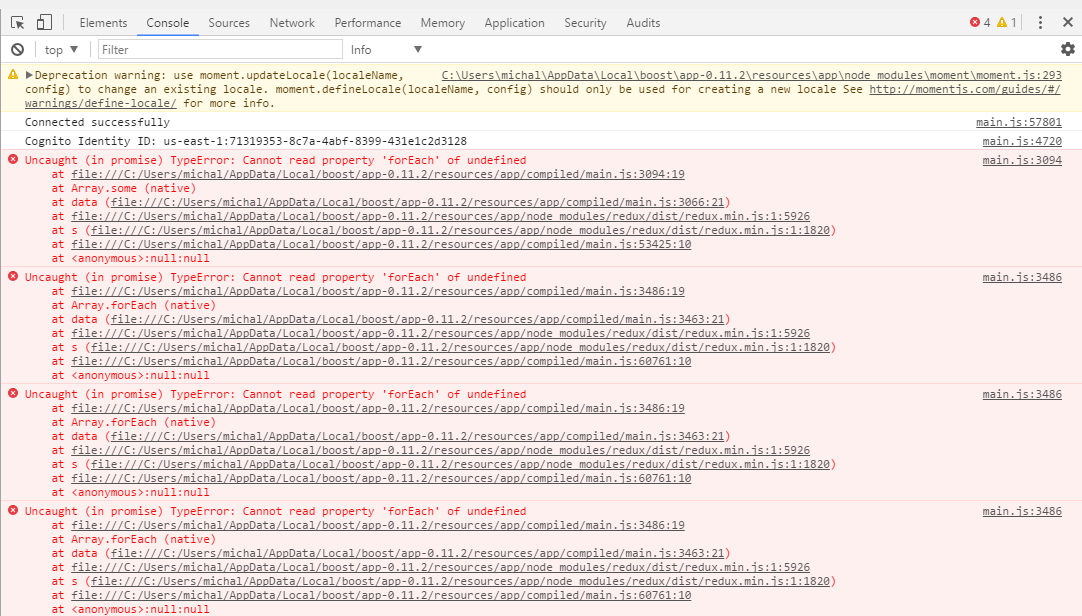
There should be an error. Could you take a screenshot from dev tool?
 Rokt33r
on 22 Mar 2018
Rokt33r
on 22 Mar 2018
I've encountered the same issue on 0.11.2 and 0.11.3 both on Mac and Windows. It boils down to TypeError: Cannot read property 'forEach' of undefined on that line:
https://github.com/BoostIO/Boostnote/blob/1c283f88d03a2c2ee85adf7603bd2203df4ad77f/browser/main/store.js#L56
 kijowski
on 23 Mar 2018
kijowski
on 23 Mar 2018
@kijowski Could you create another issue? I’ve never seen any error like the above. I need to know when it occurs.
Rokt33r
on 23 Mar 2018
@Rokt33r I've created #1729 with description of this issue and more info about why this happened that I've found.
kijowski
on 23 Mar 2018
This fixed it for me, thanks!
I opened up the storage folder with VS Code, looked at all the csons and found one that said:
'content': ''
I deleted that and restarted and my original storage and alllll the attempts at linking it again showed up. So then I had to unlink each one manually. A future feature that allows you to check and select all might be nice :)
chiangs
on 23 Mar 2018
Related issues
 DanielRamosAcosta
·
3Comments
DanielRamosAcosta
·
3Comments
 NourEldin275
·
3Comments
NourEldin275
·
3Comments
 NonlinearFruit
·
3Comments
NonlinearFruit
·
3Comments
 ryochack
·
3Comments
ryochack
·
3Comments
 dtgay
·
3Comments
dtgay
·
3Comments
Most helpful comment
@Rokt33r I've created #1729 with description of this issue and more info about why this happened that I've found.