Boostnote: Scrolling freezes on adding large or scroll-able content
Whenever we are adding some content in edit mode which is scrollable, the scrolling freezes when we switch to preview mode. And not able to scroll the content, to enable the scrolling again I have to click on some other note and back to the original one, then scrolling is restored and I am able to scroll.
 himaanshu24
All 11 comments
Hi @himaanshu24 , thank you for your reporting.
Are you using Windows?
refs: https://github.com/BoostIO/Boostnote/issues/680
 kazup01
on 9 Nov 2017
kazup01
on 9 Nov 2017
I have had this problem since I started using Boostnote. I am on Windows 10.
I don't know much about the frameworks involved in making Boostnote, but I just inspected the markup and below are some findings.
Cause
When in preview mode, a class is applied to the Code Editor to hide it. Disabling the two styles opacity and pointer-events on the matching CSS-selector fixes the scrolling issue.
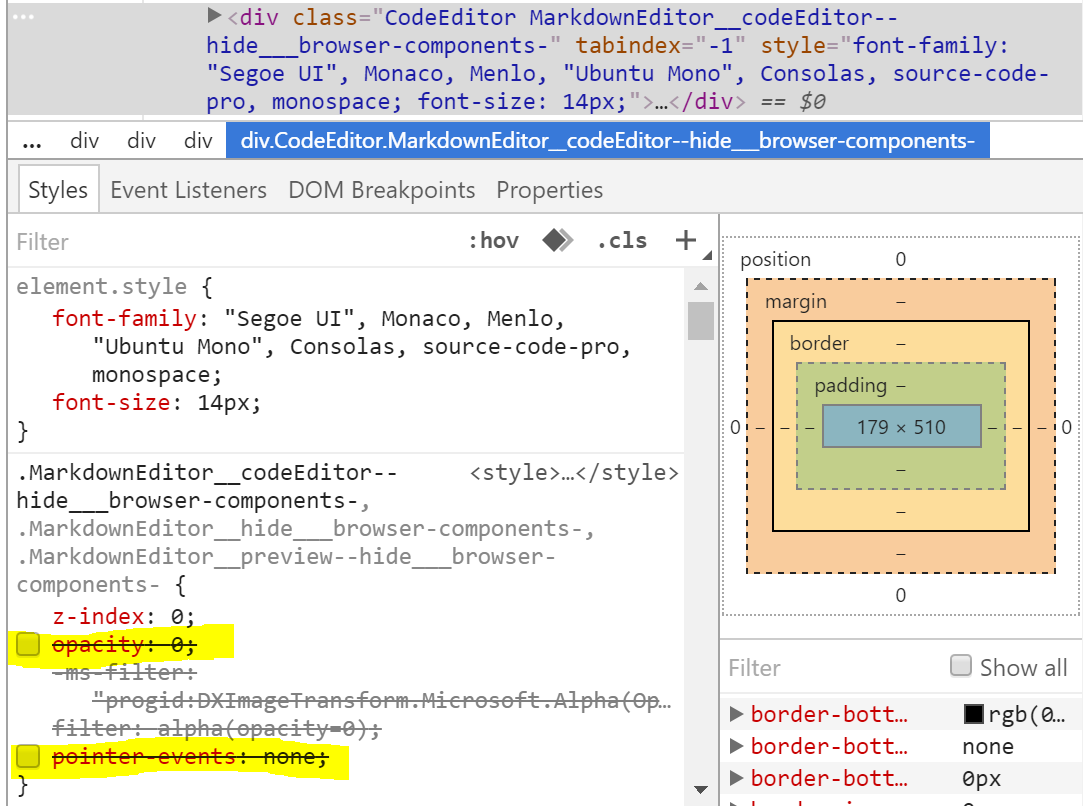
Potential fix
The same CSS-selector applies to the Markdown Editor in code edit mode and disabling those two styles breaks it.
If instead, we apply the styles directly on the Code Editor (for both preview/edit modes), the scrolling issue is fixed and both the Code Editor and Markdown Editor work as intended.
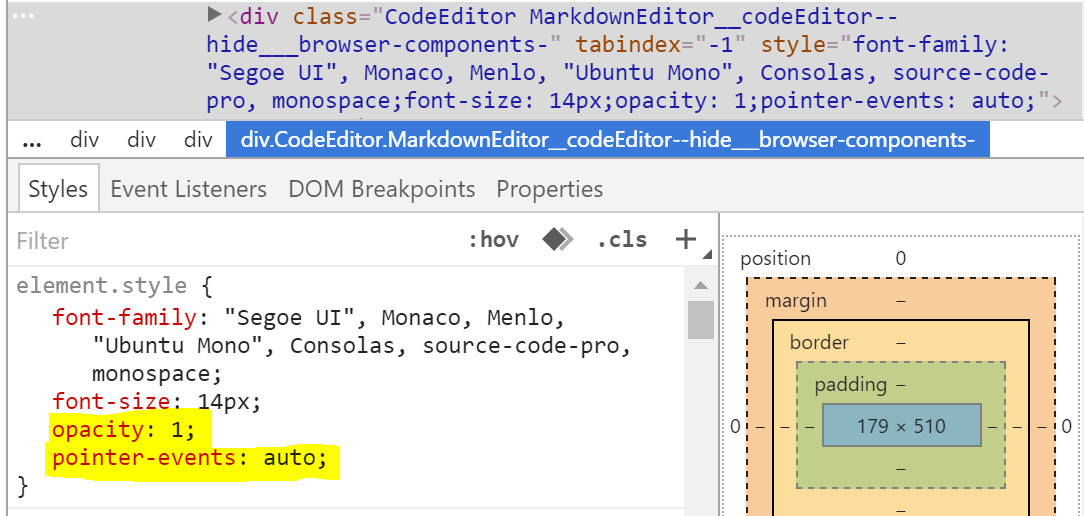
 tsebring
on 9 Nov 2017
tsebring
on 9 Nov 2017
@tsebring Thank you for your information :)
kazup01
on 9 Nov 2017
@kazup01, yes it is on Windows machine. You can see the details below.
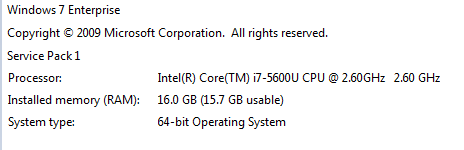
Additionally, can you tell me where to report the bug(s) for your mobile version of your app, since I would really love to use the mobile version with seamless sync b/w devices but in the current state it is not useable that much.
Again, Thank you for such a fantastic piece of software that I use on daily basis. Still missing better mobile version though :smiley: .
himaanshu24
on 10 Nov 2017
Hi @himaanshu24 , hank you for your info and we are glad to hear your feedback :)
We will update mobile app at sometime soon, enable to edit note when dropbox syncing.
👉 https://github.com/BoostIO/boostnote-mobile/pull/75
Enjoy!
kazup01
on 10 Nov 2017
Seems this issue was likely introduced with https://github.com/LetItRock/Boostnote/commit/90846fab81794605f6947816dfcf695a82303d6e#diff-3557b7c34da29ecae0a33feff7f1b05f. Before then the code editor did not have these styles applied.
Added this style-selector to /resources/app/lib/main.html (to test) and have had no issue with scrolling freezes or double scrollbars for the past day.
  .CodeEditor {
    opacity: 1 !important;
    pointer-events: auto !important;
  }
I confirm this issue also on Linux (Ubuntu 14.04 64bit).
 peci1
on 14 Nov 2017
peci1
on 14 Nov 2017
I'm sorry to have kept you guys waiting so long in the wrong UX.
I've fixed it just now. #1149
We will update to v0.8.17 in this week. Thank you for waiting!
kazup01
on 21 Nov 2017
Thank you for your help ;) @tsebring
kazup01
on 21 Nov 2017
v0.8.17 is out!
kazup01
on 25 Nov 2017
I wrote the release note. https://medium.com/boostnote/thanks-to-your-contribution-boostnote-v0-8-17-is-out-5fea9c7727f2
Thanks again for you guys waiting. Enjoy Boostnote :)
kazup01
on 25 Nov 2017
Related issues
 Petroochio
·
3Comments
Petroochio
·
3Comments
 croulibri
·
3Comments
croulibri
·
3Comments
 dtgay
·
3Comments
dtgay
·
3Comments
 cyber-arsenull
·
3Comments
cyber-arsenull
·
3Comments
 gavvvr
·
3Comments
gavvvr
·
3Comments