Boostnote: Feature: release portable version for windows
Please release portable version for windows for using from usb-stick or on computers where you haven't administrative privilages for installation.
 sberbanker
All 21 comments
if this is the case then I'd rather request a web app version rather than a portable version.
 luong-komorebi
on 20 Mar 2017
luong-komorebi
on 20 Mar 2017
@VoLuong actually, both would be great!
 iliyang
on 6 Apr 2017
iliyang
on 6 Apr 2017
at work, we don't have administrative privilages or internet connection, so a portable version would be great!
 rafael25
on 17 Apr 2017
rafael25
on 17 Apr 2017
Any progress with this?
Maybe release it in a PortableApps format?
It will increase exposure of the program significantly.
 RoyiAvital
on 18 Jun 2017
RoyiAvital
on 18 Jun 2017
Making Boostnote portable is actually quite simple:
- Create an empty Boostnote folder somwhere in your windows file system
- Open the installer with 7z as an archive
- Unzip the complete content of the subfolder "net45" to your Boostnote folder
- Create the following batch as 'Boostnote-Portable.cmd' in your Boostnote folder
The Boostnote-Portable.cmd and the Boostnote.exe are in the same folder.
@echo off
if not exist "%CD%\profile\AppData\Roaming" mkdir "%CD%\profile\appdata\Roaming"
set USERPROFILE=%CD%\profile
if not exist "%CD%\profile\notes" goto message
goto start

:message
echo PORTABLE BOOSTNOTE
echo -------------------------------
echo Please enter this storage path in Boostnote:  .\profile
echo.
pause

:start
start Boostnote.exe /I
That's it. Simply start the 'Boostnote-Portable.cmd' and you should have your portable version.
Basically it all depends on these parameters:
- Rerouting of the USERPROFILE Variable
- The portable folders AppData\Roaming must already exist when starting the executable
- The storage path must be entered as .\profile
Have fun :)
 nickbe
on 27 Jul 2017
nickbe
on 27 Jul 2017
@nickbe ,
This is basically what's PortableApps launcher does.
But this won't cover Registry Keys if used.
All and all, there should be some support from the developers.
RoyiAvital
on 27 Jul 2017
Well I already checked the registry and there's nothing there.
So you're safe to go with a simple batch file as I do myself for some time now. Making a PortableApps Version is easy enough but only makes sense if there's a lot going on with files and registry.
But here, once you've set up the storage, there's absolutely nothing else you need.
nickbe
on 27 Jul 2017
@nickbe , Having it as part of PortableApps has many advantages:
- Exposure to many more people.
- Automatic updates (The portable version should disable updates) as part of the suite.
- Security scanning.
It would be great to have it.
RoyiAvital
on 28 Jul 2017
Attached you find a zip containing a portable loader for Boostnote.
Simply extract the BoostnotePortable.exe into your copy of the Boostnote net45 folder, which should then look like this:
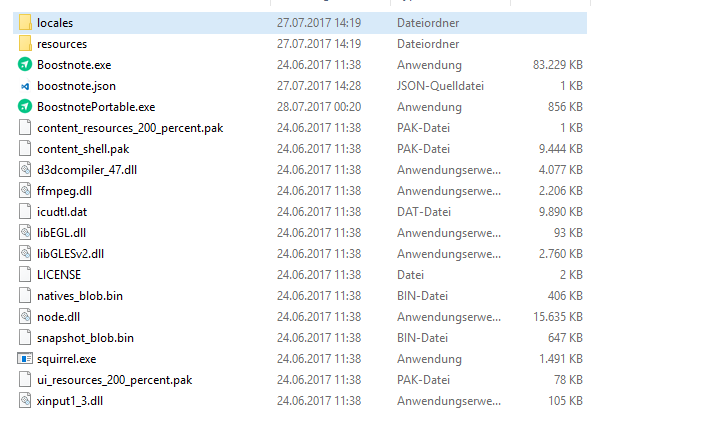
Then simply start the BoostnotePortable.exe and your good to go.
nickbe
on 28 Jul 2017
PortableApps packed programs are not always the holy grail. Many different authors trying to meddle with things you cannot control, because you don't have the source code. More than often they're simply copying large amounts of data from and to the registry and/or some appdata or other folder which is far from elegant and like bombing a mouse out of the house with C4.
Well with a simpe batch this can't happen, because you're seeing what's going on.
Having said this, here's the AutoIt Source from the executable in case you want to recompile it yourself:
nickbe
on 28 Jul 2017
@nickbe ,
Well, if the program can be configured as Portable they use it.
They just have "Heavier" solution for programs who don't play nice.
Really great suite and I'd be happy to see this one going in.
RoyiAvital
on 28 Jul 2017
Well for me my solution is more compact, faster and more elegant. But feel free to contact the PortableApps guys.
nickbe
on 28 Jul 2017
I would use your solution.
It is perfect!
But just want this program as part of PortableApps suite for the other benefits I mentioned.
RoyiAvital
on 28 Jul 2017
just created this PR for those interested #1129 which is my solution to the problem
 ScottDillman
on 15 Nov 2017
ScottDillman
on 15 Nov 2017
@nickbe ,
I extended your batch file (Little bit):
@echo off
if not exist "%CD%\Profile\AppData\Roaming" mkdir "%CD%\Profile\AppData\Roaming"
if not exist "%CD%\Profile\Documents" mkdir "%CD%\Profile\Documents"
if not exist "%CD%\Profile\AppData\Local\Temp" mkdir "%CD%\Profile\AppData\Local\Temp"
set USERPROFILE=%CD%\profile
set APPDATA=%CD%\Profile\AppData
set TEMP=%CD%\Profile\AppData\Local\Temp
set TMP=%CD%\Profile\AppData\Local\Temp
if not exist "%CD%\Profile\Documents\Boostnote" goto message
goto start

:message
echo PORTABLE BOOSTNOTE
echo -------------------------------
echo Please enter this storage path in Boostnote:  .\Profile\Documents\Boostnote
echo.
pause

:start
start Boostnote.exe /I
I manged to make it work on Abricotine as well - https://github.com/brrd/Abricotine/issues/74#issuecomment-367967968.
RoyiAvital
on 23 Feb 2018
I'll also +1 for the PortableApps platform.
Thanks for the batch files; I'll give Boostnote (portable) a try.
The PortableApps platform handles all the work for me. It installs, uninstalls, and updates - and it just works. This is _huge_.
It's trivial to test-run apps. I don't have to do anything extra; the platform does it all. Click-click installed, click-click uninstalled. The extra work of creating a batch file, extra directories, extra somethings - it's silly, but it's just enough of a hindrance/nuisance I don't bother for most apps.
The PortableApps platform makes it so easy - I've tried dozens of apps that I would not have tried if I had to install the the "normal" way - I hate polluting the registry and user area with crap; not everything gets cleaned up when uninstalling. Of those dozens, I've kept 3 or 4 of them. (e.g., I tried CintaNotes, Keepnote, The Guide, Redbook, and CherryTree - and settled on CherryTree; not perfect, but close to what I want. And of course, I'll try Boostnote... soon...) (it'd be sooner if it were just click-click... :)
It's really nice to just let things happen and they work right!
I do appreciate the batch file, unzipping manually, etc. lets me see what's happening. Often I do want that visibility. But having used the PortableApps for a while, I've become a real fanboy. (Good Ghu I hate writing that!)
I'm sure a PortableApps version would increase the user base significantly.
 AlanJayWeiner
on 30 Jul 2018
AlanJayWeiner
on 30 Jul 2018
@kazup01 cancelled funding, $40, of this issue. Visit this issue on Issuehunt
 IssueHuntBot
on 14 Sep 2018
IssueHuntBot
on 14 Sep 2018
@boostio funded this issue with $30. Visit this issue on Issuehunt
IssueHuntBot
on 14 Sep 2018
What the hell guys? There are plenty of simple helper tools to create a PortableApps version in a couple of minutes.
I can still see no sense at all in having that if a tiny and simple batch does all that and works just fine.
Since the storage path doesn't recognize a portable path itself, the only viable option to enhance portability lies with the developers themselves. So just ask then.
nickbe
on 14 Sep 2018
@nickbe
All of my portable apps' config files are stored in a cloud under a folder called __config. I tried modifying your solution since I find the %CD%\profile\appdata\Roaming\Boostnote too untidy, but ended up being halted by an error.
Boostnote.cmd
@echo off
if not exist "..\__config\Boostnote" mkdir "..\__config\Boostnote"
set USERPROFILE="..\__config\Boostnote"

start Boostnote.exe /i
Error
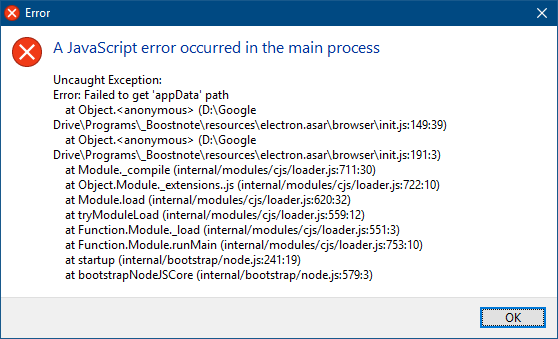
```
 moses-bowman
on 7 Apr 2019
moses-bowman
on 7 Apr 2019
Make a portable version with relative path for storage would be fine !
Other Electron app as Atom and VScode do it ! (https://code.visualstudio.com/docs/editor/portable)
I do not want to use Joplin (fully portable) I like Boostnote !
If Boostnote = "note taking"
And "note taking" = "everywhere"
"everywhere" => "portable"
So Boostnote must be portable!
I use boostnote on my usb key.
The major problem on windows is that the storage configuration is in the %appdata% folder (non transportable). And relative path in storage locations is not supported (problem with attachments and export pdf/html, etc)
PS: The "Rerouting of the USERPROFILE Variable" method with Autoit or batch script does not really work. A lot of functionality no longer works with this method.
Unfortunately, I have just started to learning nodeJS :(
Thanks you
 EKliptus
on 24 Jul 2019
EKliptus
on 24 Jul 2019
Related issues
 lijinglue
·
3Comments
lijinglue
·
3Comments
 Ocanamat
·
3Comments
Ocanamat
·
3Comments
 Petroochio
·
3Comments
Petroochio
·
3Comments
 dtgay
·
3Comments
dtgay
·
3Comments
 cyber-arsenull
·
3Comments
cyber-arsenull
·
3Comments
Most helpful comment
Making Boostnote portable is actually quite simple:
The Boostnote-Portable.cmd and the Boostnote.exe are in the same folder.
That's it. Simply start the 'Boostnote-Portable.cmd' and you should have your portable version.
Basically it all depends on these parameters:
Have fun :)