Boostnote.next: Can't collapse sidebar
Current behavior
When I hit Cmd + B, the sidebar doesn't hide. I also tried with Ctrl + B just in case.
Expected behavior
The sidebar should collapse.
Steps to reproduce
- Open the app
- Click on
SomeStorageName - Click on
All Notes - Hit
Cmd + B(nothing happens) - Click inside the editor of a given note
- Hit
Cmd + B(nothing happens)
Environment
- Boostnote version: 0.1.4
- OS version and name: macOS High Sierra, 10.13.6
 pierremonico
All 14 comments
The feature is not implemented yet. Thanks for the reminding. We'll work this soon!
 Rokt33r
on 3 Mar 2020
Rokt33r
on 3 Mar 2020
Alright, maybe just remove it from the shortcut list in the meantime then :)
pierremonico
on 4 Mar 2020
@pierremonico What shortcut list?
 Flexo013
on 4 Mar 2020
Flexo013
on 4 Mar 2020
@Flexo013 see tutorial notes...
 arcturus140
on 5 Mar 2020
arcturus140
on 5 Mar 2020
@Flexo013 see tutorial notes...
That's correct.
pierremonico
on 6 Mar 2020
I re-opened this so I can keep tracking this issue.
Rokt33r
on 6 Mar 2020
@Rokt33r, are you working on this? If not mind if I take it up? Also saw #333.
 JohnPhamous
on 8 Mar 2020
JohnPhamous
on 8 Mar 2020
@JohnPhamous Feel free to take this up!
Note that this one specifically is for hiding the entire sidebar. Check old Boostnote to see the exact behavior.
333 is for making the sidebar smaller, but still usuable.
Flexo013
on 8 Mar 2020
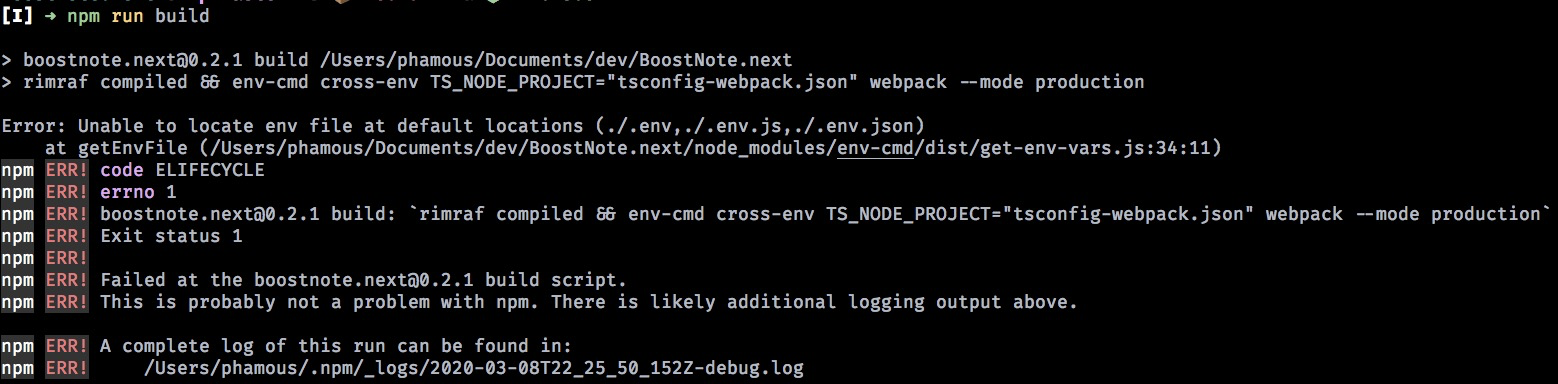
@Flexo013 thanks for clarifying. Are there other docs on how to get started working on the codebase? I tried the instructions under Build in the README but got this error
JohnPhamous
on 8 Mar 2020
@JohnPhamous You can create an empty .env file in the root folder and run
npm run dev
 ZeroX-DG
on 9 Mar 2020
ZeroX-DG
on 9 Mar 2020
@pierremonico I think #333 is better. The behavior is almost same but I think showing minimized functional UI is superior. Do you think you need hiding sidebar feature even though we have minimizing sidebar feature? If so, let us know why do you think so!
Rokt33r
on 25 Mar 2020
@Rokt33r thanks for asking. The minimized sidebar is perfect, same behaviour as in VS Code 😅
Essentially I just hide the sidebar all the time so I can write and see the result side by side without any other clutter. TLDR: I personally don't need to completely hide the sidebar; minimizing is enough.
pierremonico
on 25 Mar 2020
I agree. I personally also don't need a completely hidden sidebar, but I can imagine that some user would like this option. A sort of focus-mode, if you will.
My suggestion is to prioritize #333, and once that is implemented we can gather interest into a complete hide function with this current thread.
Flexo013
on 26 Mar 2020
Thanks for the quick responses! I'll close this and focus on #333.
Rokt33r
on 26 Mar 2020
Related issues
 HSQCoollaughing
·
3Comments
HSQCoollaughing
·
3Comments
 themattgabriel
·
4Comments
themattgabriel
·
4Comments
 isy
·
3Comments
Rokt33r
·
6Comments
isy
·
3Comments
Rokt33r
·
6Comments
 derekantrican
·
4Comments
derekantrican
·
4Comments
Most helpful comment
@Flexo013 see tutorial notes...