Boostnote.next: Note creation doesn't work randomly
Current behavior
I have no button command and ctrl doesn't replace it. I can't create a new note by pressing ctrl + N
Expected behavior
I want to be able to use keyboard shortcuts.
Environment
- Version : Boost Note 0.1.1
- OS Version and name : Ubuntu 18.04
 pokidovea
All 10 comments
I can confirm the same problem on OSX (v10.13.6)
 ncalibey
on 23 Dec 2019
ncalibey
on 23 Dec 2019
We'll launch it on the next release.
https://medium.com/boostnote/roadmap-for-boost-note-v0-1-1-4519bb36cf3d
 kazup01
on 24 Dec 2019
kazup01
on 24 Dec 2019
0.1.2 has been released already, and in Ubuntu 19.10 shortcuts still do not work.
 s0kil
on 31 Dec 2019
s0kil
on 31 Dec 2019
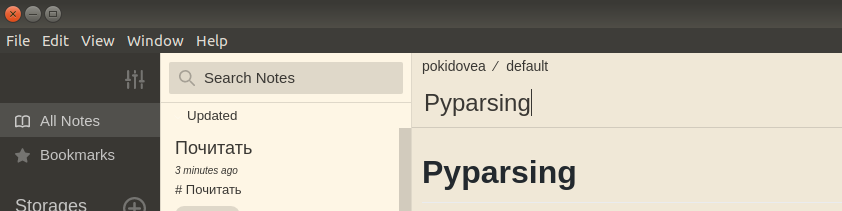
Moreover, I have no button for creating a new note now
pokidovea
on 7 Jan 2020
Ctrl+N, does not work for me on Windows 10. There is no way for me to create a new note.. :)
 raelb
on 7 Jan 2020
raelb
on 7 Jan 2020
@raelb You could duplicate a note, and then rename.
s0kil
on 7 Jan 2020
I don't understand. I do not have any notes..
raelb
on 8 Jan 2020
257
The problem is described in here. I'm really sorry that the UX is really bad.
For now you can create a note when you select a folder. The button is hidden and the shortcut doesn't work when you select all note list or note list by a tag.
We'll fix this problem quite soon.
 Rokt33r
on 9 Jan 2020
Rokt33r
on 9 Jan 2020
Partially fixed in #295.
I'm going to back to this issue again to make note creation work always.
Rokt33r
on 20 Jan 2020
This is actually fixed in #295
Rokt33r
on 9 Apr 2020
Related issues
Rokt33r
·
4Comments
 triet-truong
·
5Comments
Rokt33r
·
5Comments
triet-truong
·
5Comments
Rokt33r
·
5Comments
 HSQCoollaughing
·
3Comments
HSQCoollaughing
·
3Comments
 Flexo013
·
4Comments
Flexo013
·
4Comments
Most helpful comment
0.1.2has been released already, and in Ubuntu 19.10 shortcuts still do not work.