Bookstack: LDAP Auth broken by security groups with parenthesis in the name...
Describe the bug
LDAP authentication seems to succeed, but throws an exception; i.e. a ldap_search(): Search: Bad search filter error is given, but if I simply browse _back_ I am logged in and given admin privileges according to the External Authentication ID mapped to the role.

.env
I tried including a valid
OU=for theLDAP_BASE_DN=setting, but experienced the same result.
# General auth
AUTH_METHOD=ldap

# LDAP Settings
LDAP_SERVER=dc.domain.com
LDAP_BASE_DN="DC=domain,DC=com"
LDAP_DN="CN=bookstack,OU=Service Accounts,DC=domain,DC=com"
LDAP_PASS="strong_password"
LDAP_USER_FILTER="(&(sAMAccountName=${user})(memberOf=CN=Docs_Login,OU=Security Groups,DC=domain,DC=com))"
LDAP_VERSION=3
# Do you want to sync LDAP groups to BookStack roles for a user
LDAP_USER_TO_GROUPS=true
# What is the LDAP attribute for group memberships
LDAP_GROUP_ATTRIBUTE="memberOf"
# Would you like to remove users from roles on BookStack if they do not match on LDAP
# If false, the ldap groups-roles sync will only add users to roles
LDAP_REMOVE_FROM_GROUPS=true
Steps To Reproduce
Login using AD credentials.
Expected behavior
User logs in and authenticates.
Screenshots
If applicable, add screenshots to help explain your problem.
Your Configuration (please complete the following information):
- BookStack Version: 0.24.3
- PHP Version: PHP 7.2.10-0ubuntu0.18.04.1 (cli) (built: Sep 13 2018 13:45:02) ( NTS )
- Hosting Method (Nginx/Apache/Docker): Apache2 (2.4.29)
- Windows 2008 R2 Domain Controller and functional level.
Additional context
Possibly related: #317
 derek-shnosh
All 7 comments
I figured out what the issue was.
The account was part of some AD groups that had parenthesis in their names.
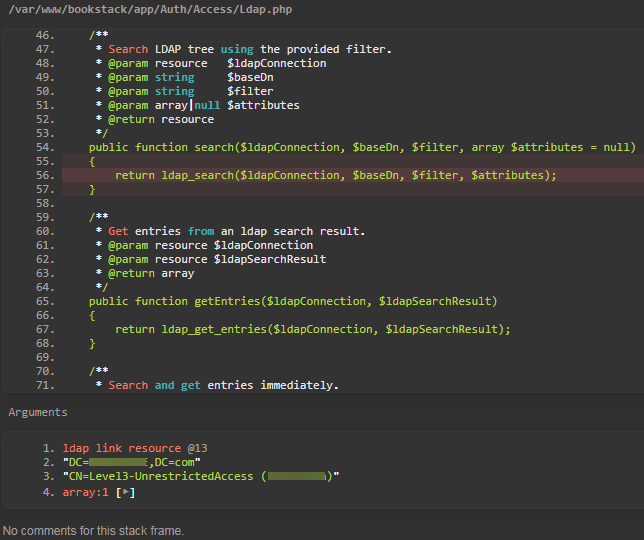
Apparently it was referencing that group as a search filter.
Since the user was part of the DOCS_LOGIN group, they were able to log in... but this bug breaks the LDAP group mappings; i.e. LDAP_USER_TO_GROUPS and LDAP_REMOVE_FROM_GROUPS.
derek-shnosh
on 8 Dec 2018
Thanks for reporting and doing the investigation work and providing details @derek-shnosh, Really helpful stuff.
Have marked as a priority for the next release.
 ssddanbrown
on 9 Dec 2018
ssddanbrown
on 9 Dec 2018
Added a fix in 26ec1cc3dcd4ebc205ab7746cc4a92603f37ea97, Will be in next release. Hoping that will be later this weekend.
ssddanbrown
on 20 Dec 2018
Excellent!
derek-shnosh
on 21 Dec 2018
@ssddanbrown - figured I'd ask here, is there a way to run from the master branch?
If I checkout the master branch and refresh the page, it's pretty broken. I'm guessing because publicdist doesn't exist as you mention here.
derek-shnosh
on 28 Dec 2018
@derek-shnosh there is but you'll need a recent version of Node.JS installed and then following the build steps towards the top of this section in the readme.
Alternatively, since I've got the files open, here's a zip of built files from current master:
bookstack-dist-files-master.zip
Copy the files out of the zip to public/dist.
Just a warning, master can be a little unstable, Might be okay right now but I'd avoid updates and switch back to release when you can.
Next release is a little late, Now hoping to get it out before wednesday the 2nd.
ssddanbrown
on 28 Dec 2018
Thanks for the reponse/input @ssddanbrown.
Try to enjoy the weekend and new year celebrations!
derek-shnosh
on 29 Dec 2018
Related issues
 davidtessier
·
3Comments
davidtessier
·
3Comments
 Legoracers
·
3Comments
Legoracers
·
3Comments
 Wookbert
·
3Comments
Wookbert
·
3Comments
 alex2702
·
3Comments
alex2702
·
3Comments
 Biepa
·
3Comments
Biepa
·
3Comments