For Feature Requests
Desired Feature: Links to articles in Page footer
Why should you add it?
Due to the EU and US privacy law, it will be mandatory for most people to add a Privacy Policy to their BookStack installation. And according to the EU law, the Privacy Policy must be available on every accessible page on your website, so the best way here is to stay with the tradition and allow Footer Links.
And for German users there is a so called Legal Info mandatory, which includes full address details of the website owner, mostly it must include:
- Full Name
- Full Address
- Phone Number
- UStID
Best way to add it would be to be able to select from existing articles, pages to put in footer links.
 ApertureDevelopment
All 8 comments
This would be awesome.
 iBooster
on 18 Jun 2018
iBooster
on 18 Jun 2018
Yes, I also recommend adding a footer.
1, increasing the space at the bottom editor for easy mobile phone add content.
2, increase privacy, copyright
3, increase the statistical information and other scripts, the content increased in the footer, it will not affect the page loading speed.
4, advertising space
Webmasters can add code to APP SETTINGS
 qianmengnet
on 7 Nov 2018
qianmengnet
on 7 Nov 2018
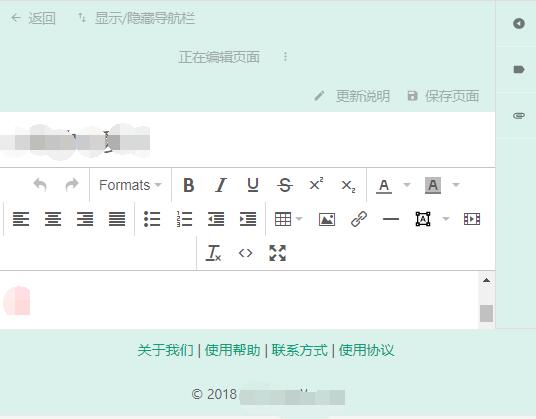
I tried to add footer, but on the edit page, footer blocked the editor. How can I set css?

qianmengnet
on 27 Nov 2018
It looks like this isn't a priority at the moment, but has anyone had luck making their own modifications to add a footer? I'm unfamiliar with Laravel and its templating system, and pretty far from webdev in general these days, and would be grateful for any help.
 aidanfindlater
on 18 Mar 2020
aidanfindlater
on 18 Mar 2020
@aidanfindlater @ApertureDevelopment
I'm not as familiar with European regulations but are these mandated to be located on a certain part of the page, or could they be located anywhere so long as they are accessible?
What counts as an accessible page? Just public-facing pages? Or also for the admin backend?
 james-geiger
on 19 Mar 2020
james-geiger
on 19 Mar 2020
They have to be easily accessible from every page. That means the link has to be always visible, cannot be hidden and should not require a search from a search functionality to find. Thats why a footer would be perfect for that
ApertureDevelopment
on 19 Mar 2020
For those interested (@ApertureDevelopment @iBooster @qianmengnet @aidanfindlater), you can see how this was implemented in the referenced PR.
Depending on your urgency, the following code may be sufficient to implement in your instance's "Custom HTML Head Content" settings editing the link href and label to suit your needs.
<style>
footer {
    padding: 0.5em;
    text-align: center;
}

footer a {
    margin: 0 0.5em;
}
</style>
<script>
window.addEventListener('DOMContentLoaded', (e) => {
    var footer = document.createElement('footer');
    footer.innerHTML = '<a href="https://www.my-privacy-policy.com">Privacy Policy</a>';

    document.querySelector('#content').insertAdjacentElement("afterend", footer);
});
</script>
@james-geiger that was incredibly helpful and exactly what I was hoping for. Thank you!
aidanfindlater
on 19 Mar 2020
Related issues
 spacesven
·
3Comments
spacesven
·
3Comments
 alex2702
·
3Comments
alex2702
·
3Comments
 Zeigren
·
3Comments
Zeigren
·
3Comments
 Biepa
·
3Comments
Biepa
·
3Comments
 Nedimko123
·
3Comments
Nedimko123
·
3Comments
Most helpful comment
For those interested (@ApertureDevelopment @iBooster @qianmengnet @aidanfindlater), you can see how this was implemented in the referenced PR.
Depending on your urgency, the following code may be sufficient to implement in your instance's "Custom HTML Head Content" settings editing the link href and label to suit your needs.