Bookstack: Show when a user last logged in
User Management
I'd love to have the ability to at least see when a user last logged in. The purpose of this would be to remove the user and keep things clean in terms of user management. Though, if possible, I'd like the user's name to still show for page author, etc.
Maybe when the user has been deleted, their name simply shows as "
 Shackelford-Arden
All 5 comments
@Shackelford-Arden Thanks for your suggestions.I agree that being able to see the last login time would be really helpful.
In regards to the deletion, Maybe a long-term solution for this would be to add functionality to allow admins to disable user accounts which would prevent logins but would keep references to created items? Would that suit your requirement?
I'll update the issue title to be focused on viewing last login, Let me know on the above and I'll open a new issue specifically for disabling if that solution suits.
 ssddanbrown
on 1 Jul 2018
ssddanbrown
on 1 Jul 2018
@ssddanbrown Disabling is an awesome way to do that! I like that. I would wonder if there'd be a way to have views or at least filtering so you can keep the user list clean but still have the option of seeing the disabled users if needed.
Thanks! One of these days I'll figure out enough Laraval/VueJS to add something other than requests lol...
Shackelford-Arden
on 2 Jul 2018
Would love to see the user last login time added to the admin dashboard. The ability to disable an account as well would be a great security improvement without messing with content
 Cave-Johnson
on 22 Jan 2020
Cave-Johnson
on 22 Jan 2020
From what I can tell, The original request here was the ability to easily identify inactive users, although the intended method to do so was via visibility of last login.
Using last login alone is a bit complicated, Since the different authentication methods and different session timeouts can result in a questionable figure.
For the next release (v0.31) I have implemented the following:
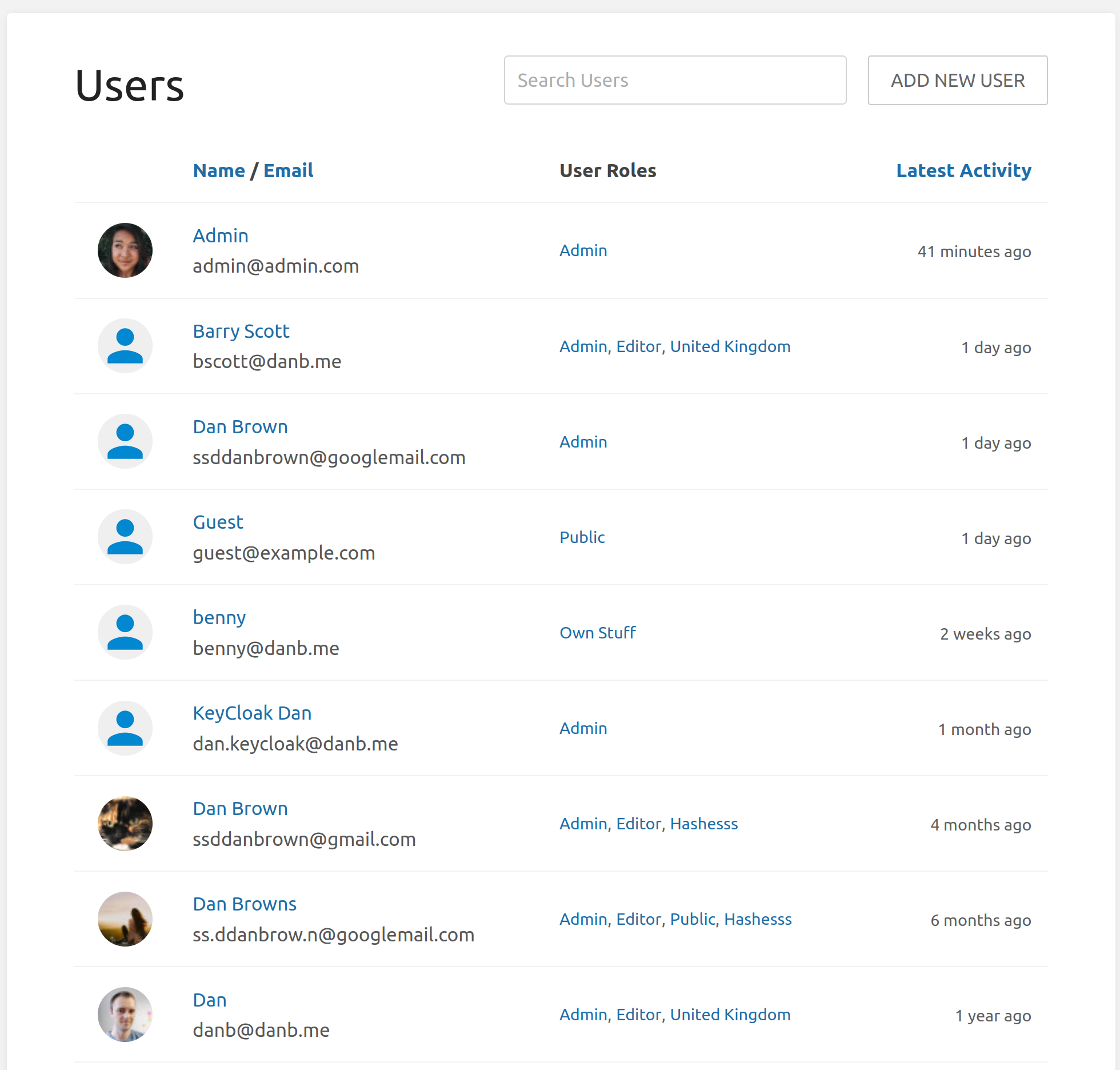
The user list will have a "latest activity" sortable column so you can identify likely inactive users.
Also within the update the tracked activity, which can affect this "Latest Activity" figure is much more extensive and includes admin operations & logins. If you need to specifically look for login events you could still then do this manually via the audit log or database.
Since I believe this solution covers the original ability intent, I'll close this off.
ssddanbrown
on 22 Nov 2020
This looks fantastic, thanks Dan!
Cave-Johnson
on 22 Nov 2020
Related issues
 marcvef
·
3Comments
marcvef
·
3Comments
 Abijeet
·
3Comments
Abijeet
·
3Comments
 tpetrauskas
·
4Comments
tpetrauskas
·
4Comments
 spacesven
·
3Comments
spacesven
·
3Comments
 mackcoding
·
3Comments
mackcoding
·
3Comments
Most helpful comment
@Shackelford-Arden Thanks for your suggestions.I agree that being able to see the last login time would be really helpful.
In regards to the deletion, Maybe a long-term solution for this would be to add functionality to allow admins to disable user accounts which would prevent logins but would keep references to created items? Would that suit your requirement?
I'll update the issue title to be focused on viewing last login, Let me know on the above and I'll open a new issue specifically for disabling if that solution suits.