Bookstack: Request: Books page as application home page
For Feature Requests
Desired Feature: Allow the application homepage to be set to /books?
 jonathanadams
All 11 comments
@jonathanadams - I'm don't know if this will be implemented but depending on which server you are using (nginx, Apache or IIS) you could set this up via a redirection.
Though this would mean that you will not be able to access the current homepage.
 Abijeet
on 14 Dec 2017
Abijeet
on 14 Dec 2017
It would be better if a single book can be assigned as the application homepage (before/after loggin in). It would also be beneficial, if we could assign one or more books so that the user can land on them books or direct onto the assigned book (if just one) when he/she logs in.
Example (purely ideas):
User X is temporary staff and only has access to procedures manual (one book). User logs in and is only directed to homepage of that manual.
User Y is temporary senior staff and has 4 books assigned to him. User logs in and is shown a list of books assigned to his login.
User Z is admin/default. Current system of v0.19 default settings apply to this user.
 aljawaid
on 24 Dec 2017
aljawaid
on 24 Dec 2017
Thumbs up for user specifik settings and ability to set a global configuration dictating settings for all users by the admin.
 olenoerby
on 25 Dec 2017
olenoerby
on 25 Dec 2017
v0.20 has the ability to select a page as the default homepage, and that is cool, but setting /books to default would be better for our use case.
 sorvani
on 20 Feb 2018
sorvani
on 20 Feb 2018
@Abijeet the current home page is only useful if you want to go to something you have recently done or that someone else has recently done.
But often I will be going to a specific book to get to a specific page. It may well not be in the recent lists once my wiki is fully populated.

sorvani
on 20 Feb 2018
I use BookStack as a private documentation wiki and have a lot of users set up with different access controls to different books, so not all users have access to all books, representing different locations.
However, when people log in, they're presented with a rather unscenic and confusing frontpage with changes and new pages - where it would be easier if they had direct access to the list of books / households they have read access to.
This is why I request the feature to set /books as homepage upon login.
olenoerby
on 22 Feb 2018
A quick and dirty workaround could be to add a rule in Nginx (or whichever web server you're using) to redirect requests from the "Dashboard" to /books.
Using Nginx:
location = / {
    rewrite ^/$ https://<your_url>/books redirect;
}
 pierre-le
on 12 Mar 2018
pierre-le
on 12 Mar 2018
That breaks things unless you add a location path for every other path such as /logon /css /libs, etc.
sorvani
on 15 Mar 2018
@sorvani No, as this rule is an exact match on the home page, which is an HTML page. You just need to place that rule on top of any other location rule.
And... I can certify that this workaround works fine bc we're using it in production right now :)
pierre-le
on 15 Mar 2018
@ssddanbrown, I'd like to take a crack at this.
I've been trying to figure out how to fit this into the current UI and for now this is what I've come up with,

I've tried to merge it with the existing Application Homepage setting but I think its still confusing.
The other option would be to somehow merge it into the current page selector that we have. Maybe at the bottom of the popup.
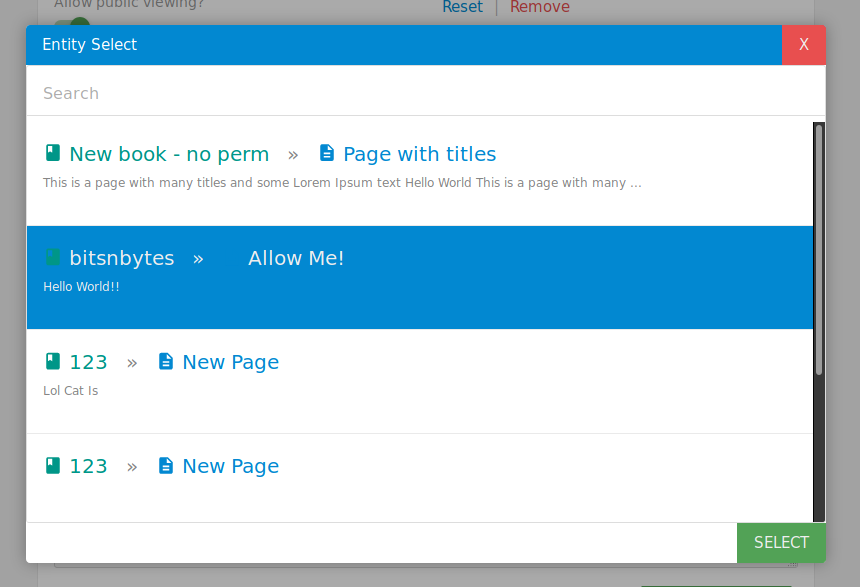
Note that the popup has a couple of minor quirks that I'll fix along with this merge request.
One more question, should we simply redirect the user to the books/list page or create a new custom template similar to the one we've done for custom page selected as homepage with the same sidebar?
Abijeet
on 15 Apr 2018
Thanks @Abijeet for having a go at this and sorry for my late reply.
I think merging it in with the entity selector will be more trouble so an extra setting, as your first screenshot, is the best option for now.
I've been thinking about cleaning up the setting UI design recently so when I do that I may alter the implementation to be clearer but as the screenshot is perfectly fine for now.
I would say a new custom template may work better, With the same sidebar content as the existing custom homepage layout but with the 'all books' page main content.
 ssddanbrown
on 21 Apr 2018
ssddanbrown
on 21 Apr 2018
Related issues
 spiritedfang
·
4Comments
spiritedfang
·
4Comments
 davidtessier
·
3Comments
davidtessier
·
3Comments
 hhk7734
·
3Comments
hhk7734
·
3Comments
 ensemblebd
·
3Comments
Abijeet
·
3Comments
ensemblebd
·
3Comments
Abijeet
·
3Comments
Most helpful comment
A quick and dirty workaround could be to add a rule in Nginx (or whichever web server you're using) to redirect requests from the "Dashboard" to
/books.Using Nginx: