Bookstack: Collapsible Content Blocks
It'd be awesome to be able to create FAQ's within Bookstack with Expandable and Collapsible text. For example: http://www.w3schools.com/jquerymobile/jquerymobile_collapsibles.asp
 cpressland
All 11 comments
i would also want to be able to colapse Images / Code Snippets
 Di2g10
on 13 Jun 2016
Di2g10
on 13 Jun 2016
If I could add to this, what I think would work well would be if you added into the rich editor Panels that could be collapsible. Would also be nice to have panels as they could be colored.
 ghost
on 13 Sep 2017
ghost
on 13 Sep 2017
Just to add, Would be ideal to use the proper browser-native tags for this:
https://developer.mozilla.org/en-US/docs/Web/HTML/Element/details
Not supported by IE/Edge but it's being worked on for edge. Will need some simple IE/edge only JS for now to support functionality on those.
 ssddanbrown
on 18 Jun 2018
ssddanbrown
on 18 Jun 2018
This would be excellent
 aljawaid
on 21 Aug 2018
aljawaid
on 21 Aug 2018
I have to say this would be huge. The ability to expand / collapse large codeblock even, would be enormously helpful regarding documentation relating to IT especially.
 Valiantiam
on 28 Dec 2018
Valiantiam
on 28 Dec 2018
Any news on this?
Can I use some plugin to have this feature already?
Without this feature wiki is unusable for us.
 drmax24
on 27 Jun 2019
drmax24
on 27 Jun 2019
@drmax24 Nope nothing at this time. An editor review is on the road-map, at which point features like this may be considered. The transition of edge browser to chromium will probably make this a little easier.
ssddanbrown
on 27 Jun 2019
@ssddanbrown Hey, I was fighting myself through the issues and pull requests and either I am blind or I actually couldn't find any info on this? Spoilers actually are a very needed feature for MSP documentation purposes and am actually very surprised to find out it's not implemented. Would be amazing if it was in 0.28.0! Pretty pretty please???
 X-15
on 20 Jan 2020
X-15
on 20 Jan 2020
This would be great if it comes in any of the next upcoming updates.
 haripako
on 23 Apr 2020
haripako
on 23 Apr 2020
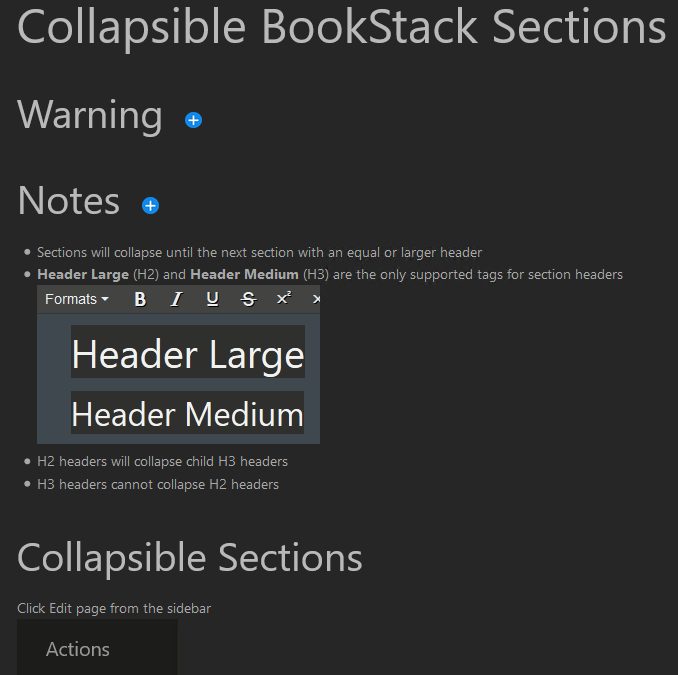
I ended up writing a hack to get this done. I put this in the Custom HTML Header section and added jquery and a png to /uploads. To use it I add class="collapse" or class="collapsible" to an H2 or H3 tag on a page using the Source Editor. It looks a bit funky in action but it's close enough.
<script src="/uploads/jquery-3.5.1.min.js"></script>
<script>
function setCollapseStop (tag) {
// Collapse all smaller headers
if ( tag == "H1") {
collapseStop = "H1";
}
if (tag == "H2") {
collapseStop = "H1,H2";
}
if (tag == "H3") {
collapseStop = "H1,H2,H3";
};
return collapseStop;
};
// Actions to perform when the page is loaded
$(document).ready(function () {
// Find all "collapse" class members and collapse them on load
$(".collapse").each(function (i, item) {
var collapseTag = $(item).prop("tagName")
setCollapseStop(collapseTag);
$(item).nextUntil(collapseStop).toggle();
// Add "collapsible" class if missing
if (!$(item).hasClass("collapsible")) {
$(item).addClass("collapsible");
};
})
// Add an image and target for users to expand sections
$(".collapsible").append(" <img src='/uploads/plus.png' style='max-width: 2%; cursor: pointer;' class='collapseimg' />");
});
// Actions to perform when the expand toggle image is clicked
$(document).on('click', '.collapseimg', function () {
var collapseTag = $(this).parent().prop("tagName");
setCollapseStop(collapseTag);
// Slide toggle might look like an accordion
$(this).parent().nextUntil(collapseStop).slideToggle();
});
</script>
Ends up looking like
 mbazdell
on 8 Aug 2020
mbazdell
on 8 Aug 2020

Markdown:
<div class=accordion>

### Spoiler
It's me - a spoiler. I am collapsible!
It's me - a spoiler. I am collapsible!
It's me - a spoiler. I am collapsible!
It's me - a spoiler. I am collapsible!
It's me - a spoiler. I am collapsible!

</div>
Custom HTML:
<link rel="stylesheet" href="//code.jquery.com/ui/1.12.1/themes/base/jquery-ui.css">
<script src="https://code.jquery.com/jquery-1.12.4.js"></script>
<script src="https://code.jquery.com/ui/1.12.1/jquery-ui.js"></script>

<script>
  $( function() {
    $( ".accordion" ).accordion({
      heightStyle: "content",
      collapsible: true,
      active: false
    });
  } );
</script>
Based on JQuery Accordion
 kirillnad
on 12 Nov 2020
kirillnad
on 12 Nov 2020
Related issues
 marcvef
·
3Comments
marcvef
·
3Comments
 tpetrauskas
·
4Comments
tpetrauskas
·
4Comments
 ensemblebd
·
3Comments
ensemblebd
·
3Comments
 spiritedfang
·
4Comments
spiritedfang
·
4Comments
 Wookbert
·
3Comments
Wookbert
·
3Comments
Most helpful comment
i would also want to be able to colapse Images / Code Snippets