Bookplayer: Playlist not sorted properly
Do you want to request a feature or report a bug?
Report a bugWhat is the current behavior?
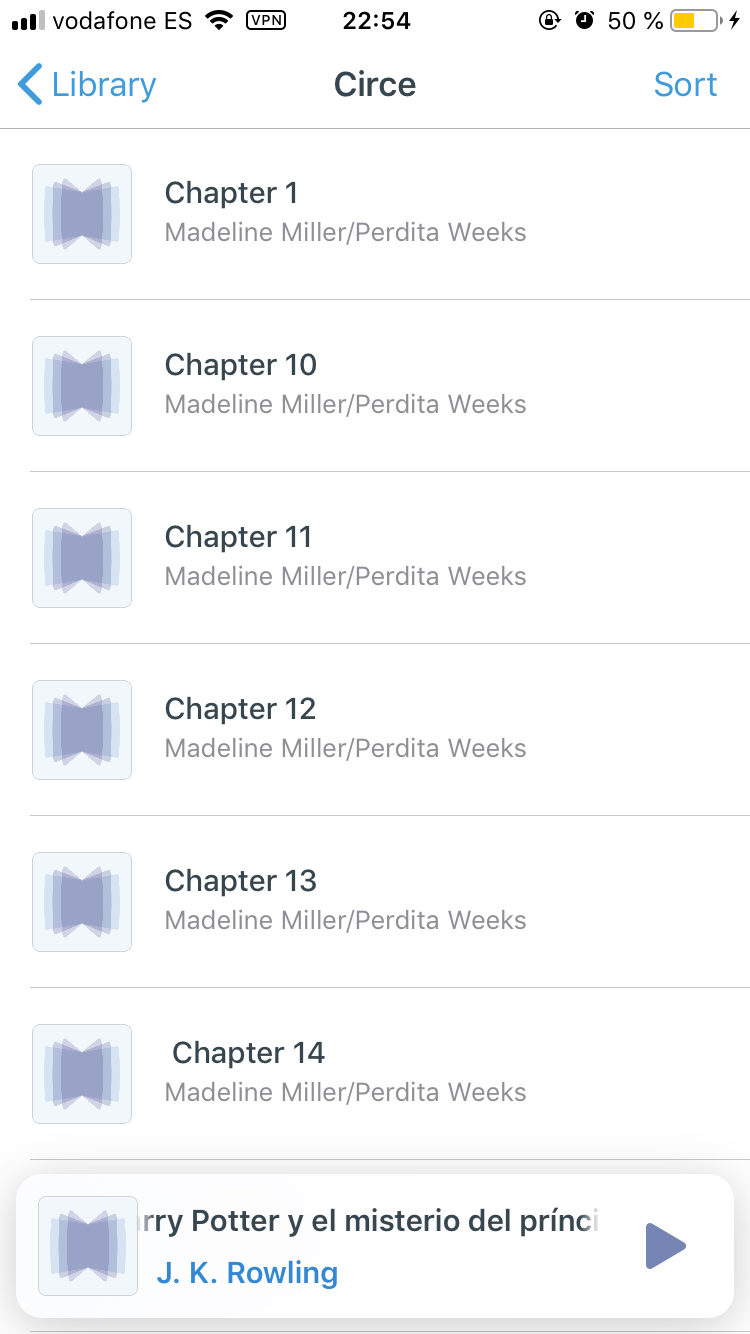
I have a playlist of files titled "Chapter 1", "Chapter 2", "Chapter 3", etc. When I try to sort them using the new sort feature added in v3.2.0 they are sorted as: "Chapter 1", "Chapter 10", "Chapter 11", "Chapter 2", instead of the correct order (like in Finder or Files.app)If the current behavior is a bug, please provide the steps to reproduce and if possible a minimal demo / screenshot / screen recording of the problem.
What is the expected behavior?
For the files to be ordered correctly, like in Finder or Files.appWhat is the motivation / use case for changing the behavior?
To be able to listen to audiobooks broken into multiple files in the correct orderPlease tell us about your environment:
- Version of BookPlayer: v3.2.0
- Your Device and its OS version: iPhone 6s, iOS 12.1
Other information
I think this can be solved by using theNSString.CompareOptions.numericoption to compare filenames when sorting the files
 halleygen
All 6 comments
Are you sorting on filename or on title?
 ryantstone
on 16 Nov 2018
ryantstone
on 16 Nov 2018
Filename, but I just tried and sorting by the title doesn’t work properly either.
halleygen
on 16 Nov 2018
Ok. I’ll take a look. Thanks for pointing it out.
ryantstone
on 16 Nov 2018
I ran into this while I was refactoring some things, turns out we had to use .numeric as an option for the NSSortDescriptor. The fix is included in the batch edit PR #289
 GianniCarlo
on 11 Dec 2018
GianniCarlo
on 11 Dec 2018
closed by #290
GianniCarlo
on 14 Dec 2018
This works great in the new update. Thanks for you hard work!
halleygen
on 21 Dec 2018
Related issues
 bensaufley
·
5Comments
bensaufley
·
5Comments
 anthonyattard
·
5Comments
anthonyattard
·
5Comments
 pichfl
·
5Comments
pichfl
·
5Comments
 Resonanz
·
3Comments
Resonanz
·
3Comments
 baron
·
4Comments
baron
·
4Comments