Bookplayer: Unable to import M4B files from Google Drive
- Do you want to request a feature or report a bug?
Bug
- What is the current behavior?
"+ Add book" -> Import files -> Google Drive
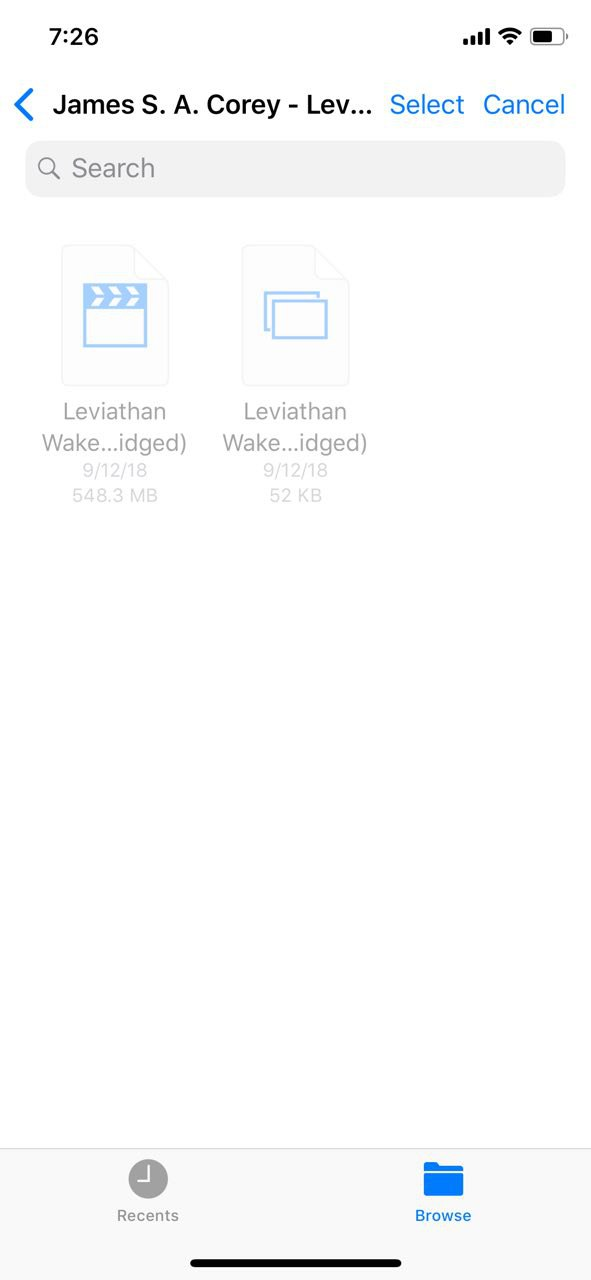
Unable to select any M4B file from Files via Google Drive source.
- If the current behavior is a bug, please provide the steps to reproduce and if possible a minimal demo / screenshot / screen recording of the problem.
- What is the expected behavior?
M4B books should be downloadable.
- What is the motivation / use case for changing the behavior?
To be able to download M4B books from Google Drive via Apple's Files
- Other information
This is something I actually reported to the authors of the Greenlit Audiobook player as well. It seems that Google Drive reports M4B files as Video, so his limit he placed of "Audio Files" restricted the use of M4B files. The same M4B file on iCloud Drive, for example, would work fine.
He was able to fix it, I believe, by loosening the file type restriction.
 mmcdole
All 11 comments
Thanks for reporting it @mmcdole , it seems like we'd have to accept video files as well 🤔
 GianniCarlo
on 1 Oct 2018
GianniCarlo
on 1 Oct 2018
@mmcdole Is this continuing to be an issue? I'm testing with an m4b file and able to import without any problems. If so it's possible that it's something specific with that file? If it's still not working let me know and we can connect and trade the file and I can see if there is something about it that is causing the issue.
Great book by the way, you're in for a hell of a ride of a series
 ryantstone
on 29 Oct 2018
ryantstone
on 29 Oct 2018
Just checked, I am still experiencing it.
When you tried it, did you try against Google Drive? As far as I know, the issue is specific with that cloud provider only.
mmcdole
on 29 Oct 2018
@mmcdole Correct, I am using Google drive. And let's verify some things to make sure we have all our numbers lining up. I'm using iOS 12.01 and my current Google drive build is the latest 4.2018.42202. I will note that your screenshot shows it as a video which matches the issue but for the file, I was using it was showing as an audio file which makes me wonder if it's something in the actual file that you have.
ryantstone
on 29 Oct 2018
@ryantstone
Google Drive app is 4.2018.42202 as well. I'm running iOS 12.0.
The source of the files is from me using a utility known as "Inaudible" which strips the DRM from my personal Audible books losslessly. It cracks the encryption code, decrypts them, extracts the AAC file and drops it into an m4b container along with all the chapter metadata, etc.
If you aren't seeing this behavior on your m4b files I'm wondering if this conversion process is encoding the M4B files in a way that makes Google Drive think they are video files?
mmcdole
on 1 Nov 2018
@mmcdole not sure what Inaudible does, but it sounds like it doesn't create proper m4b files.
 pichfl
on 1 Nov 2018
pichfl
on 1 Nov 2018
Currently for the Document Content Type UTIs we only have public.audio, but we could try adding the more specific ones: public.mpeg-4-audio and com.apple.protected-mpeg-4-audio to see if it works (docs)
@mmcdole would you mind sharing the file so we can do some tests? 🤔
GianniCarlo
on 2 Nov 2018
@GianniCarlo @pichfl @ryantstone
I've emailed you all a link to an offending M4B file encoded using this utility.
mmcdole
on 2 Nov 2018
Interestingly enough, the link you gave us saves as .m4b.mp4 in Safari, which gave me a first hint.
If you have a Mac, you can use file on the Terminal to check the file format. Expected format for m4b based books is ISO Media, Apple iTunes ALAC/AAC-LC (.M4A) Audio. Inspecting your file that way yields ISO Media, MP4 Base Media v1 [IS0 14496-12:2003].
Using ffprobe, which is part of ffmpeg, you'll find that your file registers as
major_brand     : isom
minor_version   : 512
compatible_brands: isomiso2mp41
while other m4b based books render
major_brand     : M4A
minor_version   : 512
compatible_brands: isomiso2
You can use ffmpeg to convert your file into the correct container format. It will drop the cover artwork, but you can use iTunes or kid3 to put that back in.
ffmpeg -i inputfile.m4b -vn -c:a copy output.m4b
Running the command will create new file that registers as the correct file type. ffmpeg is clever enough to set the correct stuff by guessing from the file extension of the output filename. I'm pretty sure there should be a way to make this copy the artwork as well, but my knowledge of ffmpeg is somewhat limited.
I find the whole thing very curious as opening the file from another cloud provider (iCloud) seems to work just fine for me.
Good luck and enjoy your book 🙂
Edit: I'm closing this issue as it is not caused by BookPlayer. I don't think it is wise for us to support anything besides audio files for import. Feel free to continue the discussion and re-open as necessary.
pichfl
on 2 Nov 2018
@pichfl thank you for investigating this particular file.
I looked around at some different M4B files on Librivox to compare as well. It was common for these files to have different compatible_brands but they seemed to share the same "M4A" major_brand.
It would seem that my M4B files are encoded by inAudible with the most general major_brand possible, isom, which essentially just means it is an MP4 container. Within this container there is a single AAC encode audio stream.
http://www.ftyps.com/what.html
00 00 00 18 | The size of this atom/box in bytes
-- | --
ftyp | The 4 letters 'ftyp'. This identifies the atom/box type as an ftyp box
M4A | The 4 character ftype code 'M4A ' (note trailing blank). Means "major brand" is "Apple iTunes AAC-LC (.M4A) Audio
00 00 00 01 | A 4 bytes number: the version # of the major brand above
mp42 | The 4 character ftype code 'mp42': Means a "compatible brand" "MP4 v2 [ISO 14496-14]"
isom | The 4 character ftype code 'isom': Means a "compatible brand" is "MP4 Base Media v1 [IS0 14496-12:2003]"
In this case the two "compatible brands" simply indicate that this is a standard MP4 file, compliant with ISO's basic "Base Media" specification.
The latter one, "isom" is the most general of all, and simply means that the file complies with the most basic MP4 file format specification. In fact, as further evidence of my comment above that the "major brand" should be the most "specific" one: the current ISO specification now actually prohibits using "isom" as the "major brand". Apparently their feeling being that it's "too general" to usefully identify the file in any practical way. That said, in actual files you will see "isom" used as the major brand quite often.
I was hoping that there was a different audio type filter that could be applied to allow these, but if public.audio is already being used I don't see what else BookPlayer can do. It would seem we are at the mercy of Google Drive and the way they report their files.
Thanks again!
mmcdole
on 3 Nov 2018
@mmcdole an alternative is OpenAudible. It’s what I use.
ryantstone
on 3 Nov 2018
Related issues
 boettges
·
5Comments
boettges
·
5Comments
 Guy27
·
5Comments
Guy27
·
5Comments
 anthonyattard
·
5Comments
anthonyattard
·
5Comments
 bensaufley
·
5Comments
pichfl
·
5Comments
bensaufley
·
5Comments
pichfl
·
5Comments
Most helpful comment
@mmcdole an alternative is OpenAudible. It’s what I use.