Bookmarks: Sharing bookmarks and bookmark folders
I am running Bookmarks v3.0.9. How do I share a bookmark or a folder of bookmarks?
 ifuchs
All 4 comments
You can only share folders. Click on The three-dot-menu of the folder, select details and go to the sharing tab, similar to how you would share a file system folder in nextcloud.
 marcelklehr
on 5 May 2020
marcelklehr
on 5 May 2020
Thanks. So one can only share folders and only create public links (i.e., not private links to NC authenticated uses or groups)?
On May 5, 2020, at 1:37 PM, Marcel Klehr notifications@github.com wrote:
You can only share folders. Click on The three-dot-menu of the folder, select details and go to the sharing tab, similar to how you would share a file system folder in nextcloud.
—
You are receiving this because you authored the thread.
Reply to this email directly, view it on GitHub https://github.com/nextcloud/bookmarks/issues/1019#issuecomment-624202156, or unsubscribe https://github.com/notifications/unsubscribe-auth/ABLDPSE34IJG6BEAY4D45FDRQBFHDANCNFSM4MZYPOGQ.
ifuchs
on 5 May 2020
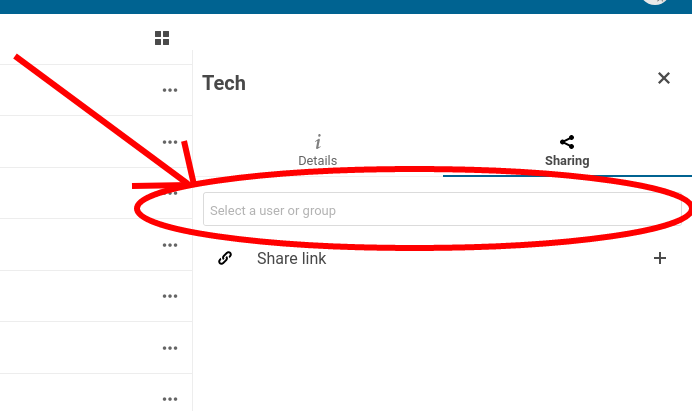
No, you can share privately with nc users and groups, too.
I have created a visual to aid you in finding the feature on your screen:
marcelklehr
on 5 May 2020
oops. I should have seen that.
On May 5, 2020, at 1:52 PM, Marcel Klehr notifications@github.com wrote:
No, you can share privately with nc users and groups, too.
I have created a visual to aid you in finding the feature on your screen.
https://user-images.githubusercontent.com/986878/81098519-c45b0b00-8f09-11ea-9761-d94ea8a660ae.png
—
You are receiving this because you authored the thread.
Reply to this email directly, view it on GitHub https://github.com/nextcloud/bookmarks/issues/1019#issuecomment-624209535, or unsubscribe https://github.com/notifications/unsubscribe-auth/ABLDPSGU2FNOB2YEIQY7DOTRQBG4DANCNFSM4MZYPOGQ.
ifuchs
on 5 May 2020
Related issues
 bernd-wechner
·
4Comments
bernd-wechner
·
4Comments
 lyallp
·
4Comments
lyallp
·
4Comments
 aproposnix
·
6Comments
marcelklehr
·
4Comments
aproposnix
·
6Comments
marcelklehr
·
4Comments
 kaffeeringe
·
6Comments
kaffeeringe
·
6Comments
Most helpful comment
oops. I should have seen that.