Bolt: user level is changed when admin-level user edits own password
Issue
If a user edits their own password, their user level changed. Thus making them no longer admin, but only editor.
Steps to reproduce
- create a new user (let's call him Frank)
- make this user an admin, chief-editor and editor
- logout
- login as user Frank
- go to config > users and let Frank edit his own password. NOTE: the admin user-level is greyed out, with a disabled checkbox (see screenshot)
- Don't do anything with the user levels, and save the user.
- Tadaaa! no longer Admin. (insert muffled cries)
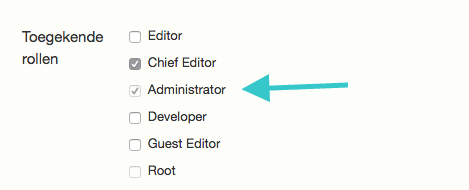
what goes wrong?
The disabled admin level is not saved
Expected result
- When Frank edits his own password, the users levels should stay exactly as they were.
( He shouldn't have to call me to ask why he suddenly can't see the settings anymore, and make me have to file a bugreport :) )
specs
Bolt 3.4.6
 ankedsgn
All 4 comments
In your app/config/permissions.yml you need to set:
roles-hierarchy:
    manipulate:
        admin: [ admin ]
 GwendolenLynch
on 23 Jan 2018
GwendolenLynch
on 23 Jan 2018
what went wrong
Took a look with @bobdenotter , and we came to the conclusion that our user Frank should not be able to edit his own profile at all. He should not be able to edit any user with the role Admin, including himself.
what _needs_ to be fixed
So basically, this issue could be fixed with showing the you do not have the permissions to edit this user after you click the edit button of the user with the role you may not edit. This is the same text Hypothetical Frank sees when trying to edit a root-user, for instance.
(Maybe this was not working well, because the user has multiple roles, of whick one he should not be able to edit)
And Frank should learn to edit his password under the 'profile' button.
background:
What actually went wrong, is that a form was submitted with a checked checkbox that was set to disabled. And checkboxes that are set to disabled are not submitted in the form. Hence the role was removed from the user.
ankedsgn
on 23 Jan 2018
And Frank should learn to edit his password under the 'profile' button.
Well, covering this one first as I don't agree. If a user can edit their password from that screen, then they should be able to. I'd call this one a UX related bug in that case :smile:
I think I have an idea on how to tackle this … I might need a couple of days (unless @bobdenotter has the time himself).
GwendolenLynch
on 23 Jan 2018
Well, covering this one first as I don't agree. If a user can edit their password from that screen, then they should be able to. I'd call this one a UX related bug in that case
Yup, my thoughts exactly!
ankedsgn
on 23 Jan 2018
Related issues
 nlemoine
·
3Comments
nlemoine
·
3Comments
 zomars
·
5Comments
GwendolenLynch
·
4Comments
GwendolenLynch
·
5Comments
zomars
·
5Comments
GwendolenLynch
·
4Comments
GwendolenLynch
·
5Comments
 svivian
·
4Comments
svivian
·
4Comments
Most helpful comment
Well, covering this one first as I don't agree. If a user can edit their password from that screen, then they should be able to. I'd call this one a UX related bug in that case :smile:
I think I have an idea on how to tackle this … I might need a couple of days (unless @bobdenotter has the time himself).