Bolt-js: Getting at selected options values from checkboxes
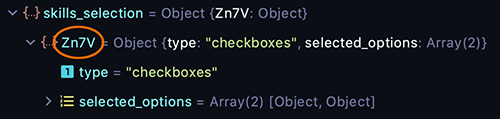
Why is there this intermediate random object name in between skills_selection and checkboxes? Why is there a dynamically named object there?
How am I supposed to get to selected_options when this value keeps changing on me? Is there some sort of ID I can put on the elements section somewhere to make this consistent?
const stateValues = view.state.values;
So looking at stateValues.skills_selection, Zn7v keeps changing. I end up having to do a hack which is bad: Object.values(stateValues.skills_selection)[0].selected_options
{
  type: "input",
  block_id: "skills_selection",
  element: {
    type: "checkboxes",
    options: skillOptions
  },
  label: {
    type: "plain_text",
    text: "Please select your skills"
  }
}
 dschinkel
All 4 comments
Hi @dschinkel -- you can add an action_id to the element object to reach this end. Doing so will result in a payload that looks like the following:
{
  skills_selection: {
    this_is_an_action_id: { type: 'checkboxes', selected_options: [Array] }
  }
}
As for why this is done, the generated key is simply a unique identifier for that particular element in the absence of one being specified by way of action_id.
 misscoded
on 2 Nov 2020
misscoded
on 2 Nov 2020
thanks I'll give it a try.
dschinkel
on 3 Nov 2020
Hey @dschinkel, just following up. Did the above suggestion resolve the issue? If so, I'd like to close this.
misscoded
on 13 Nov 2020
yes it worked fine thanks.
dschinkel
on 13 Nov 2020
Related issues
 seblaz
·
4Comments
seblaz
·
4Comments
 Falci
·
5Comments
Falci
·
5Comments
 simonsayscode
·
3Comments
simonsayscode
·
3Comments
 TK95
·
3Comments
TK95
·
3Comments
 jacklein
·
4Comments
jacklein
·
4Comments