Bolt-js: slash commands result in `dispatch_failed`
Description
I'm using a localtunnel type service to send commands to my bot
But on sending /commands, I just get an error message when sending to my local machine via the port forwarding tunnel.
/hint failed with the error "dispatch_failed"
the code works when deployed
other commands work fine over the tunnel service.
is there anything special about slash commands? they seem to use http (or https) not sockets or anything fancy.
Describe your issue here.
What type of issue is this? (place an x in one of the [ ])
- [x] bug
- [ ] enhancement (feature request)
- [X] question
- [ ] documentation related
- [ ] testing related
- [ ] discussion
Requirements (place an x in each of the [ ])
- [X] I've read and understood the Contributing guidelines and have done my best effort to follow them.
- [X] I've read and agree to the Code of Conduct.
- [X] I've searched for any related issues and avoided creating a duplicate issue.
Bug Report
bolt latest
"@slack/bolt": "^2.1.1",
Reproducible in:
package version:
node version:
OS version(s):
Steps to reproduce:
setup app
configure slash commands
configure local tunnel service
nothing arrives at server
Expected result:
slash command events
Actual result:
What actually happened

Attachments:
see above
 dcsan
dcsan
All 13 comments
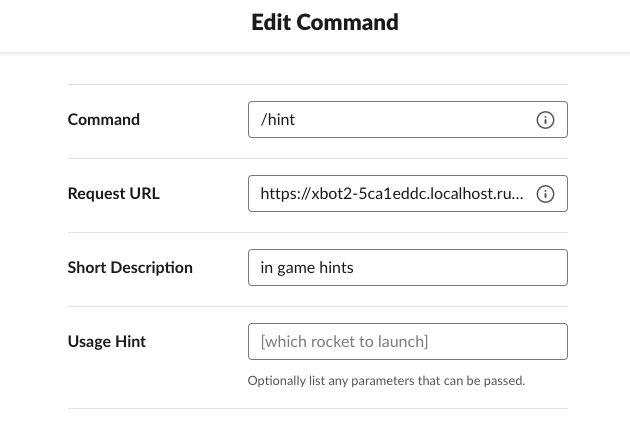
is there anything else related to the app that might be required? other permissions?
note that the deployed and local (dev) versions of the app i'm using have different AppIDs.
dcsan
on 15 Aug 2020
For what it's worth, I'm facing the same issue with "local" development. If using NGROK tunnel I am able to hit it but when using NGINX it fails. I am able to hit my end-point manually and see expected responses but when I issue a slash command in Slack I get a failed response saying: failed with the error "dispatch_failed"
When I turn off my local development instance I get a timeout instead.
 costr
on 28 Aug 2020
costr
on 28 Aug 2020
similar, tho i'm not having any issues using nginx
for me it works with ngrok but not the other local tunnel tool i was using which is just an ssh forward, http://localhost.run/
ie
ssh -v -R 80:localhost:33010 [email protected]
so it seems there's something odd about slash commands. perhaps they use a different mimetype?
update: this morning ngrok doesn't work either. Nothing seems to arrive to ngrok, in checking it's dashboard.
deploying the same bot works where I just have nginx
I'm wondering if slash commands have a different cool down or timeout behavior such that local development is sensitive and they just stop working after a while if your bot ever didn't ack/respond in time? This was definitely working for me yesterday.
heisenbug related to environment are such a pita.
dcsan
on 28 Aug 2020
I have the same issues using inlets (a self-hosted ngrok), everything was working fine the first few days now only "dispatch-failed"
 marcelo-mason
on 29 Aug 2020
marcelo-mason
on 29 Aug 2020
author of localhost.run here.
I looked into this and I had this exact error. You need to make sure your Request URL in the screenshot @dcsan posted above has the event path in, ie: https://your-domain/slack/events.
I posted a minimal viable example for commands at https://gist.github.com/tommyvn/62a6c4dc574430e06f3dbcf528511953 to hopefully hint others towards this solution.
edit: removed unnecessary comments above after @stevengill set me on the right path on #604
 tommyvn
on 31 Aug 2020
tommyvn
on 31 Aug 2020
Thanks for looping around on this issue @tommyvn!
Judging from #604 and this issue (#579), we may want to clarify that all incoming requests (actions/events/commands/etc) are received on /slack/events.
If others find that @tommyvn hint toward /slack/events solves their issue, can you please add a 👍🏻 to this comment so that we know this is the problem. If it is, then I'll try to update the docs!
 mwbrooks
on 31 Aug 2020
mwbrooks
on 31 Aug 2020
Also suddenly having issues on this theme on both our local and production apps. We're appending /slack/events to the url in all cases but still have issues. I can see when I re-add my local url through the app management page the request gives a '401 unauthorized' error.
Could well be something in our codebase but thought I'd chip in.
 robmcw
on 2 Sep 2020
robmcw
on 2 Sep 2020
I have been using /slack/events exclusively. note this is also a problem with button events.
for me the same codebase worked with a deployed bot, but not the local one using the localhost.run.
so I assumed it was the localhost.run but maybe it's due to some API throttling on a per bot basis? I use different bot instances (IDs etc) when deployed.
dcsan
on 2 Sep 2020
EDIT: FIXED: Our staging and prod servers were running Bolt 2.6.1 (and my local an earlier version). Upgrading to 2.7 solved this issue, so I can only think something was funky in that Bolt version.
After a hiatus of a few months (just seemed to fix itself last time), I've had this issue again.
So, after several months of no issues, for the last week we've been getting a "dispatch_failed" error message when sending slash commands on staging and production environments. It's working fine locally (using Ngrok for tunneling).
As the Bolt docs specify, we're using the /slack/events endpoint for our slash commands and using the .command() method to listen for them. I've checked we have no typos on this.
The strange thing is, /slack/events is working nicely for all other events and giving a 200 response when hit, but when called from a slash command gives a 500 or sometimes a 401 and this error:

And if I add a new command in the App settings I see this in the logs:

It seems like something extra is needed to receive slash commands on slack/events in Bolt, but it's not clear what/how.
Like I say, any other request to /slack/events gives a 200, and everything works nicely on my local machine using ngrok.
I'm stumped!
robmcw
on 18 Jan 2021
I had the same issue when I use fastify
But reason was
I didn't do "form parsing"
So I just add below and It works
fastify.register(require('fastify-formbody'))
Below is my Full test code
const fastify = require('fastify')({logger: true})

fastify.register(require('fastify-formbody'))
// Declare a route
fastify.post('/slack/cards', async (request, reply) => {
    console.log(request);
    reply
        .code(200)
        .header('Content-Type', 'application/json')
        .send({
            "response_type": "in_channel",
            "text": "10"
        });
})
// Run the server!
const start = async () => {
    try {
        await fastify.listen(3000)
    } catch (err) {
        fastify.log.error(err)
        process.exit(1)
    }
}
start()
 mwmw7
on 26 Jan 2021
mwmw7
on 26 Jan 2021
Can someone please post a solution to the above problem?
Is it possibly an access issue?
For example - an app is restricted to work in a specific channel by providing channel token id but / _(slash)_ command is a global command, so maybe a discrepancy through this? I may be absolutely wrong here and will remove the comment if needed..
 rohetoric
on 11 Feb 2021
rohetoric
on 11 Feb 2021
Big thanks to everyone for sharing the experiences (and solutions)! Reading through this thread, my feeling is that there are numerous reasons why Slash Commands may be resulting in the dispatched_failed. A checklist that might help others is:
- Double-check that your Request URL ends in
/slack/events - Update your Request URL in 2 places
- Events › Request URL _(e.g. events, messages, etc)_
- Interactivity › Request URL _(e.g. buttons, slash commands, etc)_
- Confirm that your local tunnel is preserving the form body, headers, etc (Ngrok seems to do this by default)
- Local firewall may be causing some headaches
If you're still having trouble, I'd suggest trying out Slack's new Socket Mode feature. You can enable this for any app and Bolt 3 has built-in support. Once enabled, it will disable Request URL and use a direct socket connection between Slack and Bolt. Learn more about using Socket Mode in Bolt's documentation.
_Warning about Socket Mode: Once enabled, it will disable Request URL. You can always disable Socket Mode, but you can't use both at the same time._
mwbrooks
on 20 Feb 2021
As @mwbrooks provided a clear guide on this, let us close this issue now. If you have a similar question, please feel free to write in or create a new one with detailed information.
 seratch
on 22 Mar 2021
seratch
on 22 Mar 2021
Related issues
 dginovker
·
4Comments
dginovker
·
4Comments
 theomelo
·
3Comments
theomelo
·
3Comments
 selfcontained
·
4Comments
selfcontained
·
4Comments
 johnsonyick
·
4Comments
johnsonyick
·
4Comments
 st3fan
·
3Comments
st3fan
·
3Comments
Most helpful comment
Thanks for looping around on this issue @tommyvn!
Judging from #604 and this issue (#579), we may want to clarify that all incoming requests (actions/events/commands/etc) are received on
/slack/events.If others find that @tommyvn hint toward
/slack/eventssolves their issue, can you please add a 👍🏻 to this comment so that we know this is the problem. If it is, then I'll try to update the docs!