Bolt-js: app_home_opened event fires twice when the 'messages' tab is clicked
Using app.action to monitor app_home_openend fires twice when a user clicks on the messages tab
 app.event("app_home_opened", async context => {
    console.log(context.payload.tab);
  });
What type of issue is this? (place an x in one of the [ ])
- [x] bug
- [ ] enhancement (feature request)
- [ ] question
- [ ] documentation related
- [ ] testing related
- [ ] discussion
Requirements (place an x in each of the [ ])
- [x] I've read and understood the Contributing guidelines and have done my best effort to follow them.
- [x] I've read and agree to the Code of Conduct.
- [x] I've searched for any related issues and avoided creating a duplicate issue.
Bug Report
Reproducible in:
package version: 1.5.0
node version: v10.14.1
OS version(s): OSX 10.14.6
Steps to reproduce:
 app.event("app_home_opened", async context => {
    console.log(context.payload.tab);
  });
Expected result:
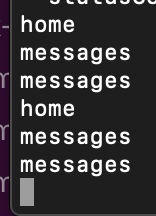
Clicking back and forth between the Home and Messages tab should appear in the console as:
home
messages
home
messages
Actual result:
 jamesfmac
All 14 comments
👋I tried to reproduce your issue but it never happened with my simple app. Also, although I have been working with Bolt for months, I've never heard of this problem yet.
I'm afraid the issue may be happening due to something specific to your app or its settings. How about creating a brand-new Slack app and verifying the app also has the same problem?
Also, to help us reproduce your situation, can you share a bit more details? I'm still not sure what is necessary yet but sharing the whole application code, your Slack app configuration, etc. may help others figure out what the cause is.
 seratch
on 25 Dec 2019
seratch
on 25 Dec 2019
Thank @seratch I'll try creating a sample app to demo what I'm seeing.
jamesfmac
on 25 Dec 2019
Hey @seratch I did some more investigation and was able to replicate the issue with this sample app.
At a high level the app settings were:
- Brand new Slack app, not distributed
- Subscribed only to he app_home_opened events
- Bot user (shown as always online)
- OAuth bot scope (not other scopes)
I can share the complete app settings if that would help?
I also used NGROK to check what event calls Bolt was receiving. There were two incoming calls each time the messages tab is opened (and only one call when the home tab is opened). The two messages tab calls always have different values for event_id but will mostly (though not always) have the same value for the event_time.
Let me know if I can help with any more detail. I'm kind of at the end of what I'm able to look at :)
jamesfmac
on 30 Dec 2019
@jamesfmac
Thanks for the information with us. I tried to reproduce your situation again, but I was not able to. I did the following steps. The issue didn't occur to me.
- Create a new Slack app
- Run your Bolt app with the issued signing secret
- Add a bot user
- Enable Event Subscriptions & add
app_home_opened(the outcome is the same with bot events or/and workspace events) - Sign up for App Home open beta
- Install the app to its development workspace
- Restart the Bolt app with the issued bot token
- Open Home / Messages tabs associated to the bot user on Slack
This issue doesn't seem to be Bolt-specific. So, as a Bolt maintainer, there is nothing further I can do for you. 🙇
I'm afraid something is happening with your Slack app configuration or workspace. Even if you build the endpoint with other tools, the problem will remain. If you don't mind, could you contact Slack's support next year? In case your Slack app has some server-side issues, they may cooperate with related teams (sharing your app id would be helpful for them).
seratch
on 30 Dec 2019
Thanks @seratch! agree that it doesn't look like a Bolt issue :) I'll test again in a fresh workspace and if the issue persists I'll follow your advice and raise it with Slack support.
jamesfmac
on 30 Dec 2019
As there is nothing further the Bolt team can do here, let me close this issue now. But if you notice something related to Bolt, please feel free to reopen this or create another one!
seratch
on 27 Jan 2020
@jamesfmac did you finally solve this issue?
 mogadanez
on 2 Jun 2020
mogadanez
on 2 Jun 2020
@mogadanez I retested and this no longer seems to be occurring. There were no changes on my side, I can only assume that something was fixed on the Slack side.
jamesfmac
on 2 Jun 2020
Ya I believe it was an issue with on Slacks side that day and has been resolved. @mogadanez are you seeing similar behavior?
 stevengill
on 2 Jun 2020
stevengill
on 2 Jun 2020
@stevengill I know I am having this issue.
 jsemander
on 4 Jun 2020
jsemander
on 4 Jun 2020
@stevengill I am also having the same issue.
 ashishmshra
on 9 Jun 2020
ashishmshra
on 9 Jun 2020
I wrote to slack support and they confirmed that its known issue
mogadanez
on 9 Jun 2020
@mogadanez, Is there any way we can handle this issue for now?
ashishmshra
on 9 Jun 2020
something like custom rate-limit
In my case put flag to Redis as soon as possible in request works pretty good
mogadanez
on 9 Jun 2020
Related issues
 simonsayscode
·
3Comments
simonsayscode
·
3Comments
 johnsonsamuel
·
4Comments
johnsonsamuel
·
4Comments
 jacklein
·
4Comments
jacklein
·
4Comments
 oosawak1975
·
4Comments
oosawak1975
·
4Comments
 aguayov
·
4Comments
aguayov
·
4Comments