Boardgame.io: npm run serve command fails on JSX
For some reason I cannot the get the node -r esm src/server.js script to run when setting up multiplayer functionality. My server.js file is identical to that in the documentation. I get the following error when it reaches the first JSX element in my game.
`> [email protected] serve C:\Users\alexw\Documents\programming projects\SHED-online
node -r esm src/server.js
C:...\SHED-online\src\game\Table.js:72
^
SyntaxError: Invalid or unexpected token
at Object.Module._extensions..js (internal/modules/cjs/loader.js:1158:10)
npm ERR! code ELIFECYCLE
npm ERR! errno 1
npm ERR! [email protected] serve: node -r esm src/server.js
npm ERR! Exit status 1
npm ERR!
npm ERR! Failed at the [email protected] serve script.
npm ERR! This is probably not a problem with npm. There is likely additional logging output above.`
is this the same issue as mentioned in this thread?
If anyone has any idea's please let me know.
Many thanks :)
 alexwoodsy
All 7 comments
@alexwoodsy I think the thread you linked is for a different issue, that thread is about Typescript rather than JSX.
I don’t think you should be including any JSX in the server code. What exactly are you importing in server.js?
If you check out this example from the multiplayer tutorial, the ./Game file being imported is plain JavaScript, separate from front-end code that could include JSX:
// src/server.js
const { Server } = require('boardgame.io/server');
const { TicTacToe } = require('./Game');

const server = Server({ games: [TicTacToe] });

server.run(8000);
You can think about the structure a little like this:
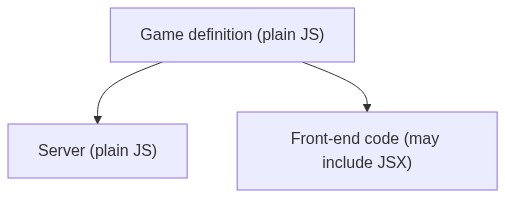
Front-end and server code is separate but both import the shared game definition.
 delucis
on 4 Feb 2021
delucis
on 4 Feb 2021
@delucis thanks for your help.
Here is my server.js code
`const {Server} = require("boardgame.io/server");
const {SHED} = require("./game");
const server = Server({
games: [SHED],
});
const lobbyConfig = {
apiPort: 8080,
apiCallback: () => console.log('Running Lobby API on port 8080...'),
};
server.run({
port: 8000,
lobbyConfig,
}); `
I have tried removing the lobby config and I still get the same errors
alexwoodsy
on 4 Feb 2021
@alexwoodsy That looks OK, but I’d guess the JSX code is somewhere inside ./game. Is that possible?
delucis
on 4 Feb 2021
Thanks you for the help @delucis, that was exactly the issue. I had imported/exported my board implementation into the index.js file in the ./game folder I was using for my folder structure.
thanks again for the help :)
alexwoodsy
on 5 Feb 2021
Hello! I am also having this issue but I don't have any JSX in my game definition (gameSetup.js) , just the board (gameView.js).
server code:
const { Server } = require('boardgame.io/server');
const { Ludo } = require('./src/gameLogic/gameSetup');

const server = Server({ games: [Ludo] });

server.run(8000);
game client:
export const GameClient = Client(
    {
        game: Ludo, // game state
        board: GameView,
        numPlayers: 2,
        debug: true,
        multiplayer: SocketIO({ server: "localhost:8000" }),
    }
);
 shamseen
on 15 Apr 2021
shamseen
on 15 Apr 2021
@shamseen Your game definition does import JSX (see lines 1 and 3 in gameSetup.js) even if you don’t have JSX in that file itself. That means that when the server imports gameSetup.js, it first evaluates the imports inside gameSetup.js and will pull in that JSX.
You’ll have to split the Ludo and GameClient exports into separate files.
delucis
on 15 Apr 2021
Thank you so much! It was driving me n u t s!
You guys have the best customer support
shamseen
on 15 Apr 2021
Related issues
 bliu13
·
8Comments
bliu13
·
8Comments
 jstacoder
·
7Comments
jstacoder
·
7Comments
 nicolodavis
·
7Comments
nicolodavis
·
7Comments
 MichalPP
·
10Comments
nicolodavis
·
6Comments
MichalPP
·
10Comments
nicolodavis
·
6Comments