Blueprint: Progress bar with multiple elements
Environment
- __Package version(s)__: core 3.37
- __Browser and OS versions__: Safari 14, macOS BigSur
Feature request
Either extend the current progress bar or create a "MultiProgressBar" component that allows setting multiple elements in different colors/intents that are stacked on top of each other.
Examples

I made this for a project that mostly uses blueprint and thought it would be nice to have in blueprint too.
I am willing to write the code for this but would need some guidance on how to structure it (adjust ProgressBar or make MultiProgressBar, prop structure etc)
 N3XT191
All 3 comments
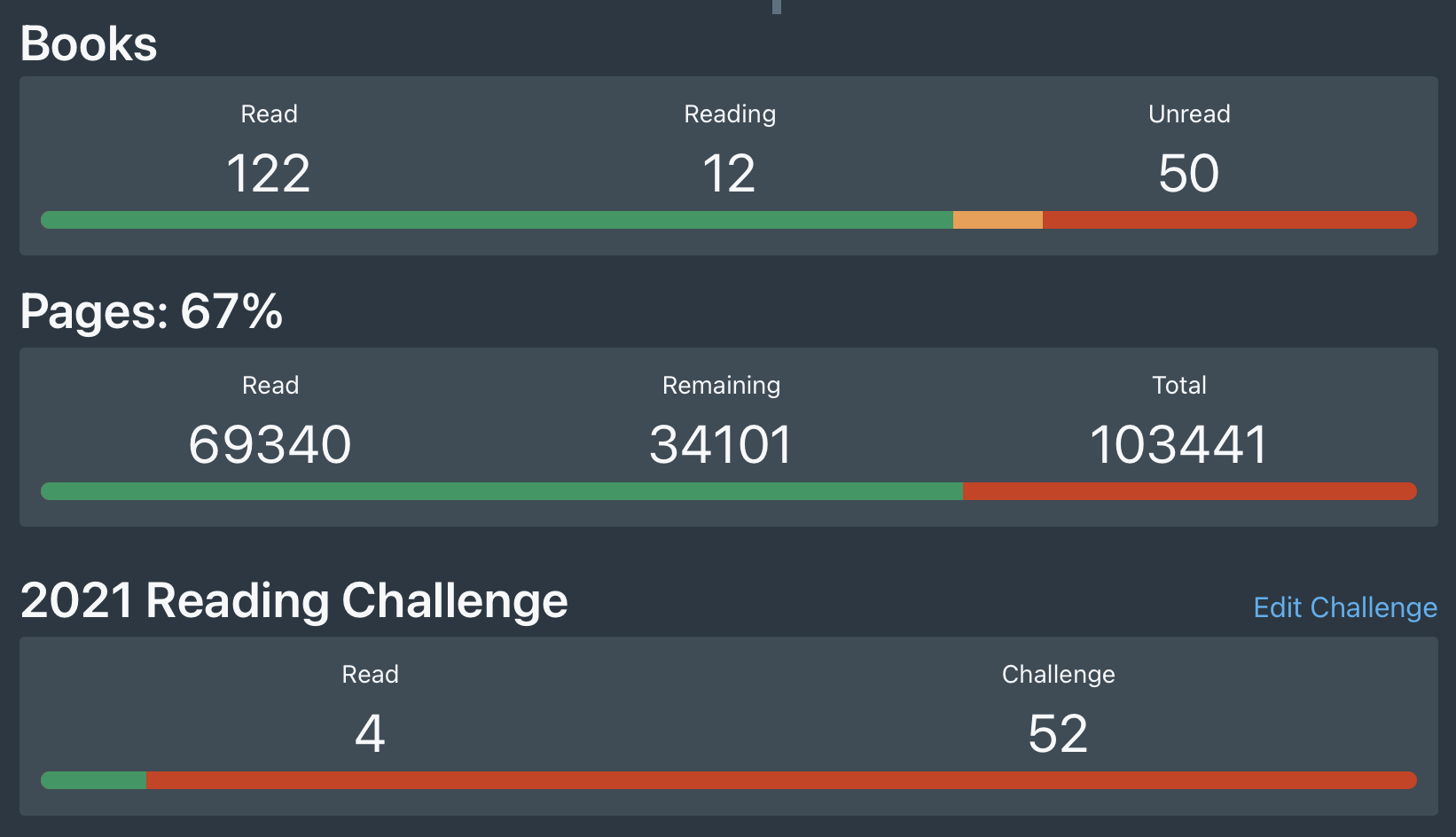
In case anyone is wondering for what this is useful, here is the main place it's used in my project
N3XT191
on 21 Jan 2021
Thanks for the additional context. It looks like this kind of component exists in other libraries such as Fomantic UI. I would be open to adding it to Blueprint. We have something similar in MultiSlider, where we render a bar with multiple segments. You could probably borrow/copy some of the MultiSlider CSS and prop interface design to build a MultiProgressBar.
 adidahiya
on 21 Jan 2021
adidahiya
on 21 Jan 2021
For Syntax, the following would probably be easiest to implement:
<MultiProgressBar values={[0.1,0.5,1.0]} intents={[Intent.SUCCESS,Intent.WARNING,Intent.ERROR]}/>
but this would be most similar to the MultiSlider syntax
<MultiProgressBar >
    <MultiProgressBarElement value={0.1} intent={Intent.SUCCESS}/>
    <MultiProgressBarElement value={0.5} intent={Intent.WARNING}/>
    <MultiProgressBarElement value={1.0} intent={Intent.ERROR}/>
</MultiProgressBar >
What might be best would be to do the following, but I don't know how to make the stacking so all 3 progress meters are visible (and not blocked by the other backgrounds)
<MultiProgressBar >
    <ProgressBar value={0.1} intent={Intent.SUCCESS}/>
    <ProgressBar value={0.5} intent={Intent.WARNING}/>
    <ProgressBar value={1.0} intent={Intent.ERROR}/>
</MultiProgressBar >
Thoughts?
N3XT191
on 21 Jan 2021
Related issues
 giladgray
·
3Comments
giladgray
·
3Comments
 scottfr
·
3Comments
scottfr
·
3Comments
 havesomeleeway
·
3Comments
havesomeleeway
·
3Comments
 westrem
·
3Comments
westrem
·
3Comments
 tgreenwatts
·
3Comments
tgreenwatts
·
3Comments
Most helpful comment
In case anyone is wondering for what this is useful, here is the main place it's used in my project