Blueprint: Make Tabs width of Parent
Environment
- __Package version(s)__: 3.29.0
- __Browser and OS versions__: Chrome v83, Windows 10
Question
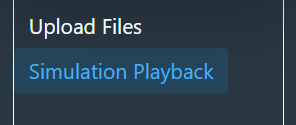
How can I create <Tabs></Tabs> with width: 100%? Attached is a screenshot of what I have, I want the blue background of the highlighted <Tab/> to fill from the one white border to the other. (Sorry the picture is small, I am not able to share any more of the web page content).
 wswiser101
All 5 comments
i think have the same problem.
How to get the width of the panels held in the tabs to be 100%... It seems like the embedding tab panel is constraining the width somehow
 bsdis
on 27 Jun 2020
bsdis
on 27 Jun 2020
Do you want the tabs to be full width? Or the content inside the tab panels? It would help if you provided a code sandbox (linked in the issue template) clearly pointing out what change you'd like to see.
 adidahiya
on 29 Jun 2020
adidahiya
on 29 Jun 2020
Sorry, I'm new and just learning how to contribute properly here. Very broadly, the specific request I have is for the tabs themselves to have a customizeable width, so that the highlighting around a selected tab stretches to a user-defined width. I am not so concerned with the content inside the tabs. I tried to recreate the issue on codesandbox but was unable to do so unfortunately.
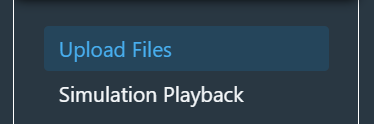
Upon further inspection, I realized that the blueprint tabs are creating a <div class="bp3-tab-indicator-wrapper" which has a defined width. Changing this width styling in chrome dev tools gave me close enough to what I wanted (see attached). Is there a way to pass in different styling for the specific bp3 class?
Once again, I apologize for my naivete and that I was unable to recreate the issue properly in codesandbox.
wswiser101
on 29 Jun 2020
From your screenshot it seems like you're trying to use vertical tabs (<Tabs vertical={true}>), is that true?
Here's a more specific code sandbox I just made for your situation which you might be able to work off and tweak to demonstrate your issues: https://codesandbox.io/s/blueprint-sandbox-npskz?file=/src/CoreExample.tsx
Yes, the .bp3-tab-indicator-wrapper element does some DOM measurement calculations to determine the tab widths. But it's not fixed width; you can customize it. You would have to style a Blueprint class, but these are part of our public API and do follow semver. So something like this should work:
.my-tabs .bp3-tab-list {
  flex-basis: 200px;
}
You are right, I am using vertical tabs. Thank you for creating that codesandbox! Your answer fixed the problem, the flex-basis on the tabs was just what I needed :smile:. Thank you!
wswiser101
on 29 Jun 2020
Related issues
 havesomeleeway
·
3Comments
havesomeleeway
·
3Comments
 Goddak
·
3Comments
Goddak
·
3Comments
 vinz243
·
3Comments
vinz243
·
3Comments
 tgreenwatts
·
3Comments
tgreenwatts
·
3Comments
 mdebeus
·
3Comments
mdebeus
·
3Comments