Blueprint: table rendered incorrectly in non-active tab
Environment
- __Package version(s)__: 3.8.3
- __Browser and OS versions__: chrome 79.0.3945.79
If possible, link to a minimal repro: sandbox https://codesandbox.io/s/render-table-correctly-in-non-active-tab-blueprint-js-4u6iq
Steps to reproduce
- create tabs, place a table in each tab
- switch to none active tab, table rendered incorrectly
Actual behavior
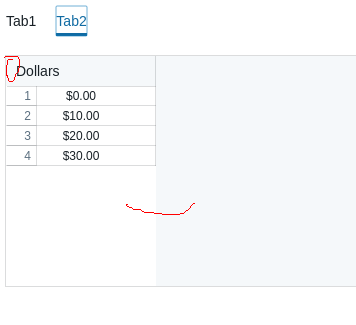
table rendered incorrectly when switching to non-active tab
Expected behavior
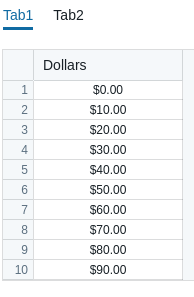
table in active/non-active tab should be consistent
Possible solution
 duidae
All 2 comments
Ran into the same issue. Downgrading to table3.7.x couldn't fix this.
 emmazxy
on 6 May 2020
emmazxy
on 6 May 2020
I too ran into the same issue. The problem appears to be (as also noted on #4109 ) that both the table and the range slider make computations against things like clientWidth and clientHeight amongst other things, which go wrong and return 0 when the element in question isn't currently displayed.
I have coded a little workaround - a replacement Tabs component that's an almost drop-in replacement for the standard component which applies "render on first use" semantics to the underlying Tab panels. In this way, the underlying panel is only actually rendered and mounted when it's actually going to be displayed for the first time, at which point the values for clientWidth etc. are sensible and accurate and everything _appears_ to work for me (so far at least ...)
NB: the additional requirements on this <Tabs/> replacement being that you must put id values on the <Tabs/> component and the individual <Tab /> elements, and you must currently specify the defaultSelectedTabId on the <Tabs /> component:
https://gist.github.com/stevestorey/de0394e649d2a5fa8586c634bcaa6911
Worth noting that this could be made a standard feature of the Blueprint Tabs component (but I'm not familiar enough with the framework codebase, nor tests etc. to make an MR myself), and there are some limitations of this implementation, notably that things like resize events may cause similar rendering problems for the table etc. if the resize happens while the tab containing them is inactive
 stevestorey
on 22 May 2020
stevestorey
on 22 May 2020
Related issues
 mdebeus
·
3Comments
mdebeus
·
3Comments
 ernestofreyreg
·
3Comments
ernestofreyreg
·
3Comments
 sighrobot
·
3Comments
sighrobot
·
3Comments
 vilav
·
3Comments
vilav
·
3Comments
 adidahiya
·
3Comments
adidahiya
·
3Comments
Most helpful comment
Ran into the same issue. Downgrading to table3.7.x couldn't fix this.