Blueprint: Problems using dark theme
Environment
- __Package version(s)__: blueprint 3.6.1, react 16.4.14
- __Browser and OS versions__: Windows 10 / Chrome 66.0.3359.181 (via Electron 3.0.5)
Question
When adding the class "bp3-dark" to my main container, here is what I'm getting:
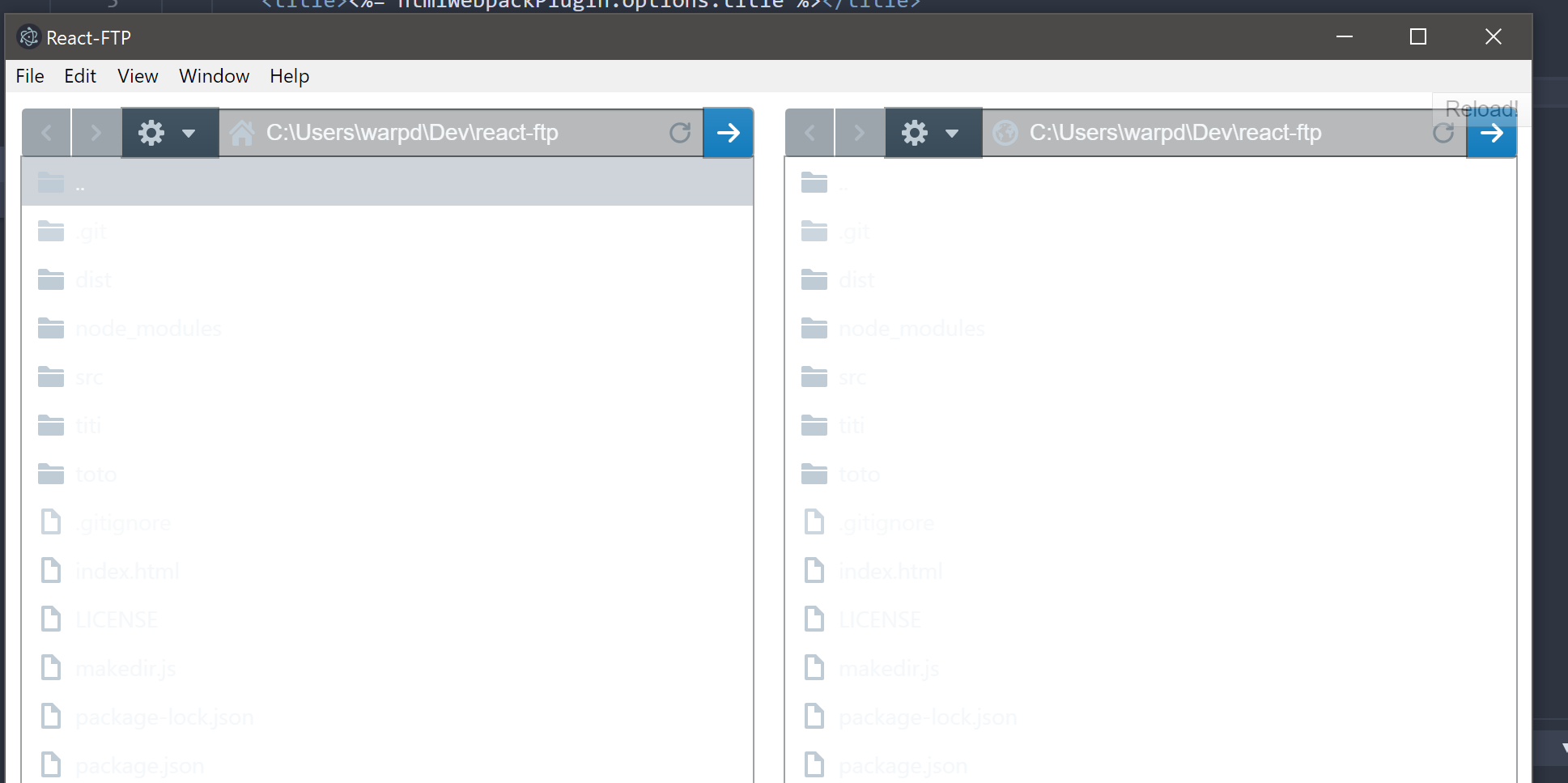
Most elements (eg. Tree, InputGroup) don't seem to follow the dark theme: only the button group seems to be correct.
Is there something more (eg. include some dark css file?) to have correct dark theme in every components?
 warpdesign
All 8 comments
@warpdesign you need to set a background color behind everything so the light text will appear. use $pt-dark-app-background-color.
 giladgray
on 24 Oct 2018
giladgray
on 24 Oct 2018
@giladgray That's Sass/Less right? Does it mean I need to build a new version of the css files to use the dark theme?
Right now I am just including these files:
require("@blueprintjs/core/lib/css/blueprint.css");
require("@blueprintjs/icons/lib/css/blueprint-icons.css");
Adding this fixes the problem:
.bp3-dark{
    background-color: #293742;
}
but I'd like to know what's the official/recommended way to use the dark theme.
warpdesign
on 25 Oct 2018
yes you need to add that background-color line somewhere. this is the official way. strongly recommend putting it on your own class instead of on .bp3-dark as that will mess up _every_ blueprint component.
some components set a background color for the theme (like Card or Dialog) but if you just slap Classes.DARK on an arbitrary container then you need to manually set the background yourself.
giladgray
on 25 Oct 2018
The easiest way to just affect your body tag dynamically i have a footer with a switch inside it but it shows how to get dark mode to work it's because the CSS uses body.bp3-dark for few parts of it's dark element styling
import React, { Component } from 'react';
import { Alignment, Switch } from '@blueprintjs/core';
class Footer extends Component{
constructor(){
super()
if(localStorage.getItem("DarkMode") === null){
localStorage.setItem("DarkMode", "no");
}
this.state = {
darkMode:localStorage.getItem("DarkMode") === 'yes',
displayCopyWriteName:"Test Company"
};
}
switchTriggered(){
localStorage.setItem("DarkMode", (!this.state.darkMode)?"yes":"no");
this.setState({darkMode:!this.state.darkMode});
}
render(){
document.body.className = ((this.state.darkMode)?"bp3-dark":"bp3-body");
console.log("Darkmode:", ((this.state.darkMode)?"bp3-dark":"bp3-body"), "state is", this.state.darkMode, "from LS", localStorage.getItem("DarkMode"));
return (
<footer className="footer-bottom ">
© {new Date().getFullYear()} {this.state.displayCopyWriteName}
<Switch checked={this.state.darkMode} label="Dark Mode" onChange={this.switchTriggered.bind(this)} />
</footer>
);
}
}
export default Footer;
so inperticular it's document.body.className = ((this.state.darkMode)?"bp3-dark":"bp3-body"); if you wish to have other classes on your body you may want to use classList property instead.
 barkermn01
on 16 Nov 2018
barkermn01
on 16 Nov 2018
yeah nice, the docs site does a similar thing @barkermn01 👍
@warpdesign see the docs styles: https://github.com/palantir/blueprint/blob/develop/packages/docs-theme/src/styles/_layout.scss#L72-L75, https://github.com/palantir/blueprint/blob/develop/packages/docs-theme/src/styles/_layout.scss#L89-L91
giladgray
on 16 Nov 2018
@barkermn01 instead of using a string "yes" or "no" it's better to use a boolean and just check if it is true or false
eg. darkMode == true
 MalikBagwala
on 19 Aug 2019
MalikBagwala
on 19 Aug 2019
@MalikBagwala no because localStorage.getItem() and localStorage.setItem() only support a DOMString,
And it's more confusing to see "true" than it is to see "yes" further more to that your EG is just daft, if your using booleans values you would do if(darkMode) you would never == true for two reasons
1) it's longer
2) it's truthy, not true.
You will notice that in the actual JS I convert the "yes", & "no" into a boolean respectively it's only when it gets saved to local storage that I use the strings "yes" & "no"
((this.state.darkMode)?"bp3-dark":"bp3-body") This is a turnary statement it's an evalation of a condition returning properties to left or right of : denpending on true or false respectivly.
Here is what the full none turnary statement would have to be to be evaluated the same way
document.body.className = (() => {
if(this.state.darkMode){
    return "bp3-dark";
}else{
    return "bp3-body";
}})();
and pre ES6
document.body.className = (function(){
if(this.state.darkMode){
    return "bp3-dark";
}else{
    return "bp3-body";
}}).bind(this)();
@barkermn01 Minor nitpick - It's ternary not turnary - you have an expression that takes three arguments - hence the name.
 UpsideDownRide
on 29 Aug 2019
UpsideDownRide
on 29 Aug 2019
Related issues
 sighrobot
·
3Comments
sighrobot
·
3Comments
 raiju
·
3Comments
raiju
·
3Comments
 scottfr
·
3Comments
scottfr
·
3Comments
 sunabozu
·
3Comments
sunabozu
·
3Comments
 vinz243
·
3Comments
vinz243
·
3Comments
Most helpful comment
The easiest way to just affect your body tag dynamically i have a footer with a switch inside it but it shows how to get dark mode to work it's because the CSS uses
body.bp3-darkfor few parts of it's dark element stylingso inperticular it's
document.body.className = ((this.state.darkMode)?"bp3-dark":"bp3-body");if you wish to have other classes on your body you may want to use classList property instead.