Blueprint: Set "initial" selectedItem with Suggest (and maybe Select)?
Environment
- __Package version(s)__: 3.1
Question
Is there a way to pass in the selected item in a Suggest and use it in a controlled manner? (This is currently state.selectedItem)?
 indigoviolet
All 11 comments
I guess I just have to fall back to Select and control the target directly.
indigoviolet
on 9 Aug 2018
@indigoviolet there is not but I'd happily review a PR to add props.selectedItem?
 giladgray
on 9 Aug 2018
giladgray
on 9 Aug 2018
Really need this! I've not used TS before though, do you have a development flow I should follow?
 remotealex
on 14 Aug 2018
remotealex
on 14 Aug 2018
@alexpriceonline https://github.com/palantir/blueprint/blob/develop/CONTRIBUTING.md 👍 👍
giladgray
on 14 Aug 2018
oops this issue is not actually fixed. we've added controlled support in #2874 but no "initial" support.
cc @danilotorrisi if you wanna hit this with defaultSelectedItem
giladgray
on 5 Sep 2018
Sure, I can easily add the defaultSelectedItem in another PR. What do you think should happen if both defaultSelectedItem and selectedItem is provided? IMHO the controlled selectedItem should always win over default uncontrolled item, what.
 danilotorrisi
on 6 Sep 2018
danilotorrisi
on 6 Sep 2018
@danilotorrisi controlled props always win over uncontrolled, you are correct.
giladgray
on 6 Sep 2018
Sorry for necro-ing this issue, but I noticed that this behavior only exists for Suggest, but not for Select. Is there any plans to implement that one as well?
 ChristianIvicevic
on 8 Feb 2021
ChristianIvicevic
on 8 Feb 2021
@ChristianIvicevic you get to render the children, and the initial selected item for Select. So you have control over what is displayed there. I don't think you need a new prop to do that: https://github.com/palantir/blueprint/blob/0750f4d5fd9775bbada07feb588abf9666d55ad6/packages/docs-app/src/examples/select-examples/selectExample.tsx#L120
 adidahiya
on 8 Feb 2021
adidahiya
on 8 Feb 2021
Sorry for not being too detailed. I was referring to the active item in the popover of the Select. For instance, the button in the following screenshot has the selected value as expected but I can't easily select the corresponding item in the popover as it clashes with keyboard input:
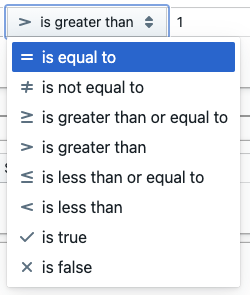
For instance if my item renderer sets MenuItem.active to true for the currently selected element, I can no longer display the focused element when pressing the arrow buttons.
In the best-case I'd like for the active item and selected item to be uncontrolled and being able to set the default active item since I only listen to onItemSelect and MenuItem.onClick respectively.
ChristianIvicevic
on 8 Feb 2021
@ChristianIvicevic use activeItem and onActiveItemChange
adidahiya
on 8 Feb 2021
Related issues
 ernestofreyreg
·
3Comments
ernestofreyreg
·
3Comments
 tgreenwatts
·
3Comments
tgreenwatts
·
3Comments
 Goddak
·
3Comments
Goddak
·
3Comments
 tomzaku
·
3Comments
tomzaku
·
3Comments
 shahzeb1
·
3Comments
shahzeb1
·
3Comments