Blueprint: How can I override style's properties for Card?
Environment
"react": "^16.4.1",
"@blueprintjs/core": "^3.0.1",
"@blueprintjs/datetime": "^3.0.0",
"@blueprintjs/select": "^3.0.0",
Question
I try to add className on Card to override the margin properties of BluePrint but without success. I also don't like using !important. How can I do that?
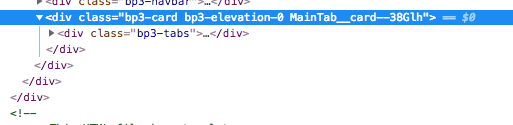
Card.tsx
<Card className={styles.card}>
        <Tabs id="TabsExample" selectedTabId={selectedTabId}  onChange={changeTab}>
          ...
        </Tabs>
        {/* <SwitchTheme /> */}
        {children}
    </Card>
Card.scss
:local(.card) {
    border-radius: 0px;
}
 tomzaku
All 4 comments
Hey, @tomzaku it seems that internal styles are connected earlier than external ones, so you can not overwrite them.
You need something like this. First loader loaded minified vendor css from node_modules and assets in my case. And second loader loading your local styles and build them into a valid CSS
  {
    test: /\.css$/, // css-loader for external styles without css-modules
    include: /(src\/assets|node_modules)/,
    use: [
      { loader: 'style-loader' },
      { loader: 'css-loader' }
    ]
  },
  {
    test: /\.scss$/, // scss-loader for internal styles with css-modules and postcss
    include: /src/,
    exclude: /(src\/assets|node_modules)/,
    use: [
      'style-loader',
      {
        loader: 'css-loader',
        options: {
          modules: true,
          importLoaders: 1,
          localIdentName: '[local]__[hash:base64:5]',
          sourceMap: true
        }
      },
      'sass-loader',
      {
        loader: 'postcss-loader',
        options: {
          config: { path: 'tools/postcss.config.js' }
        }
      }
    ]
  },
Hope that help
 amazing-space-invader
on 2 Aug 2018
amazing-space-invader
on 2 Aug 2018
yep a CSS ordering problem. you must load blueprint.css _before_ your styles to have any hope of overwriting it.
 giladgray
on 2 Aug 2018
giladgray
on 2 Aug 2018
@amazing-space-invader I tried but without luck :(
I also adding load css first like you after that load scss
like this:
[ { test: /\.(js|jsx|mjs)$/,
    loader: 'source-map-loader',
    enforce: 'pre',
    include: '/Users/zaku/Workspaces/react/ts-react-boilerplate/src',
    exclude: undefined },
  { test: /\.(ts|tsx)?$/,
    include: undefined,
    exclude: undefined,
    loader: 'awesome-typescript-loader' },
  { test: /\.css$/,
    include: /(node_modules)/,
    use: [ 'style-loader', 'css-loader' ] },
  { test: /\.(jpg|png)$/,
    include: undefined,
    exclude: undefined,
    use: { loader: 'file-loader', options: [Object] } },
  { test: /\.(ttf|eot|woff|woff2)$/,
    use: { loader: 'file-loader', options: [Object] } },
  { test: /\.(sa|sc)ss$/,
    include: /src/,
    exclude: /(node_modules)/,
    use: [ [Object], [Object], [Object], [Object] ] } ]
````
I also load file css at `index.scss` which I import at index.tsx
@import "~@blueprintjs/core/lib/css/blueprint.css";
@import "~@blueprintjs/datetime/lib/css/blueprint-datetime.css";
@import "~@blueprintjs/icons/lib/css/blueprint-icons.css";
body {
margin: 0px;
}
```
tomzaku
on 3 Aug 2018
Hey, @tomzaku. You trying to import blueprint's CSS inside your index.scss, but they located in /src/, so for bluerpint's webpack uses scss-loader too. Try to import blueprint's CSS into index.tsx, before ReactDOM.render function.
Also you can load minified CSS via cdn inside your html template before link to bundle.css
amazing-space-invader
on 3 Aug 2018
Related issues
 adidahiya
·
3Comments
adidahiya
·
3Comments
 brsanthu
·
3Comments
giladgray
·
3Comments
brsanthu
·
3Comments
giladgray
·
3Comments
 ernestofreyreg
·
3Comments
ernestofreyreg
·
3Comments
 mdebeus
·
3Comments
mdebeus
·
3Comments
Most helpful comment
Hey, @tomzaku. You trying to import blueprint's CSS inside your
index.scss, but they located in/src/, so for bluerpint's webpack uses scss-loader too. Try to import blueprint's CSS intoindex.tsx, beforeReactDOM.renderfunction.Also you can load minified CSS via cdn inside your html template before link to
bundle.css