Blueprint: TreeNode EnsureVisible method needed
Bug report
- __Package version(s)__: 1.35.1
- __Browser and OS versions__: Win 10, Chrome latest
Steps to reproduce
I'm trying to make sure the selected treenode is shown, meaning:
1) it is expanded, as so are all its parent nodes.
2) it is scrolled into view.
A tree node only has a reference to its children, not its parent, and there's no way I could find to scroll the tree to a node.
 yaronlavi
All 6 comments
@JKillian do you have any experience with scrolling to a tree node?
@yaronlavi can you use findDOMNode and Element.scrollIntoView()?
 adidahiya
on 1 Feb 2018
adidahiya
on 1 Feb 2018
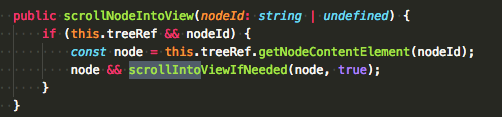
Yep, matter of fact, we had https://github.com/palantir/blueprint/pull/679 a little bit ago to give you an easy way to get access to the HTMLElement for an individual tree node. We're using it in one of our code bases now, something like this basically:
 JKillian
on 1 Feb 2018
JKillian
on 1 Feb 2018
will give it a try, thanks - but what about making sure the node and all its parent nodes are expanded as well? is this achievable somehow?
yaronlavi
on 1 Feb 2018
@yaronlavi should be possible through the content prop. in the end, you control which nodes are expanded.
 giladgray
on 1 Feb 2018
giladgray
on 1 Feb 2018
closing as stale. nothing to fix.
giladgray
on 26 Mar 2018
I know this is closed, but I ran across the same situation and thought this might help someone ( I may have ripped off forEachNode() from the examples ):
private handleNodeExpand = (nodeData: ITreeNode, nodePath: number[]) => {
  const { tree } = this.state;
  let parentNode: null | ITreeNode<any> = null;

  if (nodePath.length > 1) {
    const parentPath = nodePath[0];
    parentNode = tree[parentPath];

    parentNode.isExpanded = true;
  }

  nodeData.isExpanded = true;

  this.forEachNode(
    this.state.tree,
    this.handleNodeCollapse,
    parentNode || nodeData,
  );

  this.setState(this.state);
};

private forEachNode(
  nodes: undefined | Array<ITreeNode<any>>,
  callback: (node: ITreeNode<any>) => void,
  nodeToSkip?: ITreeNode<any>,
) {
  if (!nodes) {
    return;
  }

  for (const node of nodes) {
    if (node && !(nodeToSkip && node.id === nodeToSkip.id)) {
      callback(node);

      this.forEachNode(node.childNodes, callback);
    }
  }
}
It's not the most elegant solution and only works for a tree that's two levels deep ( all I needed, for the moment ), but I could see doing some recursion when finding the parentNode, then passing an array of nodes to forEachNode.
 joshuasprow
on 18 Oct 2018
joshuasprow
on 18 Oct 2018
Related issues
 havesomeleeway
·
3Comments
havesomeleeway
·
3Comments
 sunabozu
·
3Comments
sunabozu
·
3Comments
 ernestofreyreg
·
3Comments
ernestofreyreg
·
3Comments
 westrem
·
3Comments
westrem
·
3Comments
 mdebeus
·
3Comments
mdebeus
·
3Comments
Most helpful comment
Yep, matter of fact, we had https://github.com/palantir/blueprint/pull/679 a little bit ago to give you an easy way to get access to the HTMLElement for an individual tree node. We're using it in one of our code bases now, something like this basically: