Blueprint: [Button] Wrong onHover style on active, disabled and minimal button
Bug report
- __Package version(s)__: 1.31.0
Steps to reproduce
Button and AnchorButton with "pt-minimal" style and active and disabled props <Button className="pt-minimal" text="Button" disabled active/> don't have the style that I would expect when on hover. This is how the button looks without having the pointer over it:
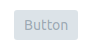
And this is how it looks when the mouse is over it:

With that style the button doesn't look active, it has the same style as a minimal and disabled button but not active.
 franciscofabian
All 4 comments
seems legit. should be straightforward to fix the CSS, I hope?
 giladgray
on 11 Oct 2017
giladgray
on 11 Oct 2017
I can take a look at this if nobody is working on it yet. Would you expect the button to become darker on hover, or simply to not become as light?
 14rcole
on 12 Oct 2017
14rcole
on 12 Oct 2017
@14rcole I haven’t started to work on it, so feel free to do it. I would expect it to behave in the same way as a non-minimal button, so that the darkness doesn't change.
Another thing that I have found is that adding also a intent prop to it, it also looks not active even without the pointer over it. It shouldn't be like that, it looks like there are a few small issues with the styling of minimal buttons.
franciscofabian
on 12 Oct 2017
So... minimal, active and disabled button looks like this, as shown by Francisco earlier:
It should simply not change on hover as the interactions are supposed to be disabled
 llorca
on 12 Oct 2017
llorca
on 12 Oct 2017
Related issues
 brsanthu
·
3Comments
brsanthu
·
3Comments
 scottfr
·
3Comments
scottfr
·
3Comments
 ghost
·
3Comments
ghost
·
3Comments
 ernestofreyreg
·
3Comments
ernestofreyreg
·
3Comments
 tgreenwatts
·
3Comments
tgreenwatts
·
3Comments
Most helpful comment
So... minimal, active and disabled button looks like this, as shown by Francisco earlier:

It should simply not change on hover as the interactions are supposed to be disabled