I'd like to be able to resize dialog windows like I can with OS windows. I think the default behavior should be symmetrical resizing such that the dialog remains centered in the overlay.
 adidahiya
All 11 comments
Draggable would be nice as well.
 dmackerman
on 8 Dec 2016
dmackerman
on 8 Dec 2016
wow this is a scary request! resizing arbitrary elements is not easy.
we have a separate plan to refactor how dialogs scroll internally such that the header and footer are fixed but the "body" can scroll freely. this behavior would gracefully support long dialogs without treading on window manager territory. would this resolve your issues?
 giladgray
on 8 Dec 2016
giladgray
on 8 Dec 2016
For a file picker dialog (e.g.), it would be great if there were a way to resize it to fit long folder and file names. I don't think body scrolling would address the need as effectively.
 cmslewis
on 8 Dec 2016
cmslewis
on 8 Dec 2016
If the dialogs are styled with a min-height and min-width and position: relative, it should be easy enough to set children to be position: absolute to keep child panels stuck to various sides of the dialog as it resizes, if necessary. I can see a path forward here. We'd just need to figure out who's responsible for setting those properties: Blueprint or users.
cmslewis
on 8 Dec 2016
@dmackerman Re: draggable dialogs: I am hesitant to add this to the core Dialog component because it adds a lot of complexity. For now I think it's best to implement this by rolling your own dialog with Overlay + react-dnd.
adidahiya
on 8 Dec 2016
If resize is complex for core component, can we please consider adding 'dialog move', where user can hold the title and position the dialog somewhere else in the view port?
Move can be very critical from application usage point of view to peek through what is behind, if that content is relevant to take some action in the dialog.
 brsanthu
on 2 Mar 2017
brsanthu
on 2 Mar 2017
@brsanthu those are draggable dialogs -- see my comment above. We might add such functionality in a new package in the future, but it's not a priority for us at the moment.
adidahiya
on 2 Mar 2017
@adidahiya can you please point me in right direction to enable dragging the dialog using header? There is this library which suppose to this capability with ease. But with Dialogs/Modals it is little different since we portal.
Any points implement this ourselves is much appreciated.
brsanthu
on 25 Apr 2017
@adidahiya I would also like to know what I should do to implement draggable/resizable dialogs in userland. Would it be as easy as sticking a with usePortal={false} inside of
When thinking about it, I'm just worried about the absolute positioning and overlay stuff getting in the way of the dragging.
 tnrich
on 6 Apr 2018
tnrich
on 6 Apr 2018
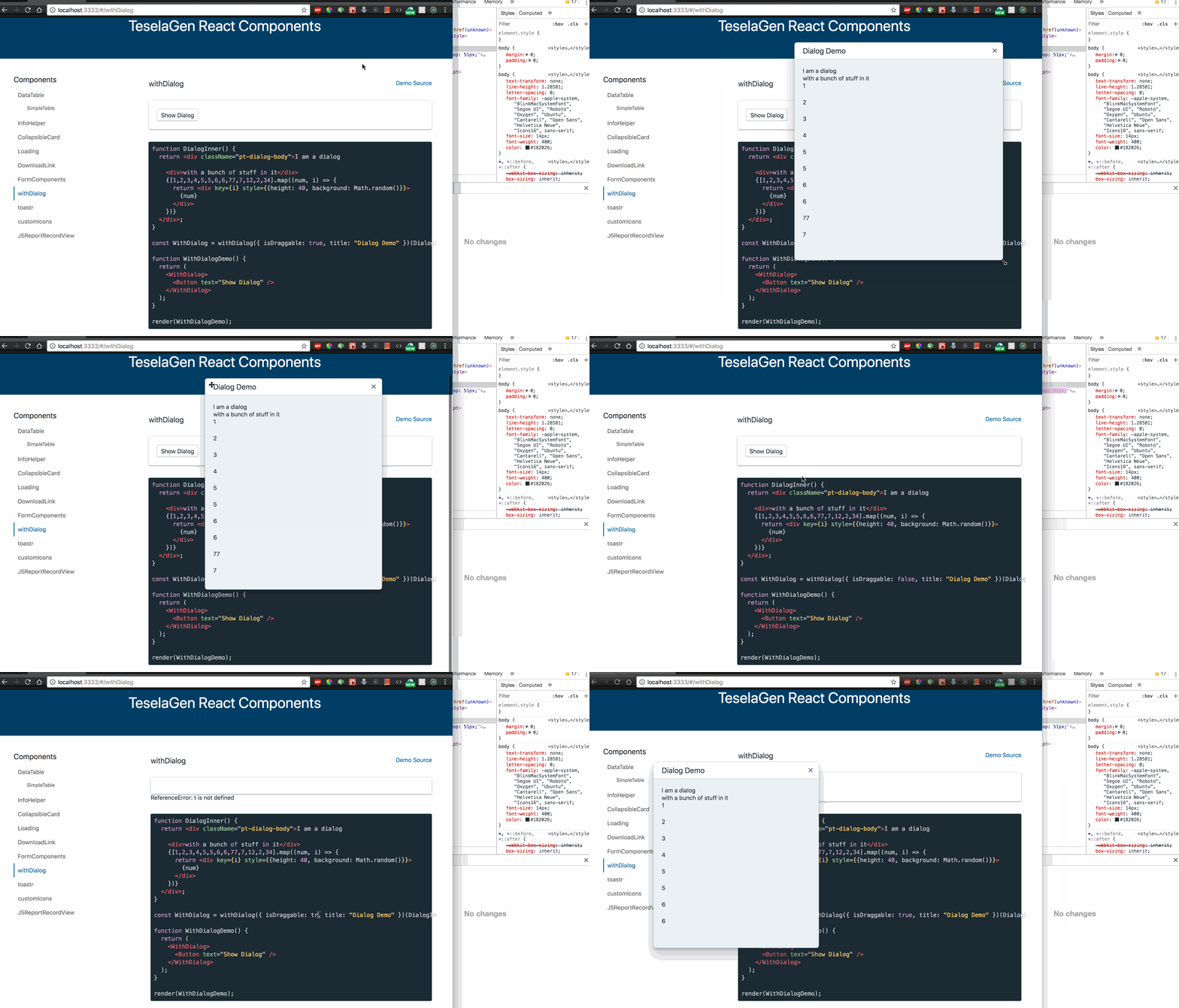
Hey everyone, I went ahead and implemented my own ResizableDraggableDialog:
import Rnd from "react-rnd";
import React from "react";
import "./style.css";
import { Dialog } from "@blueprintjs/core";

export default function ResizableDraggableDialog({
  width: defaultDialogWidth = 400,
  height: defaultDialogHeight = 450,
  RndProps,
  ...rest
}) {
  const w = window,
    d = document,
    e = d.documentElement,
    g = d.getElementsByTagName("body")[0],
    windowWidth = w.innerWidth || e.clientWidth || g.clientWidth,
    windowHeight = w.innerHeight || e.clientHeight || g.clientHeight;
  return (
    <div
      className={"tg-pt-dialog-resizable-draggable"}
      style={{ top: 0, left: 0, position: "fixed" }}
    >
      <Rnd
        enableResizing={{
          bottomLeft: true,
          bottomRight: true,
          topLeft: true,
          topRight: true
        }}
        bounds={"body"}
        default={{
          x: Math.max((windowWidth - defaultDialogWidth) / 2, 0),
          y: Math.max((windowHeight - defaultDialogHeight) / 2, 0),
          width: Math.min(defaultDialogWidth, windowWidth),
          height: Math.min(defaultDialogHeight, windowHeight)
        }}
        dragHandleClassName={".pt-dialog-header"}
        {...RndProps}
      >
        <Dialog hasBackdrop={false} usePortal={false} {...rest} />
      </Rnd>
    </div>
  );
}
.tg-pt-dialog-resizable-draggable
  .pt-overlay.pt-overlay-scroll-container.pt-overlay-inline {
  position: static;
  height: 100%;
  width: 100%;
}
.tg-pt-dialog-resizable-draggable .pt-overlay-inline .pt-overlay-content,
.tg-pt-dialog-resizable-draggable
  .pt-overlay-scroll-container
  .pt-overlay-content {
  position: static;
  width: 100%;
  height: 100%;
}
.tg-pt-dialog-resizable-draggable .pt-dialog-container .pt-dialog {
  position: static;
  width: 100%;
  height: 100%;
  margin: 0 !important;
}
.tg-pt-dialog-resizable-draggable .pt-dialog-header {
  cursor: move;
}
.tg-pt-dialog-resizable-draggable .pt-dialog-body {
  height: 100%;
  width: -webkit-fill-available;
  overflow: auto;
}
.tg-pt-dialog-resizable-draggable .pt-overlay-backdrop {
  display: none;
}
Seems to work pretty well. Hope it helps someone :)
tnrich
on 6 Apr 2018
seems quite possible! this will never be a feature in blueprint core: the expected implementation would be to compose some draggable library with a Dialog, precisely as @tnrich has done above 👍
giladgray
on 9 Apr 2018
Related issues
giladgray
·
3Comments
 vilav
·
3Comments
adidahiya
·
3Comments
vilav
·
3Comments
adidahiya
·
3Comments
 shahzeb1
·
3Comments
shahzeb1
·
3Comments
 havesomeleeway
·
3Comments
havesomeleeway
·
3Comments
Most helpful comment
Draggable would be nice as well.