Blockscout: Developer verifies a Smart Contract
This issue is intended to merge issues #68 and #161.
Acceptance Criteria:
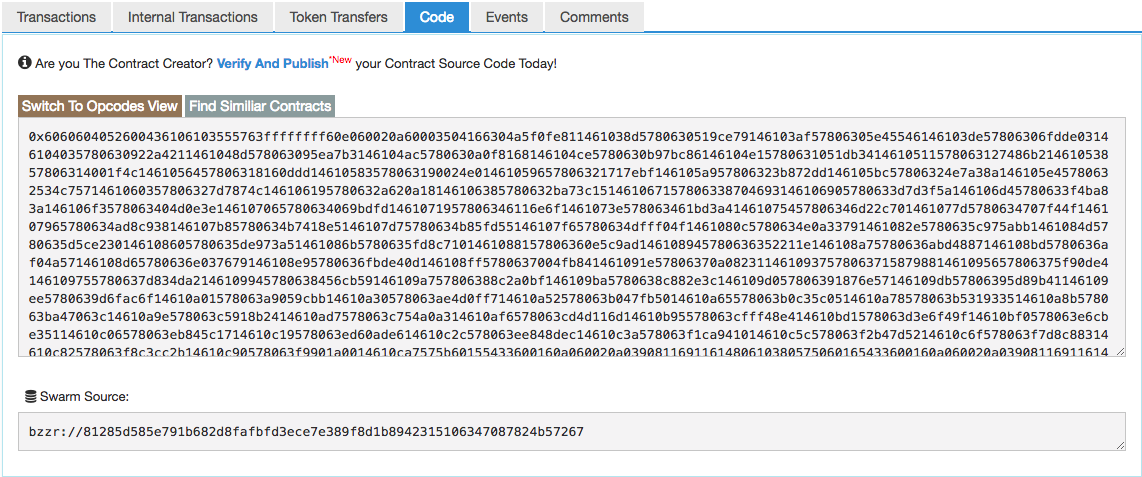
- When developer accesses the SC address page and clicks to open the
Codetab:
- If it's an unverified SC, a link with a call to verify the SC is shown.
- If it's a verified otherwise, no link is shown.
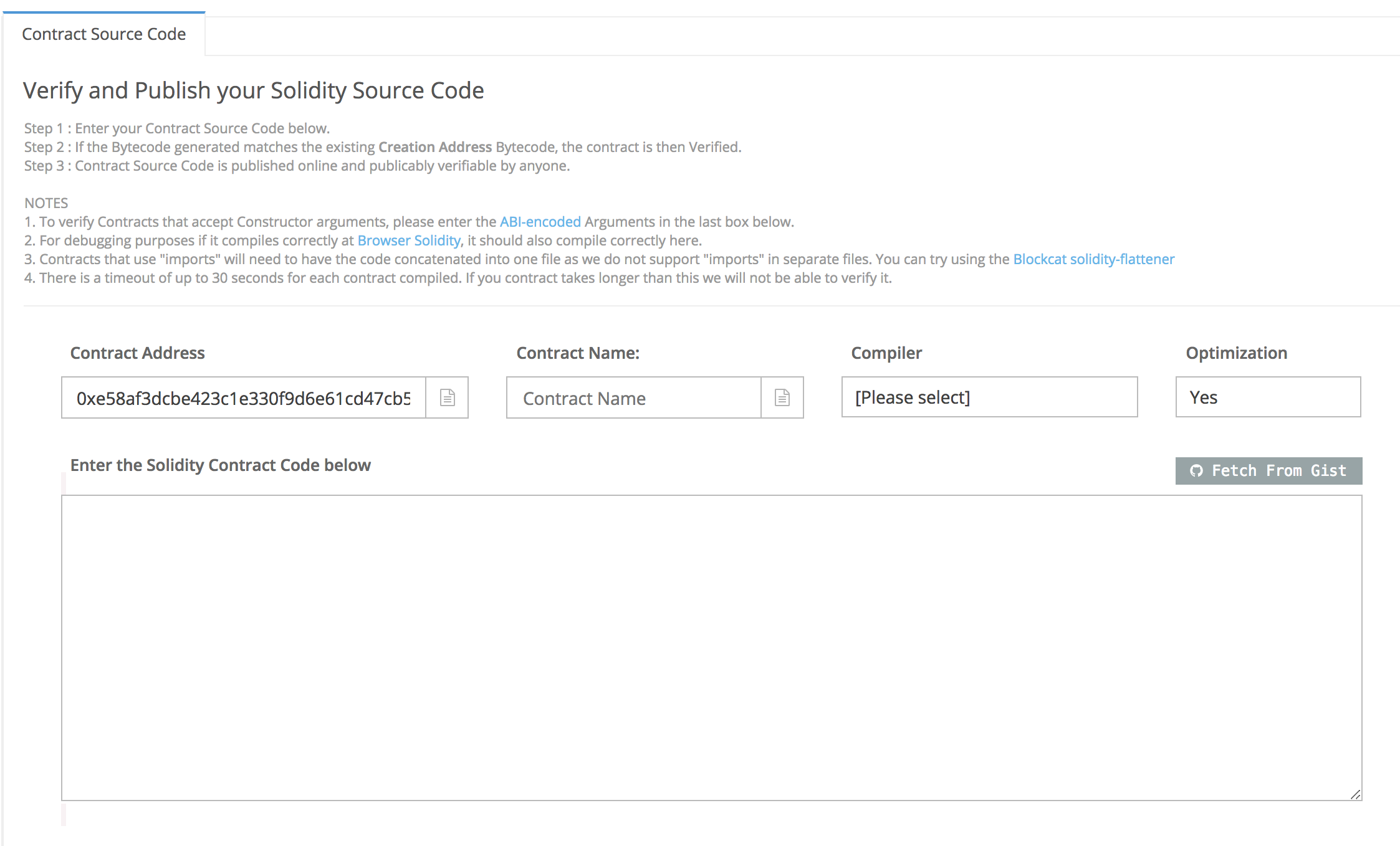
- When developer clicks on that link, she will be redirected to the Verification Page
- The Verification Page is a form with the following fields:
- Contract Address (pre-filled)
- Contract Name
- Compiler Version (dropdown)
- Optimization
- Solidity Contract Code
- When developer enters the correct info and clicks on "Verify and Publish", the source code provided should be compiled and the resulting bytecode should be compared to the given bytecode.
- If verified, Source Code, ABI, Contract Name, Compiler Version and Optimization information should be stored in DB. Also, developer should be redirected to the SC address page.
- If not verified, an error message should be shown.
Unverified SC - Verification CTA
Unverified SC - Verification Form
Questions:
- [x] On Etherscan, when a SC is already verified, the user sees an info labeled as
Runs (Optimiser). Should we store this too? - [x] In case of validation error, what is the message to be shown?
Tasks
- [x] Create verify contract page
- [x] Implement client call to retrieve solidity compile versions;
- [x] Compare bytecode's to evaluate contract authenticity;
- [x] Save additional data;
- [x] For unverified contracts, show link to verify contract;
- [x] When contract is verified, remove link to verify and add check mark;
 gfreh
gfreh
All 10 comments
@gfreh Regarding the Runs (Optimiser), I've looked into this and couldn't find any documentation through the solc (https://github.com/ethereum/solc-js) repo. I'll keep digging and will comment below if I find out more info regarding this.
In case of validation error, we should say "There was an error validating your contract. Please try again."
 acravenho
on 7 May 2018
acravenho
on 7 May 2018
Please use the standard-json-interface to the compiler, it is much more stable, easily supports multiple files and more complex settings. This also ties into the metadata output by the compilation process.
https://solidity.readthedocs.io/en/develop/using-the-compiler.html?compiler-input-and-output-json-description#compiler-input-and-output-json-description
 chriseth
on 12 May 2018
chriseth
on 12 May 2018
@chriseth, thank you so much for joining this thread. Your feedback is very valuable.
 rstormsf
on 12 May 2018
rstormsf
on 12 May 2018
@chriseth Thank you for your feedback. We appreciate the help on this matter.
acravenho
on 12 May 2018
If you like, we can setup a call. Please contact me at [email protected]
chriseth
on 14 May 2018
Hey, @amandasposito!
I've been testing the solution for this issue and below is the list of possible bugs:
- [x] If I visit the address page of a contract that is verified, the check mark next to the code tab label is only visible when the tab is active. Also, the tab label is
codewhen it is active andcontractotherwise. - [x] If I try to verify a contract with a wrong optimization option (i.e., different from the one I've chosen when deploying the contract), the verification is actually successful.
- [x] If I left the name field empty, no "can't be blank" message is shown.
- [x] If I left all fields empty, no "Can't be blank" message is shown.
- [x] If I go to verification page, fill the source code but no contract name, I got an error:
no function clause matching in String.split/3. Actually, it happens whenever I try to verify a contract that is not compilable, for example:
- a name that does not match the name in the code provided.
- a code that is not compilable (try removing a
}, for instance).
- [x] It only shows me the "Can't be blank" message for the optimization code when the provided code is correct. Examples:
- Success scenario: go to the page and fill the correct code and name for that bytecode and click to verify. The message is shown.
- Failure scenario: go to the page and fill an invalid code and name for that bytecode and click to verify. The message is not shown.
Please, let me kwnow if you need any clarification on this topics or help to reproduce them.
gfreh
on 6 Jun 2018
@acravenho everything seems fine now! Do you wanna take a look before we move this issue to done?
gfreh
on 7 Jun 2018
@gfreh I will take a look now.
acravenho
on 7 Jun 2018
LGTM 👍
acravenho
on 7 Jun 2018
I'm closing this issue because it was solved by https://github.com/poanetwork/poa-explorer/pull/182
 amandasposito
on 8 Jun 2018
amandasposito
on 8 Jun 2018
Related issues
 ArseniiPetrovich
·
3Comments
gfreh
·
4Comments
ArseniiPetrovich
·
3Comments
gfreh
·
4Comments
 maratP
·
4Comments
maratP
·
4Comments
 pedrouid
·
4Comments
pedrouid
·
4Comments
 vbaranov
·
7Comments
vbaranov
·
7Comments
Most helpful comment
Please use the standard-json-interface to the compiler, it is much more stable, easily supports multiple files and more complex settings. This also ties into the metadata output by the compilation process.
https://solidity.readthedocs.io/en/develop/using-the-compiler.html?compiler-input-and-output-json-description#compiler-input-and-output-json-description