Blockly: "Zelos" the List field is not aligned properly
I was going through toolbox and i found that *LIST and TEXT has some misaligned field*
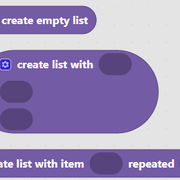
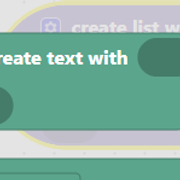
The create list with and create text with inputs are not properly aligned, as external inputs
To Reproduce
Steps to reproduce the behavior:
- Go to 'Toolbox'
- Click on 'TEXT'
- Scroll down to 'create text with ' block
- See error
Expected behavior
Should have properly aligned fields in one straight line
Screenshots
Desktop (please complete the following information):
- OS: Windows
- Browser : chrome
- Version latest
 GAUTAMRAJU15
All 7 comments
The problem here is the zelos takes inputsInline: false and creates new rows, but aligns rows the same way it would had they beed on a single row. That means the default is left aligned. Visually if we think about external inputs as separate rows, their alignment is right by default.
So there are two ways to get deal with this:
- Make it so the alignment is right aligned by default for additional rows created in zelos when inlineInputs: false.
- Update the block definition for create text and create list to setAlign(right) for its value inputs.
@rachel-fenichel thoughts?
 samelhusseini
on 27 Jan 2020
samelhusseini
on 27 Jan 2020
i think that create list with and create text with are just any blocks just like other , and we have the option to modify it with the methods available (e.g. setAlign() ) , i would go for second option , but let's discuss about both
GAUTAMRAJU15
on 28 Jan 2020
I prefer updating the block definitions.
- We already have the API to do it
- It's the simplest solution
- If a developer doesn't get the new block definitions, their blocks will still be fully functional
 rachel-fenichel
on 28 Jan 2020
rachel-fenichel
on 28 Jan 2020
i agree @rachel-fenichel
GAUTAMRAJU15
on 29 Jan 2020
Fixed.
samelhusseini
on 7 Feb 2020
actually i am using, i am loading blockly as a script
https://blockly-demo.appspot.com/static/blockly_compressed.js
but this change is not being reflected ? :(
the link is not updated ?
GAUTAMRAJU15
on 3 Apr 2020
We have yet to push our release to https://blockly-demo.appspot.com. It should happen later today and I will send out a post on the forum with more information once it has been updated.
 alschmiedt
on 3 Apr 2020
alschmiedt
on 3 Apr 2020
Related issues
 BeksOmega
·
5Comments
BeksOmega
·
5Comments
 seldomU
·
3Comments
samelhusseini
·
3Comments
BeksOmega
·
3Comments
seldomU
·
3Comments
samelhusseini
·
3Comments
BeksOmega
·
3Comments
 carloslfu
·
7Comments
carloslfu
·
7Comments
Most helpful comment
Fixed.