Bloc: [Discussion] Reacting to two BLoCs in the UI - best practices, recommendations
I have an architecture and recommendation question.
We have 2 BLoCs:
BlocAwith with a few states subclasses ofStateA, and one of them isStateASuccesswhich containsDataA.BlocBwith with a few states subclasses ofStateB, and one of them isStateBSuccesswhich containsDataB.
In the UI, there is a button that can only be enabled when BlocA.state is StateASuccess and BlocB.state is StateBSuccess, and we need to extract the data from the state as the click does something with it. We can do it using a nested BlocBuilder:
Widget build(BuildContext context) {
  return BlocBuilder<BlocA, StateA>(
    builder: (context, stateA) {
      return BlocBuilder<BlocB, StateB>(
        builder: (context, stateB) {
          return FlatButton(
            child: Text('Click me'),
            onPressed: stateA is StateASuccess && stateB is StateBSuccess
                ? _doStuff(stateA.dataA, stateB.dataB), // we can use dataA and dataB because of the implicit casts above
                : null,
          );
        },
      );
    },
  );
}
or we can do it by using combineLatest, like this (ignore the ugly unsafe dynamic List stuff, it's not the point):
Widget build(BuildContext context) {
  return StreamBuilder<List>(
    stream: CombineLatestStream.combine2(
      BlocProvider.of<BlocA>(context),
      BlocProvider.of<BlocB>(context),
      (stateA, stateB) => [stateA, stateB],
    ),
    builder: (context, statesSnapshot) {
      final stateA = statesSnapshot.data?.elementAt(0);
      final stateB = statesSnapshot.data?.elementAt(1);

      return FlatButton(
        child: Text('Click me'),
            onPressed: stateA is StateASuccess && stateB is StateBSuccess
                ? _doStuff(stateA.dataA, stateB.dataB), // we can use dataA and dataB because of the implicit casts above
                : null,
      );
    },
  );
}
Questions:
- Is such a nested
BlocProvidersomething standard or rather very exotic and shouldn't be done? - Is the
combineLatestversion Ok? Is it 'allowed' to combine the stream at the UI level? One of us said it is too complex for the UI as it has logic, but the only additional 'logic' is thecombineLatestcall, otherwise the state checks etc. is the same old thing one more time (two states instead of one). Is it really too much for the UI? - What is the 'canonical' way of doing this? I could imagine yet another
BlocCthat listens to these twoBlocAandBlocB, and has two states (naming work in progress):NotReadyandReady(with data). ThisBLocCwould do thecombineLatestand onlyyielda newReady(dataA, dataB)state when bothStateAandStateBareSuccess. The UI would use this thirdBLocC, it would only have a singleBlocBuilderand one state check to perform. I actually prototyped this but it was much more code than the other 2 solution, felt a bit over-engineered so we decided against it.
What are your thoughts?
 wujek-srujek
All 20 comments
Hi @wujek-srujek 👋
- There's nothing wrong with nesting
BlocBuilders - Is a decent approach, although too verbose. You'd rather inject one of the blocs into the other and listen to it's state and handle that combined bool as part of the one bloc's state. But this is subjective based on your requirements, so it might not apply.
- That's making your life harder, so I would advise against it.
The real question is: do you really need to have 2 separate blocs ?
Can't you just have a single bloc with the state containing DataA and DataB and if you need to handle their loading state independently you can use a single state class with bool fields for that. Have a bool get dataSuccessfullyLoaded => dataALoadedWithSuccess && dataBLoadedWithSuccess that you can use to control the button.
What you choose is very subjective based on your requirements but I'd go with either this or the nested BlocBuilders.
 narcodico
on 29 Jul 2020
narcodico
on 29 Jul 2020
Thanks @RollyPeres !
Ad. 2 Yes, we are doing just this (one BLoC listens to another) in a different case. The example above is simplified and we found in our real case wouldn't work well for us, not sure why any more. I will take a look at it again, thanks for the nudge.
Why split: the process is very complex and having just one BLoC would make the code complex as well, with a lot of states and data parts etc. In previous life (a different 'feature'/domain) we had only one BLoC, just as you suggest, and it turned out to be unwieldy, with complex code, with many ifs for state changes etc. (with many bugs that we haven't completely fixed until now). With the split, all is simpler so we are generally happy with the approach. But we are still learning, we decided to do this as we wanted to do it very differently this time around, but maybe this is not the solution, either. I'm not saying your suggestion is wrong or bad, maybe it didn't work well for us because it was our first experience with Flutter and the BLoC pattern and we may have made many mistakes along the way that made things worse.
Is this dataSuccessfullyLoaded in the BLoC? If yes, this is something I asked about before, and this is considered not good design as this makes all users of the BLoC depend on a custom getter, not only simply a stream (a BlocBuilder can't simply use the state and get all it needs from there, it needs to call extra stuff on the BLoC instance). It is also kind of a sub-state. But I might have misunderstood things.
wujek-srujek
on 29 Jul 2020
Hi @wujek-srujek 👋
Thanks for opening an issue!
I would love to better understand the role of the two blocs in your current setup because I'm guessing the blocs are created based on API resources and not features. As @RollyPeres mentioned, I think the best approach would be to have a single bloc manage that state and this problem is usually a symptom of having blocs that are not feature-oriented.
 felangel
on 29 Jul 2020
felangel
on 29 Jul 2020
As already mentioned @wujek-srujek , it all depends on your requirements.
Is this
dataSuccessfullyLoadedin the BLoC?
No, it is part of the state.
narcodico
on 29 Jul 2020
Hey guys, I would like to jump into the discussion, since I have a similar thought as @wujek-srujek.
I will try to describe my case:
I have a calendar widget, which can be either filtered by specific appointment types (e.g. work, holiday and etc) or change its view (day, week, month and etc.).
Hence, I created two separate BLoC(s) - one for event filter and one for calendar view and I would consider each one as a feature rather than a resource.
Why I need these as two separate BLoCs - because of:
- Reusability - I have another place where I need just event filter
- Testability - as @wujek-srujek mentioned it is much easier to test and maintain smaller BLoC.
So my first thought was to nesting BLoC, but as a person with JavaScript experience, I really try to avoid javascript pyramid of doom side effect.
I believe injecting one BLoC into another also creates a kind of dependency or at least redundancy, which I would like to avoid.
I was (naively) thinking if it would be possible to have a MultiBlocBuilder as an analogy to MultiBlocProvider.
What do you think @felangel?
To be clear - I have experience with Flutter and BLoC pattern for more than a year and this use case is a real problem at least from my standing point, which I am facing each time when a project grows.
 angel1st
on 1 Aug 2020
angel1st
on 1 Aug 2020
@felangel - any thoughts on the topic?
angel1st
on 6 Aug 2020
@angel1st see https://github.com/felangel/bloc/issues/538 regarding my thoughts on MultiBlocBuilder. There's nothing inherently wrong with nested BlocBuilders and even if a MultiBlocBuilder existed it would likely strictly be syntactic sugar and be identical to nested BlocBuilders.
felangel
on 6 Aug 2020
@wujek-srujek can you provide any updates/additional information or can we close this issue?
felangel
on 6 Aug 2020
Hi, yes, it's on my list, I want to provide much more context and describe the use case. I just need time for this...
wujek-srujek
on 6 Aug 2020
Thanks, @felangel - it seems #538 is the proper place for my inquiry, hence I already filed it there. To sum up - I would still believe MultiBlocBuilder has its place, but let's continue the discussion on the right place :-)
angel1st
on 6 Aug 2020
Here is the whole context. Mind you, it is a long read (quite a bit of it copied from https://github.com/felangel/bloc/issues/1475, but our requirements changed a bit since then and this description reflects this).
Use case 1
Our use case is the following (simplified, our actual use case is more complex and the 'wizard' has more steps): we first need to choose a country (country list loaded from backend), then the next step is to choose a state (e.g. California in US, Bavaria in DE) (also loaded from backend), and then a city within that state (also from backend). All in all, there are 3 different backend calls for the 3 pieces of data.
All of the data is visible in one screen (imagine the ASCII-art below is a ListView with three items that show what is currently selected and clicking it shows a popup with the country/state/city chooser (3 distinct but very similar popups):
Main screen (selected data in angle brackets, below city is not picked yet):
--------------------
[Germany]
Country
--------------------
[Bavaria]
State
--------------------

City
--------------------
Button
--------------------
When the popup is open, it partially covers the screen, but parts of the data (like the flag and first letters of the country) are still visible, although a bit dimmed. This also means that any state/data changes would be visible to the user as the underlying page is still 'active'. Below an example when the city is being selected by the user, please take your time and applaud my ASCII-foo:
--------------------
[Ger╔══════════╗
Coun║x Select  ║
----║   city   ║----
[Bav║----------║
Stat║Augsburg  ║
----║----------║----
    ║Munich    ║
City║----------║
----║Regensburg║----
Butt╚══════════╝
--------------------
Only by selecting preceding data is the user allowed to pick the next one; until then, its ListItem is disabled. E.g. you cannot chose a state or city if the country is not selected, and you cannot chose a city without a sate. Once all is selected, you can change the country and the rest will have to be reset.
Once city is selected (which implies both country and state also are), the button (otherwise disabled) can be pressed, and it invokes some logic which uses both the state and city (country not needed), so we need to preserve them until the very end as we need them to feed into the onTap callback. Button logic invokes yet another backend resource.
As the UI always needs to present all data and also make it visible in pretty much every step of the process (at least partially), we need to 'collect' it in the states as we proceed. E.g. while we are in city selection, we would have the following states:
CityListFetchInProgress (backend call initiated, but not back yet, dialog shows a loading indicator)
CityListFetchSuccess (backend call returned with the list, dialog shows the list)
CitySelected (the user clicked a state, dialog is dismissed)
CityListFetchFailure (backend call returned with an error, dialog shows a 'retry' button)
As all of these states are emitted while the city selection popup is visible, they also need to have country and state data (at least the selected ones) as the UI needs it for displaying. (Ideally, we would also preserve the country and state lists so that when the user decides to re-select them, they don't have to be loaded again (but if the user selects the country again, state list will need to be fetched again). This doesn't necessarily need to be kept in the state as the UI doesn't need the lists at this point, this can just be a private field in the BLoC. Also, state transitions are triggered by events but they don't need to carry all the data as we can get it within the bloc from current state.)
This already shows the issue - we need to pass the selected data from state to the next one, so all the states' constructors will have a growing parameter list and there will be quite some code duplication. E.g. we need to pass the selected country and state to all of CityListFetchInProgress, CityListFetchSucess, CitySelected and CityListFetchFailure as the UI needs to (partially) show them. This makes is a bit cumbersome to use the BlocBuilder. For example, take the CountryListItem: we can fill it with data if the state is CountrySelected, any of State-related states (StateListFetchInProgress, StateListFetchSuccess etc.) and any of City-related states (CityListFetchInProgress, CityListFetchSuccess etc.). Similarly, enabled status of the items depend on various states, e.g. state item is enabled from when country is selected and all other following states. Lot's of if...ors with various state types. To mitigate this, we could create a more complex hierarchy of state types (HasCountry, HasState extends HasCountry etc.) - we prototyped this, it made the BlocBuilder code easier, but it was ugly at the state hierarchy level.
Other options that come to mind are:
- Have custom fields in the bloc, like
selectedCountryandselectedState. I'm averse to this solution as it sets additional state aside, not part of the BLoC state instances. The UI will not be able to build based on the BLoC state only in thebuildercallback, it will need to get hold of the BLoC and call its custom getters. - Have one big state with all the data as its fields, which are nullable. The UI
builderalways gets the same type of state with different data, and instead of having a chain ofif/elsebased on state types, we have a chain where null checks are performed (if (state.country != null) ...,if (state.state != null) ...,if (state.cityList == null) ...etc.). This is kind of like Redux, isn't it? - For this particular use case, it could help if there were a way to 'freeze' the page while the dialog is shown (so that the UI doesn't get updated, i.e. various
buildmethods are not called). No idea if there is anything like this, and this wouldn't necessarily work for other use cases.
Enter our current solution:
- We have separate country, state, city and button BLoCs. Each is very simple, does only one thing, and drives one part of the UI (country BLoC is responsible for the CountryItem etc.).
- When a country is selected, when the dialog is closed, we immediately add the
StateListFetchRequestedevent with the chosen country to theStateBloc, which triggers loading the list. Once the user clicks theStateListItem, the list may already be there and the UI feels snappier. Sending the event is not done in the BLoC, the callback that closes the dialog fires two events:CountrySelectionSuccesswith the country toCountryBloc, and alsoStateListFetchRequestedwith the country toStateBloc. - Similarly, when a state is selected, closing the dialog causes the
StateSelectionSuccesswith the state to be sent toStateBloc, andCityListFetchRequestedwith the state to be sent toCityBloc`. StateBloclistens toCountryBloc- if aCountrySelectionSuccessstate is emitted,StateBlocknows to reset itself. Similarly,CityBloclistens toStateBlocand resets itself for theStateSelectionSuccess(new state chosen) orStateSelectionInitial(new country chosen, state reset itself). Any further BLoC, like an imaginaryCityDistrictBloccould do the same. This way, when all data is selected, and the country is reset, all the following BLoCs automatically reset in a cascade. Works like a dream.- Once city is selected, the button can be enabled. Here is where the combined stream comes to play, it looks more or less like this (we are using a pretty outdated versions of
flutter_blocandrxdart, unfortunately):
@immutable
class _States {
  final StateSelectionState stateState;
  final CitySelectionState cityState;

  const _States(this.stateState, this.cityState);
}

...

return StreamBuilder<_States>(
  stream: CombineLatestStream.combine2(
    BlocProvider.of<StateSelectionBloc>(context),
    BlocProvider.of<CitySelectionBloc>(context),
    (stateState, cityState) => _States(stateState, cityState),
  ),
  builder: (context, statesSnapshot) {
    final stateState = statesSnapshot.data?.stateState;
    final cityState = statesSnapshot.data?.cityState;

    return MaterialButton(
      child: Text('Do it!'),
      onPressed: stateState is StateSelectionSuccess &&
              cityState is CitySelectionSuccess
          ? _doIt(context, stateState.state, cityState.city)
          : null,
    );
  },
);
The type checks in onPressed also perform implicit casts, so we can just take the data from the states. If the states are of incorrect type, the button is simply disabled.
All in all, this is the only thing that I don't really like and am not overly happy with, hence the original question; otherwise, the resulting code has very simple state transitions and BLoC logic, and it next to trivial to test.
I guess this qualifies as 'BLoC per resource', not 'BLoC per feature', as you said previously, but I wasn't aware of rules like this. But read on, we have another use case where we also use small and simple BLoCs but they are not 'per resource'.
Use case 2
The user has an account and in the account they have profiles. We have a screen that looks like this (warning, ASCII-art again):
  Profiles
--------------------
Profile 1         x
Profile 2         x
Profile 3         x


--------------------
Log out
--------------------
The 'x' removes the profile. The 'log out' button forgets the whole account and navigates to another screen. These are 2 separate BLoCs for us:
ProfilesBlocthat has states:ProfilesInitial,ProfilesListFetchInProgress,ProfilesListFetchSuccess,ProfilesListFetchFailure. When 'x' is pressed, the profile is removed from the list (a request is sent to the backend and when it's back with a HTTP 200 we simply remove the profile from the list locally, we currently don't reload the list). This BLoC encompasses a couple of related resources in the backend and it fits nicely with our UI and (current) way of coding.AccountBloccan log out the user. It doesn't need any data from any other BLoCs, nothing. It has a few states for in progress, errors etc. but otherwise it is trivial. It is not used anywhere else in the app.
Here you go, I tried to be as detailed as I (also legally) can. I don't think I could (nor should) write more, I doubt many people reach this point.
wujek-srujek
on 8 Aug 2020
BTW, here is our coverage report of the code described above (partial, only the BLoC and UI parts, no repositories, HTTP clients etc. here, but they are equally well tested):
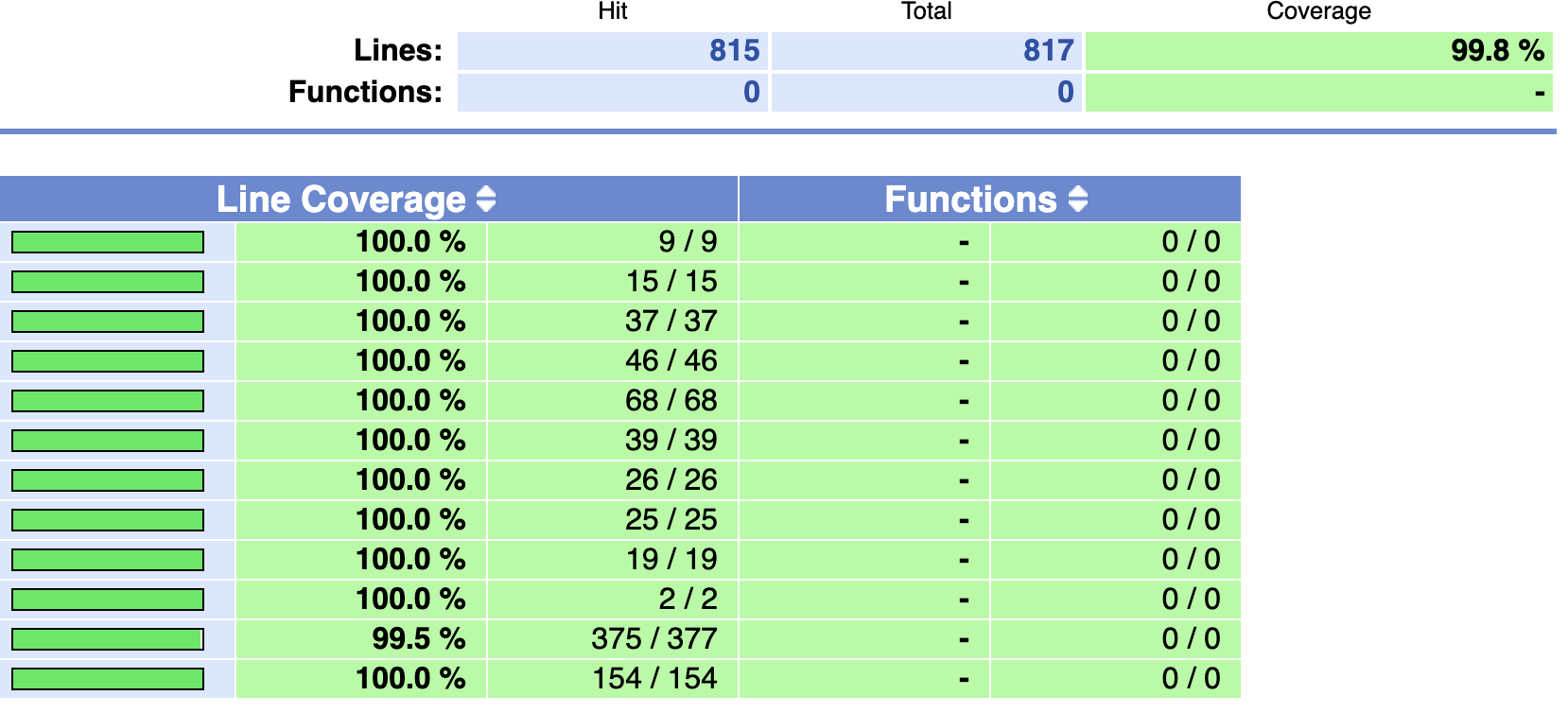
(Not a lot of code as we are using a corporate UI widget library that takes a lot of widget-related work away.)
There are literally only 2 lines that are not tested in one of our widgets, this is an oversight and I will take care of it next week ;d Mind you, the tests make sense (to us), there is not a single test that exists only to satisfy someone's code coverage wet dreams. What is important is that our tests are just as simple as the code, we don't sit day without end writing them.
This is a testament to how well your library allows us to decouple UI from logic, how easily testable BLoCs are (thanks to bloc_test), so again kudos and a big thank you to you. This also show how good and easy widget testing is in Flutter. We also like to think it has at least a little bit to do with the way we decided to tackle our tasks.
wujek-srujek
on 8 Aug 2020
@angel1st :
I believe injecting one BLoC into another also creates a kind of dependency or at least redundancy, which I would like to avoid.
We also thought about this, and didn't really like introducing this dependency if we can avoid it, just as you are saying. So, at the code/API level, one BLoC doesn't get another BLoC, it just gets a Stream<SomeState> instead, so that we can listen to it and react if certain states are emitted. It just so happens that Bloc extends Stream. We don't need the whole BLoC, we never call its add method, so a Stream is enough. Of course, when the BLoCs are created, one BLoC is just put into the other one, but in theory it could be something different. I believe this is an application of https://en.wikipedia.org/wiki/Interface_segregation_principle.
This is also helpful in tests because it makes testing simpler - we want to test how one BLoC reacts to state changes in the stream so we simply create a StreamController in the test, the BLoC under test gets the stream part, and in the test we can put states into it using the sink to trigger code that we want to test. The rest is easy.
wujek-srujek
on 9 Aug 2020
Thanks, @wujek-srujek for the note. Just to clarify - if I take a part of your case:
StateBloclistens toCountryBloc- if aCountrySelectionSuccessstate is emitted,StateBlocknows to reset itself.
Essentially, when you receive CountrySelectionSuccess inside StateBloc listener, you are sending StateBloc event from itself e.g. this.Add(StateSelectionInitial()) - is that what you are doing?
angel1st
on 9 Aug 2020
BTW - regarding your use case and the discussed topic - IMO, there are cases, when features depend on each other, e.g. Country > State > City chain. In this case, it makes sense injecting one BLoc into another since the relation between these BLoCs is clear (please note in the context of this note whether you will inject a BLoC or a Stream won't change the overall architectural approach. Otherwise, I am totally agree with you on how you decide to use Stream over a BLoC).
There are however cases when there is no dependency between BLoCs e.g. you have to have few states from different BLoCs combined in order to enable a button. Then injecting doesn't not seem a legitimate option, so we ended up with nesting. Which however creates less readable code, even if the level is 3 or 4 BLoCs.
angel1st
on 9 Aug 2020
Thanks, @wujek-srujek for the note. Just to clarify - if I take a part of your case:
StateBloclistens toCountryBloc- if aCountrySelectionSuccessstate is emitted,StateBlocknows to reset itself.Essentially, when you receive
CountrySelectionSuccessinsideStateBloclistener, you are sendingStateBlocevent from itself e.g.this.Add(StateSelectionInitial())- is that what you are doing?
Yes, that's right - we add(StateSelectionReset()), whose handler simply sets the state to StateSelectionInitial again. I don't know if there is any other way of doing this, we have been following examples from the docs.
wujek-srujek
on 9 Aug 2020
BTW - regarding your use case and the discussed topic - IMO, there are cases, when features depend on each other, e.g. Country > State > City chain. In this case, it makes sense injecting one BLoc into another since the relation between these BLoCs is clear (please note in the context of this note whether you will inject a BLoC or a Stream won't change the overall architectural approach. Otherwise, I am totally agree with you on how you decide to use Stream over a BLoC).
There are however cases when there is no dependency between BLoCs e.g. you have to have few states from different BLoCs combined in order to enable a button. Then injecting doesn't not seem a legitimate option, so we ended up with nesting. Which however creates less readable code, even if the level is 3 or 4 BLoCs.
I agree, it all depends on the use case, but as I noted in other discussions, I am a very inexperienced mobile, and Flutter and BLoC developer (I'm a seasoned developer in general, though) so I just know the few things we have come across so far. My opinions may change the more I learn.
Yes, we could have chosen to enable the button based on CityBloc only, but then we would have to get the state from StateBloc anyway, which would involve an if with a type check and a cast etc. In our case, we decided for the combined stream for convenience (but agreed, the is quite some boilerplate involved as well...).
Pretty much all of my questions stem from the fact that the more complex the use case gets, the more complex the state transitions and also the amount of data that needs to be put into states (and sometimes events) and I would like to know the best ways to tackle them.
wujek-srujek
on 9 Aug 2020
I have been also trying to tackle similar issue while being a newbie in flutter_bloc. My issue is similar to the https://bloclibrary.dev/#/flutterfirebaselogintutorial example, where if the user is Authenticated, the BlocListener navigates to Home page, but I have been trying to add another check from a different bloc, for example, if the user is Authenticated and if that user has some data stored locally then navigate to Home page, otherwise navigate to SetLocation page. Tried with MultiBlocListener but wasn't successful. One example would be amazing!
Thanks in advance and really really appreciate your great work towards the flutter community !!
 MahdiShahadat
on 4 Sep 2020
MahdiShahadat
on 4 Sep 2020
@MahdiShahadat Isn't your problem solvable using this approach (pseudocode)?
BlocListener<AuthBloc, AuthState>(
  listener: (context, state) {
    if (state is Authenticated) {
      final navigator = Navigator.of(context);
      if (userHasDataStoredLocallyUsingAnotherBloc(context)) {
        navigator.push(homePageRoute);
      } else {
        navigator.push(setLocationPageRoute);
      }
    }
  },
  child: ...
);
@wujek-srujek Thank you so much for your reply!
I ended up solving it using this approach:
```@override
Widget build(BuildContext context) {
return MultiRepositoryProvider(
providers: [
RepositoryProvider
create: (context) => AuthenticationRepository(),
),
RepositoryProvider
create: (context) => LocalDBRepository(),
),
],
child: MultiBlocProvider(
providers: [
BlocProvider
create: (context) => AuthenticationBloc(
authenticationRepository:
context.repository
),
),
BlocProvider
create: (context) => LocalDBCubit(
context.repository
),
),
],
child: AppMainCanvas(),
),
);
class AppMainCanvas extends StatefulWidget {
@override
_AppMainCanvasState createState() => _AppMainCanvasState();
}
class _AppMainCanvasState extends State
final _navigatorKey = GlobalKey
NavigatorState get _navigator => _navigatorKey.currentState;
@override
Widget build(BuildContext context) {
return MaterialApp(
theme: theme,
navigatorKey: _navigatorKey,
builder: (context, child) {
return BlocListener
listener: (context, state) {
if (state.status == AuthenticationStatus.unauthenticated ||
state.status == AuthenticationStatus.unknown) {
_navigator.pushAndRemoveUntil
SplashPage.route(),
(route) => false,
);
} else if (state.status == AuthenticationStatus.authenticated) {
final localDBCubit = context.bloc
localDBCubit.getRecordByDate('20200905'); }
},
child: BlocListener
listener: (context, state) {
if (state.status == LocalDBStatus.queryingSuccess) {
_navigator.pushAndRemoveUntil
HomePage.route(),
(route) => false,
);
} else if (state.status == LocalDBStatus.queryingFailure) {
_navigator.pushAndRemoveUntil
TenantOnboardingPage.route(),
(route) => false,
);
}
},
child: child,
),
);
},
onGenerateRoute: Router.generateRoute,
);
}
}```
MahdiShahadat
on 8 Sep 2020
Related issues
 clicksocial
·
3Comments
clicksocial
·
3Comments
 shawnchan2014
·
3Comments
shawnchan2014
·
3Comments
 zjjt
·
3Comments
zjjt
·
3Comments
 nhwilly
·
3Comments
nhwilly
·
3Comments
 craiglabenz
·
3Comments
craiglabenz
·
3Comments
Most helpful comment
Hey guys, I would like to jump into the discussion, since I have a similar thought as @wujek-srujek.
I will try to describe my case:
I have a calendar widget, which can be either filtered by specific appointment types (e.g. work, holiday and etc) or change its view (day, week, month and etc.).
Hence, I created two separate BLoC(s) - one for event filter and one for calendar view and I would consider each one as a feature rather than a resource.
Why I need these as two separate BLoCs - because of:
So my first thought was to nesting BLoC, but as a person with JavaScript experience, I really try to avoid javascript pyramid of doom side effect.
I believe injecting one BLoC into another also creates a kind of dependency or at least redundancy, which I would like to avoid.
I was (naively) thinking if it would be possible to have a
MultiBlocBuilderas an analogy toMultiBlocProvider.What do you think @felangel?
To be clear - I have experience with Flutter and BLoC pattern for more than a year and this use case is a real problem at least from my standing point, which I am facing each time when a project grows.