Bloc: [Question] What is the best approach for Navigation between two pages?
It's not a bug, just want to learn a good approach. I search a lot but didn't find any good solution.
*Note: Here is the full sample code: https://github.com/abdullah432/flutter_bloc_navigation_sample
Trying to explain
I create 3 blocs. 1) authentication 2) Login 3) Signup
At Start
home: BlocBuilder<AuthenticationBloc, AuthenticationState>(
        builder: (context, state) {
          if (state is AuthenticationSuccess)
            return HomePage();
          else if (state is AuthenticationFailure)
            return LoginPage(userRepository: _userRespository,);
          else if (state is AuthenticationInProgress)
            return LoadingIndicator();
          else
            return SplashPage();
        },)
    );
AuthenticationFailure State
This state will open LoginPage. LoginPage has a label "New user? Signup". Now when the user click on this text. User will be navigated to SignupPage.
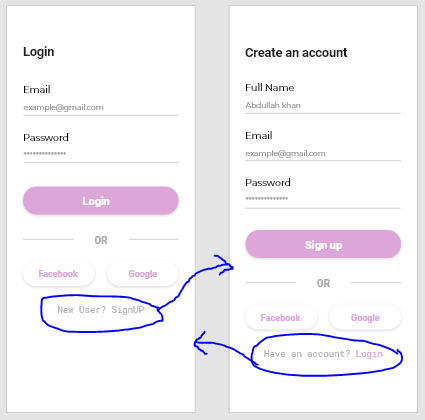
Problems
1) I navigate to SignupPage using Navigator.pop(....); but when I do Navigator.pop(context); and try to click again. Second-time navigation didn't work. (I didn't understand what happened when I navigate to signuppage. State or bloc is destroyed after navigation?)
2) After navigation to SignupPage when I clicked on the Signup button. After authentication is successful, home page is loaded but it replaces the previous loginpage, not signup page. When i pop then came to homepage. (I link authentication bloc with both loginpage and signup page you can see below. Why it's replacing loginpage, when I'm active on signuppage?)
LoginPage called
return Scaffold(body: BlocProvider<LoginBloc>(
      create: (context) {
        return LoginBloc(
            userRepository: _userRepository,
            authenticationBloc: BlocProvider.of<AuthenticationBloc>(context));
      },
      child: LoginForm(userRepository: _userRepository,),
    ));
SignupPage called
return Scaffold(
        body: BlocProvider<SignupBloc>(
      create: (context) {
        return SignupBloc(
            userRepository: _userRepository,
            authenticationbloc: BlocProvider.of<AuthenticationBloc>(context));
      },
      child: SignupForm(userRepository: _userRepository,),
    ));
I don't know, I make it clear or it's good place to ask but help will be appreciated.
Is the event-based navigation approach is good in my scenario? https://bloclibrary.dev/#/recipesflutternavigation
 abdullah432
All 9 comments
Hi, @abdullah432
There are many solutions,
- You can reuse the BlocProvider package on the required page
- Use the second Navigator to wrap the page you need. #1432
- Wrap all pages directly on top
 YeungKC
on 15 Jul 2020
YeungKC
on 15 Jul 2020
@YeungKC Thanks for your answer. I'm new to the bloc. So can you explain what you mean by points 1 and 3? If you send me a reference of the implementation of both points that will be helpful. I will check the second point reference #1432 in about 4 to 5 hours.
abdullah432
on 15 Jul 2020
@YeungKC I check #1432 this solution but the scenario is not the same. I didn't know you run my sample code but I will explain again. I have authentication bloc which has different events including AuthenticationLoggedIn. This event will be called whenever user clicked on the login button or signup button or (SignupButtonPressed or LoginButtonPressed) event is called. After 3 seconds AuthenticationLoggedIn event will return AuthenticationSuccess state.
In the main.dart I manage it like this
return MaterialApp(
      title: 'HappyShooping',
      debugShowCheckedModeBanner: false,
      theme: ThemeData(
        primarySwatch: Colors.blue,
        visualDensity: VisualDensity.adaptivePlatformDensity,
      ),
      home: BlocBuilder<AuthenticationBloc, AuthenticationState>(
        builder: (context, state) {
          if (state is AuthenticationSuccess)
            return HomePage();
          else if (state is AuthenticationFailure)
            return LoginPage(userRepository: _userRespository,);
          else if (state is AuthenticationInProgress)
            return LoadingIndicator();
          else
            return SplashPage();
        },)
    );
When AuthenticationSuccess state returns user will be navigated to the homepage and everything works fine for login page. But when I navigate to signup page from login page using Navigator.push(). Problem starts. When I clicked on signup button transition happened successfully and AuthenticationSuccess state returns successfully too. But the Signup page is not replacing with the homepage. Somehow I understand why but I'm not sure. I think the only way possible is to use event-based navigation but I came here to know is there any better way to navigate in my scenario. I think the sample code will be helpful in understanding the scenario. It's really basic scenario and really easy to implement without bloc but becomes very confusing using bloc.
abdullah432
on 15 Jul 2020
I resolve the issue and know before asking the question that this approach will work but I don't know it's the only possible approach or there are other good approaches.
I add two extra states to authentication bloc. 1) NavigateToLoginPage 2) NavigateToSignupPage.
When user clicked on "NewUser?Signup" Text Widget, in GestureDetector I activate NewUserLoginEvent event of Loginbloc.
_onNewUserSignupLabelPressed() {
    loginBloc.add(NewUserLoginEvent());
  }
and that event called NewUserAuthEvent of authentication bloc.
if (event is NewUserLoginEvent) {
      authenticationBloc.add(NewUserAuthEvent());
    }
which return NavigateToSignupPage
if (event is NewUserAuthEvent) {
      yield NavigateToSignupPage();
    }
and in main.dart, this state return SignupPage.
return MaterialApp(
      title: 'HappyShooping',
      debugShowCheckedModeBanner: false,
      theme: ThemeData(
        primarySwatch: Colors.blue,
        visualDensity: VisualDensity.adaptivePlatformDensity,
      ),
      home: BlocBuilder<AuthenticationBloc, AuthenticationState>(
        builder: (context, state) {
          if (state is AuthenticationSuccess)
            return HomePage();
          else if (state is AuthenticationFailure)
            return LoginPage(userRepository: _userRespository,);
          else if (state is NavigateToLoginPage) {
            return LoginPage(userRepository: _userRespository,);
          }
          else if (state is NavigateToSignupPage) {
            return SignupPage(userRepository: _userRespository,);
          }
          else if (state is AuthenticationInProgress)
            return LoadingIndicator();
          else
            return SplashPage();
        },)
    );
Hi @abdullah432 👋
Thanks for opening an issue!
I'm in the process of revamping all of the examples for v6.0.0. You can check out the new flutter_login example for what I would recommend in this case.
Hope that helps 👍
 felangel
on 15 Jul 2020
felangel
on 15 Jul 2020
Hi @abdullah432
I'm glad you solved the problem. I was too tired yesterday to reply in time, sorry.
YeungKC
on 16 Jul 2020
Hey guys, facing the same issue (I think)
What I did:
1) Forked current repo
2) In flutter_firebase_login project (bloc\bloc\examples\flutter_firebase_login\lib) added WelcomeScreen which replaced LoginScreen in main.dart. WelcomeScreen has 2 buttons: login and register which link to LoginScreen and RegisterScreen respectively.
3) Tested the app, if I register from welcome screen and it is successful, the register screen "disappears" and HomeScreen is shown.
4) Tested the app, if I sign in from welcome screen and it is successful, the LoginScreen does NOT "disappear" and stays on top of HomeScreen. If I then press back button, I can see that I am logged in (HomeScreen is shown).
Here are the changes I made:
https://github.com/felangel/bloc/compare/master...animalnots:master
repo url: https://github.com/animalnots/bloc
What I expect:
In step 4, after successfully logging in, I expect LoginScreen to disappear like the RegisterScreen does.
If anybody got idea why it doesn't work as expected I would appreciate response.
 animalnots
on 24 Jul 2020
animalnots
on 24 Jul 2020
@felangel, I am not sure whether closed issues are monitored, but it would be nice if mentions work.
animalnots
on 25 Jul 2020
@animalnots I'm not sure exactly about your issue but I think this issue happens when you use single bloc in multiple pages. You will need separate bloc for each page. When you navigate to the next page through Navigator.push(), new bloc will be activated. But in some scenarios, we need single bloc in multiple pages like authentication (in my scenario mention above). In that case the only way to navigate from one page to another is through bloc like this https://github.com/felangel/bloc/issues/1455#issuecomment-658758736. But again I'm new to the bloc. That's my personal point of view. (someone can correct me if I'm wrong). Hope it help.
abdullah432
on 29 Jul 2020
Related issues
 MahdiPishguy
·
3Comments
MahdiPishguy
·
3Comments
 shawnchan2014
·
3Comments
shawnchan2014
·
3Comments
 timtraversy
·
3Comments
timtraversy
·
3Comments
 clicksocial
·
3Comments
clicksocial
·
3Comments
 ricktotec
·
3Comments
ricktotec
·
3Comments