Bloc: [Help] BlocBuilder does not get called. Updates on Hot Reload though
Hey!
I got this bloc and a group of buttons. Each button has a Note attached to it and for now all I'm doing is when tapped, I add an UpdateNote event.
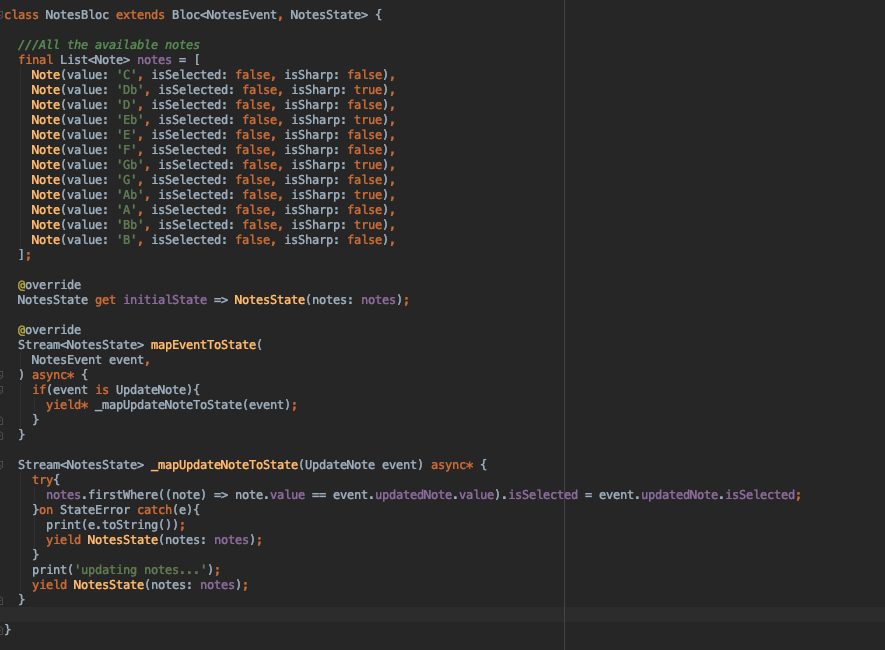
When I tap the button nothing happens, but as soon as I HR the UI updates so the event is getting triggered and the list is being updated, however the BlocBuilder does not detect a change on the state. Why is this happening?
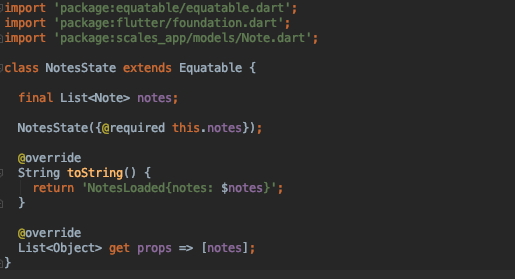
This is my state
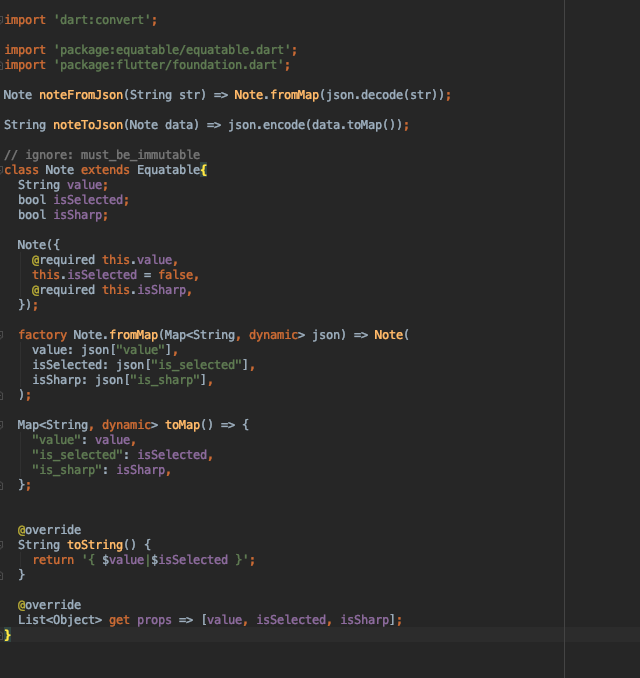
This is the Note model
Update:
So I've noticed that when I update the value of an item inside the list, for some reason the current state's list gets automatically updated as well..
so inside my previously shown bloc...
  Stream<NotesState> _mapUpdateNoteToState(UpdateNote event) async* {
    print(state.notes); //This list got already updated
    final List<Note> updatedNotes = notes.map(
            (note) => note.value == event.updatedNote.value ? event.updatedNote : note
    ).toList();
    print(updatedNotes); // Now this list is the same as the other one
    yield NotesState(notes: updatedNotes);
  }
when I press a note button this is what I call:
onTap: () {
  final Note updatedNote = note;
  updatedNote.isSelected = true;
  _notesBloc.add(UpdateNote(updatedNote));
},
Update 2
I've changed things a bit more and got a bit closer but I still can't get the BlockBuilder to be called
I changed my _mapUpdateNoteToState to this...
 Stream<NotesState> _mapUpdateNoteToState(UpdateNote event) async* {
    final List<Note> updatedNotes = state.notes.map((note) {
      return note.value == event.updatedNote.value ? event.updatedNote : note;
    }).toList();
    print(NotesState(notes: updatedNotes) == state); //This prints false
    yield NotesState(notes: updatedNotes);
    _notesRepository.updateNote(note: event.updatedNote);
    print(NotesState(notes: updatedNotes) == state); //This prints true
  }
 JoseGeorges8
All 5 comments
I got it to work now by removing _notesRepository.updateNote(note: event.updatedNote); from the call... I'm a bit unsure as to why is this causing an issue. All this line does is update the repositories list..
my data provider
class NotesBasicProvider extends NotesBaseProvider{

  ///All the available notes
  final List<Note> _notes = [
    Note(value: 'C', isSelected: false, isSharp: false),
    Note(value: 'Db', isSelected: false, isSharp: true),
    Note(value: 'D', isSelected: false, isSharp: false),
    Note(value: 'Eb', isSelected: false, isSharp: true),
    Note(value: 'E', isSelected: false, isSharp: false),
    Note(value: 'F', isSelected: false, isSharp: false),
    Note(value: 'Gb', isSelected: false, isSharp: true),
    Note(value: 'G', isSelected: false, isSharp: false),
    Note(value: 'Ab', isSelected: false, isSharp: true),
    Note(value: 'A', isSelected: false, isSharp: false),
    Note(value: 'Bb', isSelected: false, isSharp: true),
    Note(value: 'B', isSelected: false, isSharp: false),
  ];

  @override
  List<Note> getNotes() => _notes;

  @override
  Future<List<Note>> getAsyncNotes() async => _notes;

  @override
  void updateNote(Note updatedNote) {
    _notes.firstWhere((note) => note.value == updatedNote.value).isSelected = updatedNote.isSelected;
  }
}
Even though i've resolved the issue, could you tell me why that line was stopping the ui from updating?
JoseGeorges8
on 11 Dec 2019
Hi @JoseGeorges8 👋
Thanks for opening an issue!
I'm glad you resolved the problem and the reason updateNote is causing the problem is because you're mutating _notes instead of creating a copy and updating the value. You can create a copy using List.from(_notes)..firstWhere(...). Hope that helps 👍
 felangel
on 12 Dec 2019
felangel
on 12 Dec 2019
Thanks! I'll try that instead soon and let you know!
JoseGeorges8
on 12 Dec 2019
Closing for now but feel free to comment with additional information/questions and I'm happy to continue the conversation 👍
felangel
on 12 Dec 2019
Hey sorry to come this late but that worked great for a different part of the app! thank you!
JoseGeorges8
on 13 Dec 2019
Related issues
 zjjt
·
3Comments
zjjt
·
3Comments
 abinvp
·
3Comments
abinvp
·
3Comments
 ricktotec
·
3Comments
ricktotec
·
3Comments
 shawnchan2014
·
3Comments
shawnchan2014
·
3Comments
 craiglabenz
·
3Comments
craiglabenz
·
3Comments
Most helpful comment
Hey sorry to come this late but that worked great for a different part of the app! thank you!