Bloc: VSCode extension: command 'extension.new-bloc' not found
Describe the bug
>Bloc: New Bloc command returns command 'extension.new-bloc' not found error.
Reproducible only in Flutter projects. When I try to create a bloc on server-side project, it lets me to do so. Reinstalling Bloc extension and restarting VSCode didn't help.
Interesting it worked few days ago. I was able to create the first bloc.
Bloc extension version: 2.0.0
VS Code info:
Version: 1.40.0
Commit: 86405ea23e3937316009fc27c9361deee66ffbf5
Date: 2019-11-06T17:09:34.601Z
Electron: 6.1.2
Chrome: 76.0.3809.146
Node.js: 12.4.0
V8: 7.6.303.31-electron.0
OS: Darwin x64 19.0.0
To Reproduce
Steps to reproduce the behavior:
- CMD + Shift + P
- Type
bloc - Select
Bloc: New Bloc - See error
Expected behavior
I expect to see bloc name selector
Screenshots

*Logs *
flutter analyze:
No issues found
[✓] Flutter (Channel stable, v1.9.1+hotfix.5, on Mac OS X 10.15 19A602, locale en-RU)
    • Flutter version 1.9.1+hotfix.5 at /Users/andrey/flutter
    • Framework revision 1aedbb1835 (4 weeks ago), 2019-10-17 08:37:27 -0700
    • Engine revision b863200c37
    • Dart version 2.5.0


[!] Android toolchain - develop for Android devices (Android SDK version 28.0.3)
    • Android SDK at /Users/andrey/Library/Android/sdk
    • Android NDK location not configured (optional; useful for native profiling support)
    • Platform android-28, build-tools 28.0.3
    • Java binary at: /Applications/Android Studio.app/Contents/jre/jdk/Contents/Home/bin/java
    • Java version OpenJDK Runtime Environment (build 1.8.0_152-release-1248-b01)
    ! Some Android licenses not accepted.  To resolve this, run: flutter doctor --android-licenses

[✓] Xcode - develop for iOS and macOS (Xcode 11.0)
    • Xcode at /Applications/Xcode.app/Contents/Developer
    • Xcode 11.0, Build version 11A420a
    • CocoaPods version 1.8.4

[!] Android Studio (version 3.3)
    • Android Studio at /Applications/Android Studio.app/Contents
    ✗ Flutter plugin not installed; this adds Flutter specific functionality.
    ✗ Dart plugin not installed; this adds Dart specific functionality.
    • Java version OpenJDK Runtime Environment (build 1.8.0_152-release-1248-b01)

[✓] VS Code (version 1.40.0)
    • VS Code at /Applications/Visual Studio Code.app/Contents
    • Flutter extension version 3.6.0

[✓] Connected device (1 available)
    • Android SDK built for x86 • emulator-5554 • android-x86 • Android 8.1.0 (API 27) (emulator)

! Doctor found issues in 2 categories.
 agordeev
All 26 comments
Hi @agordeev 👋
Thanks for opening an issue!
Can you please provide a link to a sample app in which the command fails? I am unable to reproduce locally in various flutter projects.
Thanks! 👍
 felangel
on 13 Nov 2019
felangel
on 13 Nov 2019
Closing for now but feel free to comment with additional details/reproduction steps and I"m happy to continue the conversation 👍
felangel
on 13 Nov 2019
Unfortunately, I'm unable to share the project as it is a proprietary. The issue does not appear when I try to use on your examples from this repo.
VSCode dev tools console outputs this:
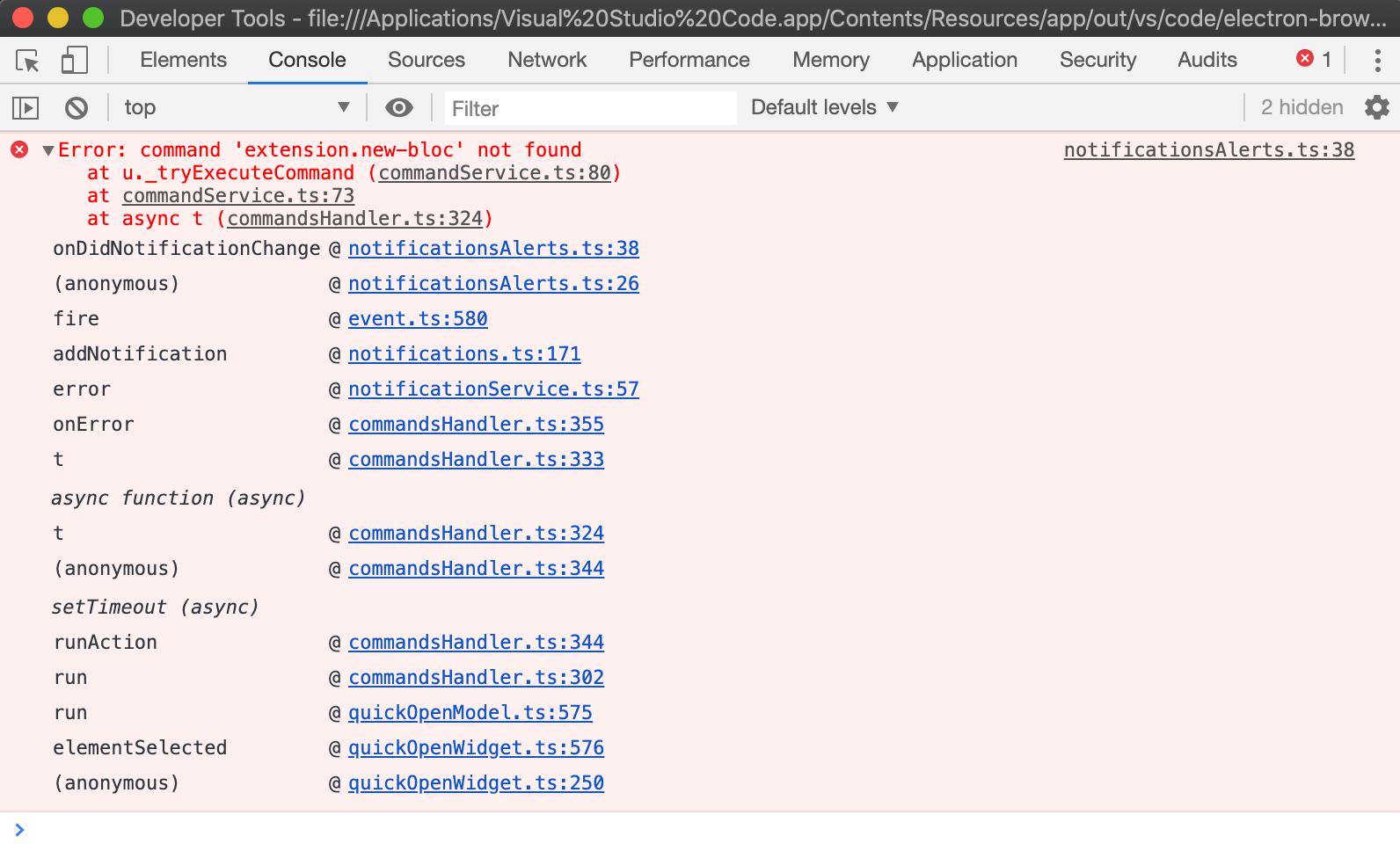
Removing extension's folder from /users/%myname%/.vscode/extensions during reinstall didn't help neither.
agordeev
on 14 Nov 2019
Hmm it looks like the error is coming from within VSCode and not the bloc extension itself. I’ll try to investigate this further. In the meantime if you’re able to put together a sample app that reproduces the issue it would be awesome! Thanks 👍
felangel
on 14 Nov 2019
Looks like this is exactly the same issue as this one: https://github.com/shanalikhan/code-settings-sync/issues/745
agordeev
on 14 Nov 2019
I've tried to disable all the extensions except of Bloc, but that didn't help
agordeev
on 14 Nov 2019
@agordeev any updates? Have you tried a reinstall of VSCode?
felangel
on 15 Nov 2019
No updates.
I haven't. It's too radical :)
agordeev
on 15 Nov 2019
Haha might be good in case something got corrupt 😛
felangel
on 15 Nov 2019
I'm going to close this for now. The issue still persist and I don't know how to fix it. Hopefully someone will provide more details how to fix or reproduce it, then we can reopen
agordeev
on 18 Nov 2019
@agordeev can you re-test with v2.1.0 of the vscode extension? I updated the vscode extension dependencies and bundled the extension via webpack.
felangel
on 20 Nov 2019
Nope, still the same error :(
agordeev
on 20 Nov 2019
😢 I was hoping that would've helped. Do you think you'll have time to try to create a sample project which reproduces the problem?
felangel
on 20 Nov 2019
I managed to fix the issue by simply replacing any version to actual version or a blank space:
equatable: any
to this:
equatable: ^1.0.1
or even
equatable:
in pubspec.yaml.
Apparently VSCode extension subsystem somehow interferes with Flutter dependency manager.
agordeev
on 25 Nov 2019
hmm very strange 🤔
Thanks for sharing, I'll try to reproduce this and see if I can improve anything in the extension.
felangel
on 25 Nov 2019
I doubt this is something in extension
agordeev
on 26 Nov 2019
Tried reproducing the issue and still nothing 😞
Closing for now since you've figured out how to resolve it on your side and it doesn't appear to be related to the bloc extension as you pointed out 👍
felangel
on 27 Nov 2019
I had the same problem and I fixed manually by editing the package.json file of the extension to
main": "./dist/extension.js" from ("./out/extension.js") . Hope it helps.
 andreacimino
on 28 Dec 2019
andreacimino
on 28 Dec 2019
Until yesterday everything was working, most probably an upgrade broke something.
andreacimino
on 28 Dec 2019
@andreacimino thanks for reporting this! Just fixed and published v3.0.1
felangel
on 29 Dec 2019


Same problem on v3.0.1.
 JeasonL
on 31 Dec 2019
JeasonL
on 31 Dec 2019
@JeasonL thanks for reporting this. @andreacimino are you also experiencing the same issue on v3.0.1?
felangel
on 31 Dec 2019
I will try to install from scratch and will let you know (I am using still my modified version).
andreacimino
on 31 Dec 2019
Here works fine.
andreacimino
on 31 Dec 2019
@JeasonL are you able to provide more information or reproduction steps? Are you using Windows or MacOS? I am also unable to reproduce this but it sounds like you're running into the same issue as @agordeev.
felangel
on 31 Dec 2019
The error happens to me because i am running on flutter 1.9.1 and bloc 2.1.0 because can't upgrade flutter yet(an amalyzer wear error under investigating). When the extention get automatic updated to version 3.0 the errors appears. I fixes by just downgrade extenxion. Hope that help somebody. Sorry for my bad English.
 marcos930807
on 31 Dec 2019
marcos930807
on 31 Dec 2019
Related issues
 Reidond
·
3Comments
Reidond
·
3Comments
 komapeb
·
3Comments
komapeb
·
3Comments
 RobPFarley
·
3Comments
RobPFarley
·
3Comments
 nerder
·
3Comments
nerder
·
3Comments
 craiglabenz
·
3Comments
craiglabenz
·
3Comments
Most helpful comment
I managed to fix the issue by simply replacing
anyversion to actual version or a blank space:to this:
or even
in
pubspec.yaml.Apparently VSCode extension subsystem somehow interferes with Flutter dependency manager.