Blitz: `blitz db seed` error: Cannot find module
What is the problem?
When running blitz seedblitz db seed the module db/seeds.ts cannot be found.
Steps to Reproduce
- Create new blitz app
on latest canary. - Run
blitz seedblitz db seed - See error:
Error: Cannot find module '/Users/simon/Code/myapp/db/seeds'
Versions
0.23.2-canary.3
0.24.1
(Node 14)
Edit: I've updated the issue to reflect the renamed command blitz seed -> blitz db seed, see more information in comment below.
 simonedelmann
All 28 comments
I believe the issue was fixed at https://github.com/blitz-js/blitz/pull/1239
I could not reproduce it in the latest 0.24.1.
 peaonunes
on 7 Oct 2020
peaonunes
on 7 Oct 2020
@peaonunes i don't think so. Only it was renamed from blitz seed to blitz db seed
 flybayer
on 7 Oct 2020
flybayer
on 7 Oct 2020
@peaonunes i don't think so. Only it was renamed from blitz seed to blitz db seed
Interesting! I've cloned the latest, bootstrapped an app and ran the blitz db seed and worked fine. The differences from the my setup from the reported in the issue are that I'm at the latest local on canary, and the node (mine is 12, not 14, do we support node 14?).
peaonunes
on 7 Oct 2020
@peaonunes I've tested with latest blitz (0.24.1) and a fresh project, still not working. But there is a new error message, seems like the thrown error is handled now:
◢ Loading seeds
✕ Couldn't import default from db/seeds.ts or db/seeds/index.ts file
blitz --version --verbose (Node 14)
macOS Catalina | darwin-x64 | Node: v14.7.0

blitz: 0.24.1 (global)
blitz: 0.24.1 (local)

  Package manager: npm
  System:
    OS: macOS 10.15.7
    CPU: (12) x64 Intel(R) Core(TM) i7-8850H CPU @ 2.60GHz
    Memory: 8.19 GB / 16.00 GB
    Shell: 5.7.1 - /bin/zsh
  Binaries:
    Node: 14.7.0 - /var/folders/3z/gw5jft154vs93chj00bm1sw40000gn/T/fnm-shell-2589620/bin/node
    Yarn: Not Found
    npm: 6.14.7 - /var/folders/3z/gw5jft154vs93chj00bm1sw40000gn/T/fnm-shell-2589620/bin/npm
    Watchman: Not Found
  npmPackages:
    @prisma/cli: 2.8.0 => 2.8.0
    @prisma/client: 2.8.0 => 2.8.0
    blitz: 0.24.1 => 0.24.1
    react: 0.0.0-experimental-7f28234f8 => 0.0.0-experimental-7f28234f8
    react-dom: 0.0.0-experimental-7f28234f8 => 0.0.0-experimental-7f28234f8
    typescript: 4.0.3 => 4.0.3
I've also tested with Node 12 now, same result:
blitz --version --verbose (Node 12)
macOS Catalina | darwin-x64 | Node: v12.18.4

blitz: 0.24.1 (global)
blitz: 0.24.1 (local)

  Package manager: npm
  System:
    OS: macOS 10.15.7
    CPU: (12) x64 Intel(R) Core(TM) i7-8850H CPU @ 2.60GHz
    Memory: 6.99 GB / 16.00 GB
    Shell: 5.7.1 - /bin/zsh
  Binaries:
    Node: 12.18.4 - /var/folders/3z/gw5jft154vs93chj00bm1sw40000gn/T/fnm-shell-2589620/bin/node
    Yarn: Not Found
    npm: 6.14.6 - /var/folders/3z/gw5jft154vs93chj00bm1sw40000gn/T/fnm-shell-2589620/bin/npm
    Watchman: Not Found
  npmPackages:
    @prisma/cli: 2.8.0 => 2.8.0
    @prisma/client: 2.8.0 => 2.8.0
    blitz: 0.24.1 => 0.24.1
    react: 0.0.0-experimental-7f28234f8 => 0.0.0-experimental-7f28234f8
    react-dom: 0.0.0-experimental-7f28234f8 => 0.0.0-experimental-7f28234f8
    typescript: 4.0.3 => 4.0.3
@peaonunes I've tested with latest blitz (0.24.1) and a fresh project, still not working. But there is a new error message, seems like the thrown error is handled now:
◢ Loading seeds
✕ Couldn't import default from db/seeds.ts or db/seeds/index.ts file
blitz --version --verbose (Node 14)
I've also tested with Node 12 now, same result:
blitz --version --verbose (Node 12)
That's odd, I'm gonna recreate my setup and try again. I was hoping to fix it, but I need to reproduce it first lol
peaonunes
on 7 Oct 2020
Very strange. I've just tried in a container (VSCode devcontainer), but I still get the same error.
Just to be sure it is not a silly error on my side: This commands below should work to get the empty seeds function to run, right?
npm install -g blitz@latest
blitz new myApp
cd myApp
blitz db migrate
blitz db seed
I can also confirm, this does not work in a fresh node container. This should be reproducable:
// Run docker
docker run -it node /bin/bash
// Inside docker container
// Global install of blitz fails because of some permission issues,
// so I had to install in a local folder first
cd /root
npm init -y
npm install blitz
npx blitz new app
cd app
npx blitz db migrate
npx blitz db seed
I'm getting the error 'Couldn't import default from db/seeds.ts or db/seeds/index.ts file' when trying to run blitz db seed on a new installation using the latest version of the CLI.
Here's a stack trace:
[Error: Cannot find module '/Volumes/Samsung Portable SSD T3 Media/amweb-blitz/db/seeds'
Require stack:
- /Volumes/Samsung Portable SSD T3 Media/amweb-blitz/node_modules/blitz/node_modules/@blitzjs/cli/lib/src/commands/db.js
- /Volumes/Samsung Portable SSD T3 Media/amweb-blitz/node_modules/@oclif/config/lib/plugin.js
- /Volumes/Samsung Portable SSD T3 Media/amweb-blitz/node_modules/@oclif/config/lib/config.js
- /Volumes/Samsung Portable SSD T3 Media/amweb-blitz/node_modules/@oclif/config/lib/index.js
- /Volumes/Samsung Portable SSD T3 Media/amweb-blitz/node_modules/@oclif/command/lib/command.js
- /Volumes/Samsung Portable SSD T3 Media/amweb-blitz/node_modules/@oclif/command/lib/index.js
- /Volumes/Samsung Portable SSD T3 Media/amweb-blitz/node_modules/blitz/node_modules/@blitzjs/cli/lib/src/index.js
- /Users/aaronfulkerson/.nvm/versions/node/v14.13.0/lib/node_modules/blitz/dist/cli.js] {
code: 'MODULE_NOT_FOUND',
requireStack: [
'/Volumes/Samsung Portable SSD T3 Media/amweb-blitz/node_modules/blitz/node_modules/@blitzjs/cli/lib/src/commands/db.js',
'/Volumes/Samsung Portable SSD T3 Media/amweb-blitz/node_modules/@oclif/config/lib/plugin.js',
'/Volumes/Samsung Portable SSD T3 Media/amweb-blitz/node_modules/@oclif/config/lib/config.js',
'/Volumes/Samsung Portable SSD T3 Media/amweb-blitz/node_modules/@oclif/config/lib/index.js',
'/Volumes/Samsung Portable SSD T3 Media/amweb-blitz/node_modules/@oclif/command/lib/command.js',
'/Volumes/Samsung Portable SSD T3 Media/amweb-blitz/node_modules/@oclif/command/lib/index.js',
'/Volumes/Samsung Portable SSD T3 Media/amweb-blitz/node_modules/blitz/node_modules/@blitzjs/cli/lib/src/index.js',
'/Users/aaronfulkerson/.nvm/versions/node/v14.13.0/lib/node_modules/blitz/dist/cli.js'
]
}
Seems to be choking on this line: seeds = require(seedPath).default;
Doesn't it have something to do with Node not knowing how to read a .ts file?
 aaronfulkerson
on 7 Oct 2020
aaronfulkerson
on 7 Oct 2020
I also checked. I'll check it out as soon as possible.
 nitaking
on 10 Oct 2020
nitaking
on 10 Oct 2020
It worked after the yarn link in the current canary branch, so the
Perhaps I missed it because of the difference in behavior between yarn link and unlinked
nitaking
on 10 Oct 2020
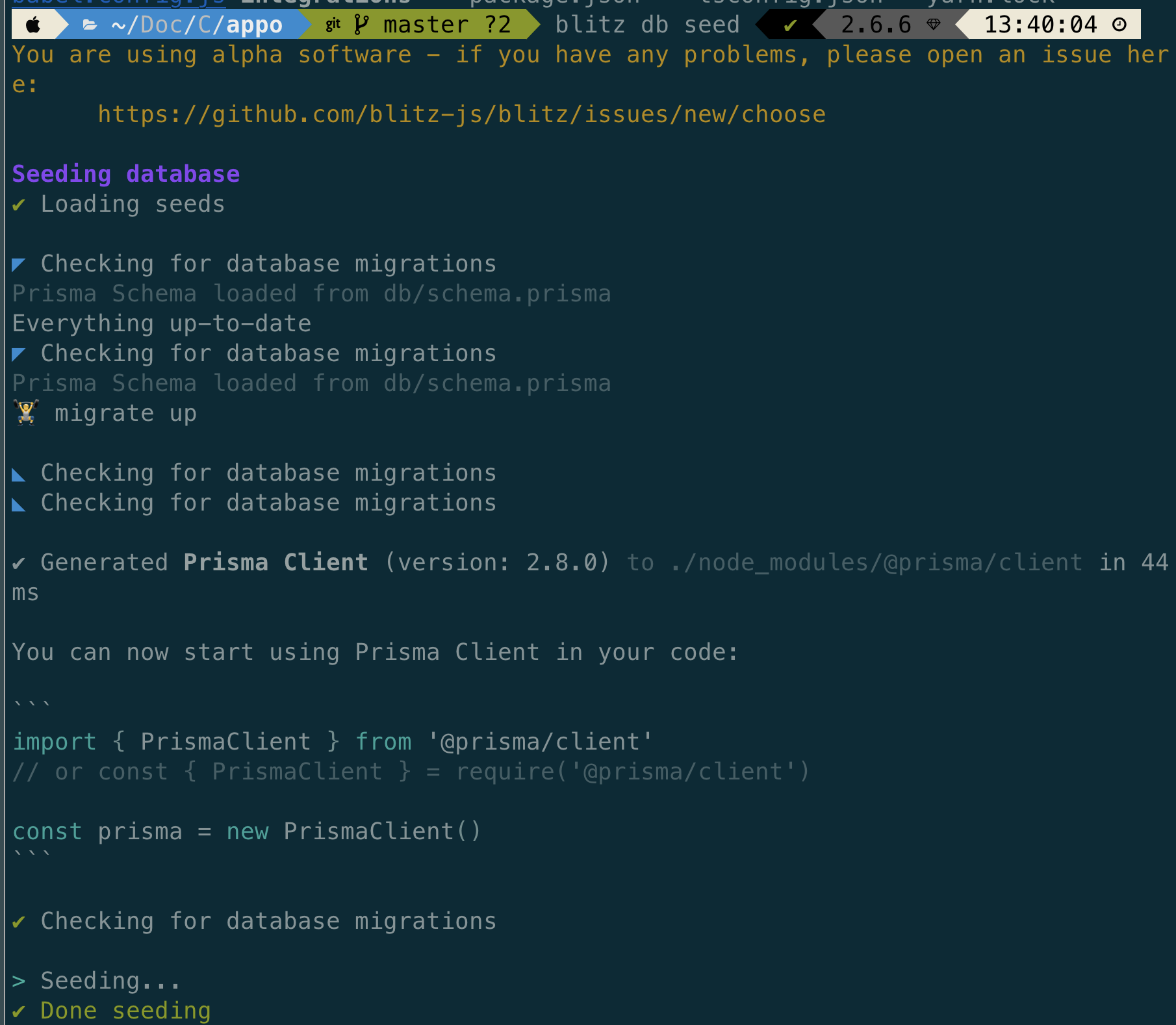
~/c/spkb (feat/add-write-lesson|…) $ blitz db seed 01:42:20
You are using alpha software - if you have any problems, please open an issue here:
https://github.com/blitz-js/blitz/issues/new/choose
Seeding database
◢ Loading seeds
✕ Couldn't import default from db/seeds.ts or db/seeds/index.ts file
~/c/spkb (feat/add-write-lesson|…) $ yarn link blitz 01:42:26
yarn link v1.22.4
success Using linked package for "blitz".
✨ Done in 0.12s.
~/c/spkb (feat/add-write-lesson|…) $ blitz db seed 01:44:34
You are using alpha software - if you have any problems, please open an issue here:
https://github.com/blitz-js/blitz/issues/new/choose
Seeding database
✔ Loading seeds
◢ Checking for database migrations
Everything up-to-date
◣ Checking for database migrations
🏋️ migrate up
◢ Checking for database migrations
✔ Generated Prisma Client (version: 2.7.1) to ./node_modules/@prisma/client in 192ms
You can now start using Prisma Client in your code:
``
import { PrismaClient } from '@prisma/client'
// or const { PrismaClient } = require('@prisma/client')
const prisma = new PrismaClient()
``
◣ Checking for database migrations
┌─────────────────────────────────────────────────────────┐
│ │
│ Update available 2.7.1 -> 2.8.1 │
│ Run npm i --save-dev @prisma/cli to update │
│ │
✔ Checking for database migrations
> Seeding...
✔ Done seeding
Set up verdaccio and debug
nitaking
on 10 Oct 2020
I'm trying to find a way to reproduce this problem.
I was able to register @blitz/cli into the local private npm registry, but publishing the blitz itself is private and I get an error.
Is there any way to fix this?
Or you know other approch?
cli publish: (success. but I don't know hou to access)
verdaccio(start local private npm registry)cd packages/cliyarn build- add
touch .npmrc->registry=http://localhost:4873 npm version patchnpm publish --registry=http://localhost:4873
blitz app publish: (failed.)
verdaccio(start local private npm registry)- add
touch .npmrc->registry=http://localhost:4873 - edit
package.json->"publish-canary": "yarn run publish-prep && lerna publish --registry http://localhost:4873 --force-publish --preid canary --pre-dist-tag canary", yarn publish-latest -- --registry=http://localhost:4873
$ lerna publish --registry http://localhost:4873 --force-publish --preid canary
info cli using local version of lerna
lerna notice cli v3.22.1
lerna info current version 0.24.2-canary.0
lerna ERR! EBEHIND Local branch 'canary' is behind remote upstream origin/canary
lerna ERR! EBEHIND Please merge remote changes into 'canary' with 'git pull'
Can you share your seeds file? i had the same problem.. but after a log.error(err) inside the exception handler of the seed method.. i realized that it was due to a syntax error inside a string.
And it worked fine after i fixed that error.
 nahue
on 16 Oct 2020
nahue
on 16 Oct 2020
// import db from "./index"

/*
 * This seed function is executed when you run `blitz db seed`.
 *
 * Probably you want to use a library like https://chancejs.com
 * or https://github.com/Marak/Faker.js to easily generate
 * realistic data.
 */
const seed = async () => {
  // for (let i = 0; i < 5; i++) {
  //   await db.project.create({ data: { name: "Project " + i } })
  // }
}

export default seed
This is with latest blitz (0.24.3), fresh generated project.
Edit: Forgot to mention, the issue is still there.
simonedelmann
on 17 Oct 2020
In case this is helpful, wanted to share that I hit this as well on a fresh generated project (0.24.3)
And in the spirit of testing I got a local clone of the main blitz repo, ran through the [contributors guide[(https://blitzjs.com/docs/contributing) (props on that by the way!) and got everything set up with yarn dev and yarn link-cli.
Then I ran yarn link blitz in my generated project, followed by blitz db seed hoping to hack away at whatever was going wrong, and ✨ the error was gone.
So I can reproduce @nitaking's issue that this is really hard to reproduce 😅
For what it's worth, I didn't install blitz globally initially, instead using npx blitz db seed. That still fails for me and debugging the built package is really tricky to get into. But now that I've got blitz set up with the dev cli globally, it _does_ work. So maybe this has something to do with the usage of npx (followed by, I set up a seed script in my project's package.json).
 JedWatson
on 18 Oct 2020
JedWatson
on 18 Oct 2020
It seems this works fine with the local dev version of blitz, but not with a blitz version from npm.
flybayer
on 18 Oct 2020
Resolved by @nemesv :)
nitaking
on 21 Oct 2020
Can we reopen this issue? The seeding fails if you try importing something from another file.
aaronfulkerson
on 1 Nov 2020
Can we reopen this issue? The seeding fails if you try importing something from another file.
Perhaps that is a different issue to review import functions support. Or is that failing out of the box after bootstrapping the blitz app?
peaonunes
on 2 Nov 2020
It should fail after bootstrapping a new app. Try importing the hashPassword function from the auth-utils file.
aaronfulkerson
on 2 Nov 2020
@aaronfulkerson open a new issue for that
flybayer
on 5 Nov 2020
Hello everyone,
blitz db seed still gives me the error
yarn run v1.22.4
$ blitz db seed
You are using alpha software - if you have any problems, please open an issue here:
      https://github.com/blitz-js/blitz/issues/new/choose

Seeding database
◢ Loading seeds
✕ Couldn't import default from db/seeds.ts or db/seeds/index.ts file
error Command failed with exit code 1.
info Visit https://yarnpkg.com/en/docs/cli/run for documentation about this command.
If I run yarn link blitz I get
yarn link v1.22.4
error No registered package found called "blitz".
info Visit https://yarnpkg.com/en/docs/cli/link for documentation about this command.
blitz --version
You are using alpha software - if you have any problems, please open an issue here:
      https://github.com/blitz-js/blitz/issues/new/choose

Linux 5.6 | linux-x64 | Node: v12.16.2

blitz: 0.23.2 (global)
blitz: 0.25.0 (local)

  Package manager: yarn
  System:
    OS: Linux 5.6 Arch Linux
    CPU: (8) x64 Intel(R) Core(TM) i7-4700MQ CPU @ 2.40GHz
    Memory: 1.46 GB / 15.57 GB
    Shell: 5.8 - /bin/zsh
  Binaries:
    Node: 12.16.2 - ~/.nvm/versions/node/v12.16.2/bin/node
    Yarn: 1.22.4 - ~/.yarn/bin/yarn
    npm: 6.14.4 - ~/.nvm/versions/node/v12.16.2/bin/npm
    Watchman: 4.9.0 - /usr/bin/watchman
  npmPackages:
    @prisma/cli: 2.11.0 => 2.11.0
    @prisma/client: 2.4.1 => 2.4.1
    blitz: 0.25.0 => 0.25.0
    react: 0.0.0-experimental-33c3af284 => 0.0.0-experimental-33c3af284
    react-dom: 0.0.0-experimental-33c3af284 => 0.0.0-experimental-33c3af284
    typescript: 3.9.7 => 3.9.7
 maotora
on 14 Nov 2020
maotora
on 14 Nov 2020
@maotora does it still fail if you run yarn blitz db seed ?
flybayer
on 14 Nov 2020
@flybayer Not sure if I tried that option but I made an npm script like, "seed": "blitz db seed" which I used yarn run seed to run.
maotora
on 14 Nov 2020
Did it work?
flybayer
on 14 Nov 2020
No, it didn't work.
Same error,
yarn run v1.22.4
$ /home/user/Projects/project/node_modules/.bin/blitz db seed
You are using alpha software - if you have any problems, please open an issue here:
      https://github.com/blitz-js/blitz/issues/new/choose

Seeding database
◢ Loading seeds
✕ Couldn't import default from db/seeds.ts or db/seeds/index.ts file
error Command failed with exit code 1.
info Visit https://yarnpkg.com/en/docs/cli/run for documentation about this command.
@maotora ok, please open a new issue and include as many details and logs as possible
flybayer
on 20 Nov 2020
Related issues
flybayer
·
4Comments
 yhoiseth
·
3Comments
flybayer
·
4Comments
yhoiseth
·
3Comments
flybayer
·
4Comments
 SharadKumar
·
3Comments
SharadKumar
·
3Comments
 svobik7
·
3Comments
svobik7
·
3Comments
Most helpful comment
@peaonunes I've tested with latest blitz (0.24.1) and a fresh project, still not working. But there is a new error message, seems like the thrown error is handled now:
blitz --version --verbose (Node 14)
I've also tested with Node 12 now, same result:
blitz --version --verbose (Node 12)