Blitz: `blitz new` stuck on 'Retrieving the freshest of dependencies'
What is the problem?
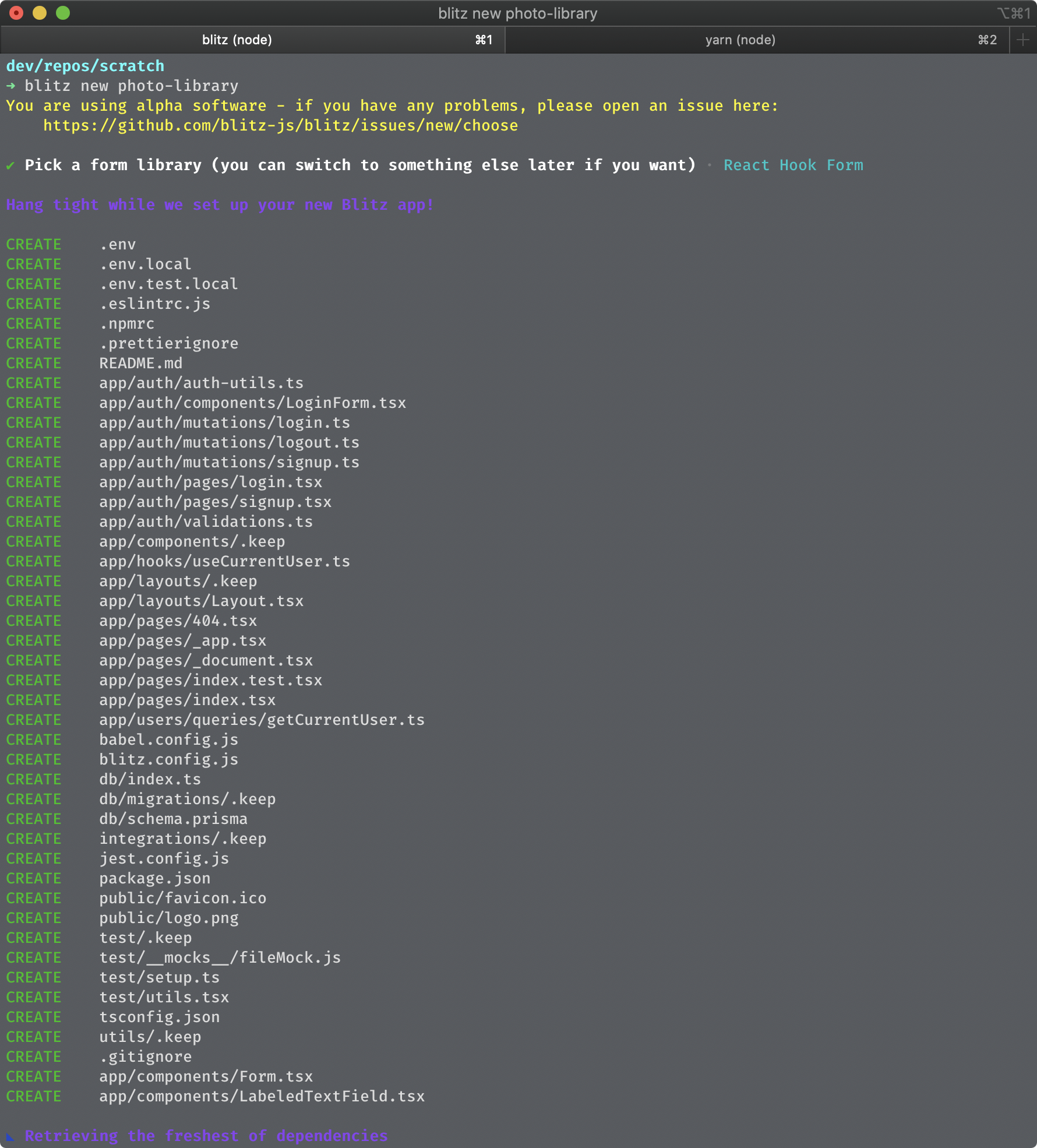
running blitz new hangs on Retrieving the freshest of dependencies after creating file structure.
Steps to Reproduce
- run
npm install -g blitz - run
blitz new app-name - select either
React Final Form (recommended)orReact Hook Form - cli now hangs on
Retrieving the freshest of dependenciesindefinitely.
a. after aborting:
b. cd into the project directory (cd app-name) and runblitz startthe error appears:Error: Cannot find module '@blitzjs/server'
Versions
output of blitz --version --verbose
debug: blitzPkgPath: /Users/adam.sisk/.asdf/installs/nodejs/14.4.0/.npm/lib/node_modules/blitz/dist/index.js
debug: cliPkgPath: /Users/adam.sisk/.asdf/installs/nodejs/14.4.0/.npm/lib/node_modules/blitz/node_modules/@blitzjs/cli/lib/src/index.js

macOS Catalina | darwin-x64 | Node: v14.4.0

blitz: 0.21.0 (global)

  Package manager: npm
  System:
    OS: macOS 10.15.5
    CPU: (12) x64 Intel(R) Core(TM) i7-9750H CPU @ 2.60GHz
    Memory: 700.02 MB / 16.00 GB
    Shell: 5.7.1 - /bin/zsh
  Binaries:
    Node: 14.4.0 - ~/.asdf/installs/nodejs/14.4.0/bin/node
    Yarn: 1.22.4 - /usr/local/bin/yarn
    npm: 6.14.5 - ~/.asdf/installs/nodejs/14.4.0/bin/npm
    Watchman: Not Found
  npmPackages:
    @prisma/cli: Not Found
    @prisma/client: Not Found
    blitz: Not Found
    react: Not Found
    react-dom: Not Found
    typescript: Not Found
Other
screenshot
 CalamityAdam
All 19 comments
Hey @CalamityAdam sorry about that! We occasionally have people report this, but it's only happening in very specific cases with no way to reproduce.
Is there any special network situation you are in?
At the very least we can add a 10-15s timeout to this.
 flybayer
on 2 Sep 2020
flybayer
on 2 Sep 2020
I opened an issue to add a timeout: https://github.com/blitz-js/blitz/issues/989
flybayer
on 2 Sep 2020
Hey @flybayer -
No unique network situation that I'm aware of.
Might also be worth noting that I am using asdf for version management.
CalamityAdam
on 2 Sep 2020
update: inside the project directory I ran yarn and then blitz start which at least started the server, however connecting to the server resulted in the following error:
photo-library on master [?] is 📦 v1.0.0 via ⬢ v14.4.0 took 20s
➜ blitz start
You are using alpha software - if you have any problems, please open an issue here:
https://github.com/blitz-js/blitz/issues/new/choose
✔ Prepped for launch
info - Loaded env from /Users/adam.sisk/dev/repos/scratch/photo-library/.blitz/caches/dev/.env
warn - You have enabled experimental feature(s).
warn - Experimental features are not covered by semver, and may cause unexpected or broken application behavior. Use them at your own risk.
ready - started server on http://localhost:3000
warn - Fast Refresh is disabled in your application due to an outdated `react` version. Please upgrade 16.10 or newer! Read more: https://err.sh/next.js/react-version
info - Using external babel configuration from /Users/adam.sisk/dev/repos/scratch/photo-library/.blitz/caches/dev/babel.config.js
event - compiled successfully
event - build page: /
wait - compiling...
event - compiled successfully
Error: @prisma/client did not initialize yet. Please run "prisma generate" and try to import it again.
In case this error is unexpected for you, please report it in https://github.com/prisma/prisma-client-js/issues/390.
at new PrismaClient (/Users/adam.sisk/dev/repos/scratch/photo-library/node_modules/.prisma/client/index.js:3:11)
at eval (webpack-internal:///./db/index.ts:12:50)
at Module../db/index.ts (/Users/adam.sisk/dev/repos/scratch/photo-library/.blitz/caches/dev/.next/server/pages/_app.js:188:1)
at __webpack_require__ (/Users/adam.sisk/dev/repos/scratch/photo-library/.blitz/caches/dev/.next/server/pages/_app.js:23:31)
at eval (webpack-internal:///./app/auth/auth-utils.ts:9:60)
at Module../app/auth/auth-utils.ts (/Users/adam.sisk/dev/repos/scratch/photo-library/.blitz/caches/dev/.next/server/pages/_app.js:116:1)
at __webpack_require__ (/Users/adam.sisk/dev/repos/scratch/photo-library/.blitz/caches/dev/.next/server/pages/_app.js:23:31)
at eval (webpack-internal:///./app/_resolvers/auth/mutations/login.ts:3:77)
at Module../app/_resolvers/auth/mutations/login.ts (/Users/adam.sisk/dev/repos/scratch/photo-library/.blitz/caches/dev/.next/server/pages/_app.js:104:1)
at __webpack_require__ (/Users/adam.sisk/dev/repos/scratch/photo-library/.blitz/caches/dev/.next/server/pages/_app.js:23:31)
event - build page: /next/dist/pages/_error
wait - compiling...
event - compiled successfully
error - Error: @prisma/client did not initialize yet. Please run "prisma generate" and try to import it again.
In case this error is unexpected for you, please report it in https://github.com/prisma/prisma-client-js/issues/390.
at new PrismaClient (/Users/adam.sisk/dev/repos/scratch/photo-library/node_modules/.prisma/client/index.js:3:11)
at eval (webpack-internal:///./db/index.ts:12:50)
at Module../db/index.ts (/Users/adam.sisk/dev/repos/scratch/photo-library/.blitz/caches/dev/.next/server/pages/_app.js:188:1)
at __webpack_require__ (/Users/adam.sisk/dev/repos/scratch/photo-library/.blitz/caches/dev/.next/server/pages/_app.js:23:31)
at eval (webpack-internal:///./app/auth/auth-utils.ts:9:60)
at Module../app/auth/auth-utils.ts (/Users/adam.sisk/dev/repos/scratch/photo-library/.blitz/caches/dev/.next/server/pages/_app.js:116:1)
at __webpack_require__ (/Users/adam.sisk/dev/repos/scratch/photo-library/.blitz/caches/dev/.next/server/pages/_app.js:23:31)
at eval (webpack-internal:///./app/_resolvers/auth/mutations/login.ts:3:77)
at Module../app/_resolvers/auth/mutations/login.ts (/Users/adam.sisk/dev/repos/scratch/photo-library/.blitz/caches/dev/.next/server/pages/_app.js:104:1)
at __webpack_require__ (/Users/adam.sisk/dev/repos/scratch/photo-library/.blitz/caches/dev/.next/server/pages/_app.js:23:31)
Error: @prisma/client did not initialize yet. Please run "prisma generate" and try to import it again.
In case this error is unexpected for you, please report it in https://github.com/prisma/prisma-client-js/issues/390.
at new PrismaClient (/Users/adam.sisk/dev/repos/scratch/photo-library/node_modules/.prisma/client/index.js:3:11)
at eval (webpack-internal:///./db/index.ts:12:50)
at Module../db/index.ts (/Users/adam.sisk/dev/repos/scratch/photo-library/.blitz/caches/dev/.next/server/pages/_app.js:188:1)
at __webpack_require__ (/Users/adam.sisk/dev/repos/scratch/photo-library/.blitz/caches/dev/.next/server/pages/_app.js:23:31)
at eval (webpack-internal:///./app/auth/auth-utils.ts:9:60)
at Module../app/auth/auth-utils.ts (/Users/adam.sisk/dev/repos/scratch/photo-library/.blitz/caches/dev/.next/server/pages/_app.js:116:1)
at __webpack_require__ (/Users/adam.sisk/dev/repos/scratch/photo-library/.blitz/caches/dev/.next/server/pages/_app.js:23:31)
at eval (webpack-internal:///./app/_resolvers/auth/mutations/login.ts:3:77)
at Module../app/_resolvers/auth/mutations/login.ts (/Users/adam.sisk/dev/repos/scratch/photo-library/.blitz/caches/dev/.next/server/pages/_app.js:104:1)
at __webpack_require__ (/Users/adam.sisk/dev/repos/scratch/photo-library/.blitz/caches/dev/.next/server/pages/_app.js:23:31)
update: npm uninstall -g blitz and then npm install -g blitz seemed to fix this
CalamityAdam
on 2 Sep 2020
Ok good!
flybayer
on 2 Sep 2020
so, another update:
I think I may have some network issue... I run into this problem at home, but not at work. It seems reinstalling blitz wasn't the fix after all, but being on a different network was the fix. I'm on a work laptop, which when not connected to the work network has Carbon Black Predictive Security Cloud turned on. maybe that's causing an issue? However, the weirder part, when I connect to the company VPN via GlobalProtect from home, then blitz new works as expected and retrieving fresh dependencies takes only seconds.
something must be up with my network. any pointers how to further diagnose? thanks!
CalamityAdam
on 3 Sep 2020
Oh, very interesting!
Here's the two url formats we use. We make these two calls for each dependency.
So one thing you could do is try calling each of those with curl in your terminal to see if you can reproduce the issue that way:
curl https://registry.npmjs.org/blitz
Both calls were successful!
➜ curl https://registry.npmjs.org/-/package/blitz/dist-tags
{"latest":"0.21.1","canary":"0.18.1-canary.1","danger":"0.17.1-danger.3b5aa900.11"}%
and the other spit out a lot of version information.
so I guess this is good, but still leaves me confused 😛
CalamityAdam
on 4 Sep 2020
Ok weird. So the next step is to make a new blank project, install got, make an index.js file that uses got to call the above urls and see if that works.
Something like this. This is how we call the urls in blitz code.
got('https://registry.npmjs.org/blitz', {retry: {limit: 3}, responseType: "json"})
  .json()
  .then(console.log)
Both calls work successfully.
Outputs are the same as the curl call outputs (albeit parsed) mentioned above.
Blank project, with an index.js and got version 11.6.1:
// index.js

const got = require("got");

got("https://registry.npmjs.org/blitz", {
  retry: { limit: 3 },
  responseType: "json",
})
  .json()
  .then(console.log);

got("https://registry.npmjs.org/-/package/blitz/dist-tags", {
  retry: { limit: 3 },
  responseType: "json",
})
  .json()
  .then(console.log);
Wow, this is a weird one..
flybayer
on 11 Sep 2020
I am experiencing the same issue. Uninstalling and re-installing blitz as described by by @CalamityAdam did not resolve the issue.
I am on Node v14.4.0, macOS Catalina (latest).
Edit: I have no network issues I would have noticed.
 sdnyco
on 14 Sep 2020
sdnyco
on 14 Sep 2020
Same problem here, solved using blitz new task-manager --npm
 lligato
on 14 Sep 2020
lligato
on 14 Sep 2020
Same problem here, solved using
blitz new task-manager --npm
Interesting! I'll try this when I'm back on my home network (where the issue is occurring). I wonder if it stems from an issue with yarn?
CalamityAdam
on 15 Sep 2020
No luck using blitz new app-name --npm, results are the same: hangs on Retrieving freshest of dependencies
CalamityAdam
on 17 Sep 2020
That makes sense, because that step is the same for both npm/yarn.
@CalamityAdam are you interested/able to try fixing this since you can reliably reproduce? I'm happy to have a call and walk through it or even do a bit of pairing if you need.
flybayer
on 18 Sep 2020
@flybayer I would be more than happy to help with this! we can connect on slack
CalamityAdam
on 19 Sep 2020
I got that problem in the past, then reinstalled blitz and now i get something that i may think has the same origin.
blitz --version
macOS Big Sur | darwin-x64 | Node: v14.12.0

blitz: 0.23.0 (global)

  Package manager: npm
  System:
    OS: macOS 11.0
    CPU: (4) x64 Intel(R) Core(TM) i3-8100B CPU @ 3.60GHz
    Memory: 8.55 GB / 32.00 GB
    Shell: 5.8 - /bin/zsh
  Binaries:
    Node: 14.12.0 - /usr/local/bin/node
    Yarn: Not Found
    npm: 6.14.8 - /usr/local/bin/npm
    Watchman: Not Found
The output of blitz new
✔ Pick a form library (you can switch to something else later if you want) · React Final Form

Hang tight while we set up your new Blitz app!

CREATE    .env
CREATE    .env.local
CREATE    .env.test.local
CREATE    .eslintrc.js
CREATE    .npmrc
CREATE    .prettierignore
CREATE    README.md
CREATE    app/auth/auth-utils.ts
CREATE    app/auth/components/LoginForm.tsx
CREATE    app/auth/components/SignupForm.tsx
CREATE    app/auth/mutations/login.ts
CREATE    app/auth/mutations/logout.ts
CREATE    app/auth/mutations/signup.ts
CREATE    app/auth/pages/login.tsx
CREATE    app/auth/pages/signup.tsx
CREATE    app/auth/validations.ts
CREATE    app/components/.keep
CREATE    app/hooks/useCurrentUser.ts
CREATE    app/layouts/.keep
CREATE    app/layouts/Layout.tsx
CREATE    app/pages/404.tsx
CREATE    app/pages/_app.tsx
CREATE    app/pages/_document.tsx
CREATE    app/pages/index.test.tsx
CREATE    app/pages/index.tsx
CREATE    app/users/queries/getCurrentUser.ts
CREATE    babel.config.js
CREATE    blitz.config.js
CREATE    db/index.ts
CREATE    db/migrations/.keep
CREATE    db/schema.prisma
CREATE    integrations/.keep
CREATE    jest.config.js
CREATE    package.json
CREATE    public/favicon.ico
CREATE    public/logo.png
CREATE    test/.keep
CREATE    test/__mocks__/fileMock.js
CREATE    test/setup.ts
CREATE    test/utils.tsx
CREATE    tsconfig.json
CREATE    utils/.keep
CREATE    .gitignore
CREATE    app/components/Form.tsx
CREATE    app/components/LabeledTextField.tsx

⚠️  Failed to fetch latest version of 'eslint-plugin-import', falling back to '2.x'.
⚠️  Failed to fetch latest version of 'typescript', falling back to '4.x'.
⚠️  Failed to fetch latest version of '@prisma/client', falling back to '2.x'.
⚠️  Failed to fetch latest version of 'eslint', falling back to '7.x'.
⚠️  Failed to fetch latest version of 'babel-eslint', falling back to '10.x'.
⚠️  Failed to fetch latest version of 'eslint-plugin-react', falling back to '7.x'.
⚠️  Failed to fetch latest version of 'jest', falling back to '26.x'.
✔ Retrieving the freshest of dependencies
◣ Installing those dependencies (this will take a few minutes)
(node:12166) UnhandledPromiseRejectionWarning: Error: sha256 of https://binaries.prisma.sh/all_commits/650b5d0348ec38ae61e1e7db69bb54808418ede4/darwin/query-engine.gz (uzipped) should be cd127f7d071767def353057626c88abaedd815a01945db266bdc7da01c940cf2 but is 724c98a82435c79c51b99b8acbd87d19e099bbc7ec21fc145e1d2d6f6d800d7b
    at /Users/mhaehnel/Projects/parcello/b2b/node_modules/@prisma/fetch-engine/dist/downloadZip.js:78:27
    at runMicrotasks (<anonymous>)
    at processTicksAndRejections (internal/process/task_queues.js:93:5)
(Use `node --trace-warnings ...` to show where the warning was created)


(node:12166) UnhandledPromiseRejectionWarning: Unhandled promise rejection. This error originated either by throwing inside of an async function without a catch block, or by rejecting a promise which was not handled with .catch(). To terminate the node process on unhandled promise rejection, use the CLI flag `--unhandled-rejections=strict` (see https://nodejs.org/api/cli.html#cli_unhandled_rejections_mode). (rejection id: 1)
(node:12166) [DEP0018] DeprecationWarning: Unhandled promise rejections are deprecated. In the future, promise rejections that are not handled will terminate the Node.js process with a non-zero exit code.

✔ Installing those dependencies (this will take a few minutes)
✔ Formatting your code
✔ Committing your app
✔ Initializing SQLite database

Your new Blitz app is ready! Next steps:

   1. cd b2b
   2. blitz start
Seems like there is some problem with hash validation.
After that running npm install and blitz db migrate everything seems to be running.
 markhaehnel
on 25 Sep 2020
markhaehnel
on 25 Sep 2020
Related issues
flybayer
·
4Comments
flybayer
·
3Comments
 aaronfulkerson
·
3Comments
aaronfulkerson
·
3Comments
 merelinguist
·
3Comments
merelinguist
·
3Comments
 svobik7
·
3Comments
svobik7
·
3Comments