Blitz: Blitz recipes failing on Ubuntu Server
What is the problem?
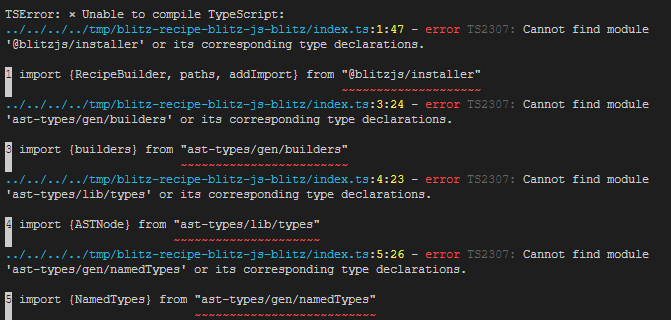
I am trying to use the new feature blitz recipes (blitz install tailwind) and i'm getting typescript errors.
Steps to Reproduce
blitz new testcd testblitz install tailwind
Versions
Linux 5.4 | linux-x64 | Node: v12.18.3

blitz: 0.17.0 (global)
blitz: 0.17.0 (local)
Other
Typescript errors:
 jose-donato
All 12 comments
Sorry about that @jose-donato! It appears to be a platform compatibility issue with Linux. We'll get it fixed.
 flybayer
on 4 Aug 2020
flybayer
on 4 Aug 2020
cc @aem
flybayer
on 4 Aug 2020
No worries. thanks for the awesome framework and the fast reply. Looking forward to start contributing!
jose-donato
on 4 Aug 2020
~Oops. I know what's going on here. For local Blitz dev we don't need to manually install the types because it's always running through the yarn workspace, but for prod builds the types aren't included. I'll add those to the existing recipes and update the docs as well~ see comment below
 aem
on 5 Aug 2020
aem
on 5 Aug 2020
I'm no longer totally sure what's going on here. On a Linux VM with a brand new node/npm/yarn/blitz setup I was able to create a new app and install the recipe without a problem.
@jose-donato is there any chance you generated a plain JS project rather than a TS project?
aem
on 5 Aug 2020
Yes, of course. I'll try that as soon as i can. (Additional info: I'm using Ubuntu Server 20.04)
jose-donato
on 5 Aug 2020
Oops sorry for the confusion, I wasn't asking you to generate your own JS project, but if you generated a JS project instead of TS then this would make sense, that's all
aem
on 5 Aug 2020
Oh, sorry. I misunderstood. Nop, i just used blitz new <name>
jose-donato
on 5 Aug 2020
Tried with another linux distro (Lubuntu 19.04) and it is working fine!
jose-donato
on 6 Aug 2020
Interesting. I wonder if the server distro does something weird with symlinks, temp directories, or how child processes get access to the filesystem. Any of those three could cause this. I'll do a little more digging, but good to know at least that it's limited to a specific distro
aem
on 6 Aug 2020
Just to give a little update, i tried again in the same machine and it worked. I don't know if i was being noob in the first time or it was really an error.
Anyway thanks for the help!
jose-donato
on 5 Sep 2020
Glad to know it's working now, even if we don't know why! 😆 I'm going to close for now but let us know if this reappears!
aem
on 5 Sep 2020
Related issues
 svobik7
·
3Comments
svobik7
·
3Comments
 LoriKarikari
·
4Comments
LoriKarikari
·
4Comments
 timsuchanek
·
5Comments
timsuchanek
·
5Comments
 ganeshmani
·
4Comments
ganeshmani
·
4Comments
 eorenstein1
·
3Comments
eorenstein1
·
3Comments