Blink: TF179: strange keyboard behavior when switching back to blink
A handful of times today I've switched back to blink from safari or another program only to have blink act as if the "command" key - and possibly some other modifier key - is permanently pressed. That is, I can reproduce this when it happens by watching the blink config menu come up when I hit , inside a vim session. Some keys transfer ok; others (like o) do something else, but I'm not sure what exactly is being sent.
This is also not 100% repeatable; I can't figure out when it happens until it happens. Advice on generating the appropriate logs/info for debugging would be greatly appreciated.
 sbromberger
All 57 comments
confirm that too with tf179 and more:
sometimes c letter stops works, just in vim insert mode typing one-by-one letterszxcvb and got zxvb
sometimes when using vim hotkey to switch between windows in vim C-W ( remmaped Ctrl to Caps) and it sends Command-W which close current blink tab with mosh session, very frustrating
 dmitryzykov
on 13 Dec 2019
dmitryzykov
on 13 Dec 2019
Yep, it is strange. In build 180 i'm reseting internal kb state on focus. Please let me know if it is better.
 yury
on 14 Dec 2019
yury
on 14 Dec 2019
Still happening in 180. It's frustrating that I don't know what triggers it.
sbromberger
on 14 Dec 2019
It seems to me like cmd is got stuck.... investigating...
yury
on 14 Dec 2019
during today’s work in 180 got random problems like cmd was pressed, but it wasn’t. That happened after i returned to blink from other apps by cmd+tab
dmitryzykov
on 14 Dec 2019
It seems to happen more frequently, I think, when I've copied something to the (iOS) clipboard, but I can't be 100% sure of this.
sbromberger
on 14 Dec 2019
maybe current problems some how related to old issue https://github.com/blinksh/blink/issues/476
dmitryzykov
on 14 Dec 2019
Quick fix. Press cmd... trying to reproduce this thing.
yury
on 14 Dec 2019
in my case pressing cmd doesn't reset things. I have to go out of blink, type in some other app, and come back.
sbromberger
on 14 Dec 2019
in my case pressing cmd usually helps.
But sometimes i need to press globes button (language switch) and after that it works
dmitryzykov
on 14 Dec 2019
I found few cases, please take a look at build 182.
yury
on 15 Dec 2019
@yury still have this problem in 182 :(
recorded video how i’m reproducing problem ( but not always reproducible )
https://youtube.com/watch?v=vcEb9N7XHNI
dmitryzykov
on 15 Dec 2019
Can you email me .blink/kb.json ?
yury
on 15 Dec 2019
Reproduced!
yury
on 15 Dec 2019
@yury
kb.zip
dmitryzykov
on 15 Dec 2019
Ok, I got what is going on.
In other app (safari) hold cmd to show commands help view, but press tab before it becomes visible. iOS will try to present cmd help view in blink. But since I remove all commands when blink is in background iOS shows nothing, but get cmd stuck.
In build 183 it will show that commands view, so you will not be confused.
yury
on 15 Dec 2019
Is that some sort of iOS bug from https://github.com/blinksh/blink/issues/476? If so how we can notify apple about it or figure out status of this bug?
dmitryzykov
on 15 Dec 2019
That makes sense. I use cmd-tab to switch apps and that’s when it’s happening (not always but when it happens that’s when.)
sbromberger
on 15 Dec 2019
@yury
Unfortunately 183 didn’t fix that completely.
That’s true that in most cases after cmd-tab in 183 i can see commands view.
But still sometimes get situation when switched back to blink and cmd stuck but command view haven’t appeared.
recorded video https://youtube.com/watch?v=W1EkVtO8QTQ
dmitryzykov
on 15 Dec 2019
@dmitryzykov thank you.
I will try another way to get this is working tomorrow... At least we know scenario and we know that it is cmd key (cmd-tab combo).
Also, I tried with other apps same trick and didn’t get that behavior we have. So it should be smth on our side.
yury
on 15 Dec 2019
Actually, I'm able to repro that issue with other apps. Twitter+Discord, Mail + Safari....
Worst thing, I see in logs event, but I can't make iOS reset cmd stuck. I think we should contact Apple somehow on that...
Related:
https://twitter.com/shritesh/status/1206251250452488192
yury
on 16 Dec 2019
Update:
I think I found solution. Pushing build 184. Please test.
Thank you.
yury
on 17 Dec 2019
@yury
Thank you, that’s great.
I’ve updated to 184 and tried to reproduce problem for 5 minutes and never got this problem. It worked well during test.
fingers crossed, but it seems fixed. Will update if get problem again.
dmitryzykov
on 17 Dec 2019
The new build is inserting control characters when you tab out and back:
seth@elemental:~$ sleep 100  # I then tab out to safari and back into blink
^[[O^[[I
edit: but it's not consistent. It's definitely there, though, since vim complains about the invalid keypresses and it shows up as described above.
sbromberger
on 17 Dec 2019
@sbromberger I can't reproduce this, but I tried to disable shortcuts in build 185. Please let me know if issue is still there.
Thank you.
yury
on 18 Dec 2019
I'll be able to test it tonight. FWIW, I haven't been able to consistently reproduce it. Thanks.
sbromberger
on 18 Dec 2019
@yury - TF185 is now sending esc?
seth@hydrogen:/var/log/remote$ sleep 100   # switch to another app using cmd-tab, release, switch back using cmd-tab
^[^[^[^[^[^[^[^[^[^[^[^[^[^[^[^[
The multiple esc's are generated by releasing, and then pressing the COMMAND key - one per press.
sbromberger
on 19 Dec 2019
@sbromberger can you send me your .blink/kb.json ?
yury
on 19 Dec 2019
sbromberger
on 19 Dec 2019
@yury - just FYI, the only thing I remember changing is caps lock to esc. I don't know where these other definitions are coming from.
sbromberger
on 19 Dec 2019
@sbromberger no worries, they are defaults.
yury
on 19 Dec 2019
@sbromberger Still can't reproduce. I put more guards on application state.
I will push build 186 just for you to try.
yury
on 19 Dec 2019
Thanks. I'll give it a try tonight. It happened after I swipe-quit blink and restarted it; I'll try to reproduce tonight.
sbromberger
on 19 Dec 2019
I believe I've seen this too, so I'll upgrade to the latest build tonight and watch for it.
 chrismetcalf
on 19 Dec 2019
chrismetcalf
on 19 Dec 2019
So far with TF187 I can't reproduce the inserted characters. I do note, however, that tab-switching is confused: a command-tab switch away from blink doesn't bring up the floating app switcher it goes directly to an app, and subsequent tab presses (holding the cmd key down) don't do anything. Once the cmd key is released (in the new app) and repressed, tab with floating app switcher appears.
This is not a huge deal, but I wanted to include it because it requires 4 presses to get out of blink to the floating app switcher.
sbromberger
on 20 Dec 2019
@sbromberger thanks!
I found another solution :)
Will be fixed in next release.
yury
on 20 Dec 2019
@sbromberger pushed 188 for you.
yury
on 20 Dec 2019
@yury TF189 seems to work flawlessly so far!! Nice work!
sbromberger
on 20 Dec 2019
@yury
unfortunately i got problem with sticky command again at 189 :(
this time i worked in blink->mosh->vim and by regular hotkey to switch between vim windows ctrl+w my tab was closed and i started to record video after:
https://youtube.com/watch?v=gUckU5d-ER4
dmitryzykov
on 20 Dec 2019
@yury
189 just got sticky command after command+tab :(
dmitryzykov
on 20 Dec 2019
I've had 2 sticky commands today after heavy usage but it's loads better than it was. I also like the fact that command-tab switching works.
sbromberger
on 21 Dec 2019
Build 190 is out. Another try.
yury
on 21 Dec 2019
@yury 190 didn’t fix bug :(
reproduced in 190 in newly started blink in 30 seconds, just command-tab to safari and back to blink multiple times, and cmd has stuck in blink:(
dmitryzykov
on 21 Dec 2019
@dmitryzykov
Yep, if do multiple cmd-tab back and fourth it breaks :( But in general usage it is ok for me.
Again it is 100% iPadOS issue, I can reproduce it with other apps.
I’m run out of ideas how to fix it. iOS really reports that cmd is down and all cmd+X shortcuts are working with just X :(
Another thought. It is related to #856 (issue with current App Store release), and as far as I can tell #856 is fixed. So I think we can release to App Store with this issue.
What do you think?
yury
on 21 Dec 2019
@yury
in general usage it is ok for me
the main pain here is that i got this problem in general usage.
My regular workflow happening in terminal and browser, and main frustrating thing, when i returned to terminal and start typing, my tab with active session closed by just any text with w letter in it. I’ve lost my work progress multiple times because of this problem. So it is very critical for me.
I understand that this situation is related to iOS issue. Have you reported about this issue to apple? If that is public, can you send a link and we will add our +1 there?
I switched to blink from termius and can’t remember similar problem there.
dmitryzykov
on 21 Dec 2019
@dmitryzykov
Frankly speaking, we didn’t report that issue yet. All issues we reported are ignored :(
I tested termius - it doesn’t have a lot of cmd+X shorts. But i’m able to repro issue too.
As I understand, issue is introduced in iOS 13.2. Sad, but 13.3 beta 1 also has that issue.
I will still try to find fix for this issue, but I don’t think it will be quick fix.
As a quick workaround for now, you can remap cmd+X shortcuts to cmd+shift+X shortcuts or smth.
yury
on 21 Dec 2019
@yury
Please report this issue to apple and write instruction here how we (just users) can report to apple. When it will be multiple reports it improves chances for their attention.
Is that technically possible to return workaround behavior from some of previous TF when cmd is stuck - show command hotkeys window? It will be clear that cmd is stuck and i need press cmd manually and only then keep working.
dmitryzykov
on 21 Dec 2019
@dmitryzykov build 191 should show help view.
yury
on 22 Dec 2019
TF191 is sticking ctrl now. This is new; I don't think I've ever had ctrl stuck (just command).
sbromberger
on 22 Dec 2019
Update:
- Good news - I found reliable approach to detect stuck key.
- Bad news - I can't fix it. So I decided to show modal window:
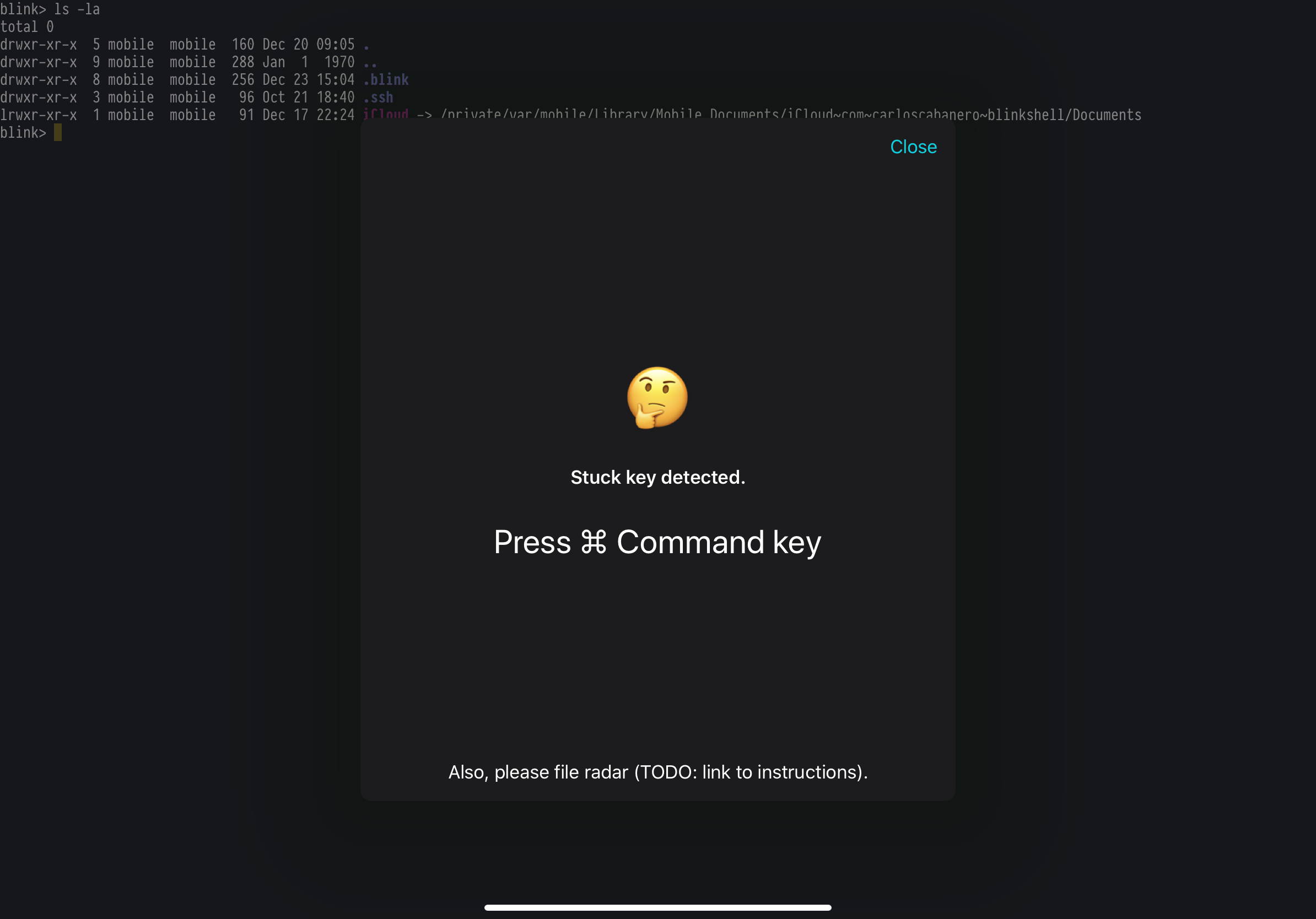
- Interesting part - after presenting that modal, key doesn't stuck. Didn't find out why.
yury
on 23 Dec 2019
@yury thank you
would be great if that linked instruction has an info how users can upvote for iOS bug in apple bug tracker ( or any other way how to send +1 to apple for this problem )
dmitryzykov
on 23 Dec 2019
@yury - a couple of thoughts.
TF191 is sticking more than the previous versions for me, and it's not just command - it's control and possibly something else. Last night I switched back to blink and started typing - I hit "T" and got a new blink tab, and then the keyboard froze. I couldn't type anything at all - had to swipe-quit. (Thank goodness for mosh!)
The earlier versions of blink didn't seem to have this problem. I'm not necessarily suggesting we go back to that keyboard code, but there's something different there that didn't trigger this behavior that might be worth exploring.
If you can detect it, then is it possible to reinitialize the keyboard when you see it happening? Blink never starts up in stuck mode for me; it's always after I tab back to it.
If keyboard reinit doesn't work, can you do a transparent modal that disappears quickly?
Thanks for all your hard work on this. I can imagine it's really frustrating.
sbromberger
on 23 Dec 2019
@sbromberger thank you for details and ideas.
No, keyboard reinit doesn’t help. And quickly showing window and closing it too :)
What does help is a little delay - 0.5-0.7 sec before activate shortcuts, but not 100%. Sometimes you still have to press stuck key.
@dmitryzykov we will create instructions to report or +1 issue. If we don’t find 100% working solution.
yury
on 23 Dec 2019
Videos for radar
yury
on 26 Dec 2019
Hello everyone, I noticed I have a lot of issues with stuck keys lately. Almost everytime I get back to Blink using Cmd+Tab.
Weird thing: a few months ago Blink used to detect it and ask me to press some keys, with 13.3.1 the app never shows that screen.
This is so frustrating. I know this is a bug iPadOS, I hope with 13.4 and the release of their new Magic Keyboard, Apple will finally fix it.
Any guidance regarding the best keyboard configuration? any way to mitigate the issue?
Thanks!
 crsohr
on 9 Apr 2020
crsohr
on 9 Apr 2020
So, ever since I disabled caps lock -> esc mapping in blink in favor of doing it directly in iOS, I have gotten exactly NO "stuck keys" warnings or issues. Just a data point.
sbromberger
on 10 Apr 2020
So, ever since I disabled caps lock -> esc mapping in blink in favor of doing it directly in iOS, I have gotten exactly NO "stuck keys" warnings or issues. Just a data point.
Interesting. I have just hit Reset in the keyboard configuration screen, just in case. I'll let you know if it changes anything.
crsohr
on 10 Apr 2020
Related issues
 toph-allen
·
3Comments
toph-allen
·
3Comments
 zaptrem
·
4Comments
zaptrem
·
4Comments
 basepi
·
5Comments
basepi
·
5Comments
 rekendahl
·
4Comments
rekendahl
·
4Comments
 s8m2s
·
5Comments
s8m2s
·
5Comments
Most helpful comment
Videos for radar