Blink: Latest version has broken “caps as CTRL”
Using an Apple Smart Keyboard with iPad Air. Worked fine until I updated. :-(
 hutchike
All 22 comments
Linking to #840 and #732 as they seem related.
 sideshowcoder
on 2 Nov 2019
sideshowcoder
on 2 Nov 2019
853 is the same too!
 chrismetcalf
on 3 Nov 2019
chrismetcalf
on 3 Nov 2019
I have somewhat isolated the issue.
The mapping is 'sort of working'.
When you press 'CapsLock-C' it properly sends the 'CTRL-C' [INTR].
Same is true for all key sequences (i.e. CapsLock-F moves forward one character, CapsLock-A moves to beginning of line].
However, pressing the CapsLock key is acting like a toggle key, similar to the designed behavior of CapsLock.
That is, the modifier to 'CTRL' remains active, so pressing 'A' moves to beginning of line, pressing 'C' send CTRL-C [INTR], etc.
If you then press the physical CapsLock key again, it is 'toggled' off, and the 'A' key properly sends the character 'A'.
I think you get the idea.....
 jerryabramson
on 11 Nov 2019
jerryabramson
on 11 Nov 2019
+1 for this issue; seems like CMD as ESC seems to be working fine: can use CMD + f to forward words (emacs style) everywhere. Not sure why the issue is just affecting CAPS ¯_(ツ)_/¯
It would be really great to have this fixed. Can’t really emacs without CAPS as CTRL =(
 jramapuram
on 18 Nov 2019
jramapuram
on 18 Nov 2019
Any updates on this? I bought Blink from the AppStore because of this feature. I’m heading on a trip in a couple of weeks and was hoping to just take my iPad and use Blink + DO for development and leave my heavy laptop at home. Caps-as-ctrl is hardwired into my hands, and the keyboard on the iPad is so small that trying to use the Ctrl key is actually kinda painful, especially with Emacs.
Really hoping we can get a dot release in the next 2 weeks to fix this!
 OldhamMade
on 27 Nov 2019
OldhamMade
on 27 Nov 2019
Integrating... TF should be at the end of the week.
 yury
on 27 Nov 2019
yury
on 27 Nov 2019
@yury wonderful! That’s great to hear.
BTW, further to @jerryabramson‘s comment, I’m also seeing similar behavior with “Grab Ctrl+Space”. This is pretty essential for Emacs use, as it’s used to mark regions. Right now it might work once, but then afterwards it switches to bring up the “change keyboard” menu — The same one that’s brought up when pressing the dedicated key to the left of the Ctrl button (with the globe). Not sure if your fix addresses that also?
OldhamMade
on 27 Nov 2019
Oh, interesting; the first Ctrl+Space does nothing (doesn’t even set the mark), any following Ctrl+Space just enters a space.
If it helps, I’m connecting to an Ubuntu machine then starting Emacs directly (no Tmux/Screen session in the way).
OldhamMade
on 27 Nov 2019
@OldhamMade unfortunately, Apple broke ctrl+space too. For CapsLock as Ctrl we found workaround, but for ctrl+space - not yet.
Anyway, as temporary solution you will able to map left or right cmd to ctrl+space combo, may be that will help.
yury
on 27 Nov 2019
Anyway, as temporary solution you will able to map left or right cmd to ctrl+space combo, may be that will help.
Allowing more options for the right Cmd/Option keys would be great! RightCmd+Spc seems like a very comfortable key press on the smaller iPad hardware keyboard.
OldhamMade
on 27 Nov 2019
RightCmd+Spc will not work too :( it is spotlight. But RightOption+Spc will work.
yury
on 27 Nov 2019
Incidentally, not seen it reported yet, but on iOS 13.2.3 with the latest Blink from the App Store, unmapped Caps Lock (I mean, “Caps Lock as Caps Lock”) doesn't work either.
@yury would this fix also fix this? If not let me know I can open a separate issue.
 cwis-public
on 8 Dec 2019
cwis-public
on 8 Dec 2019
Hi @cwis-public,
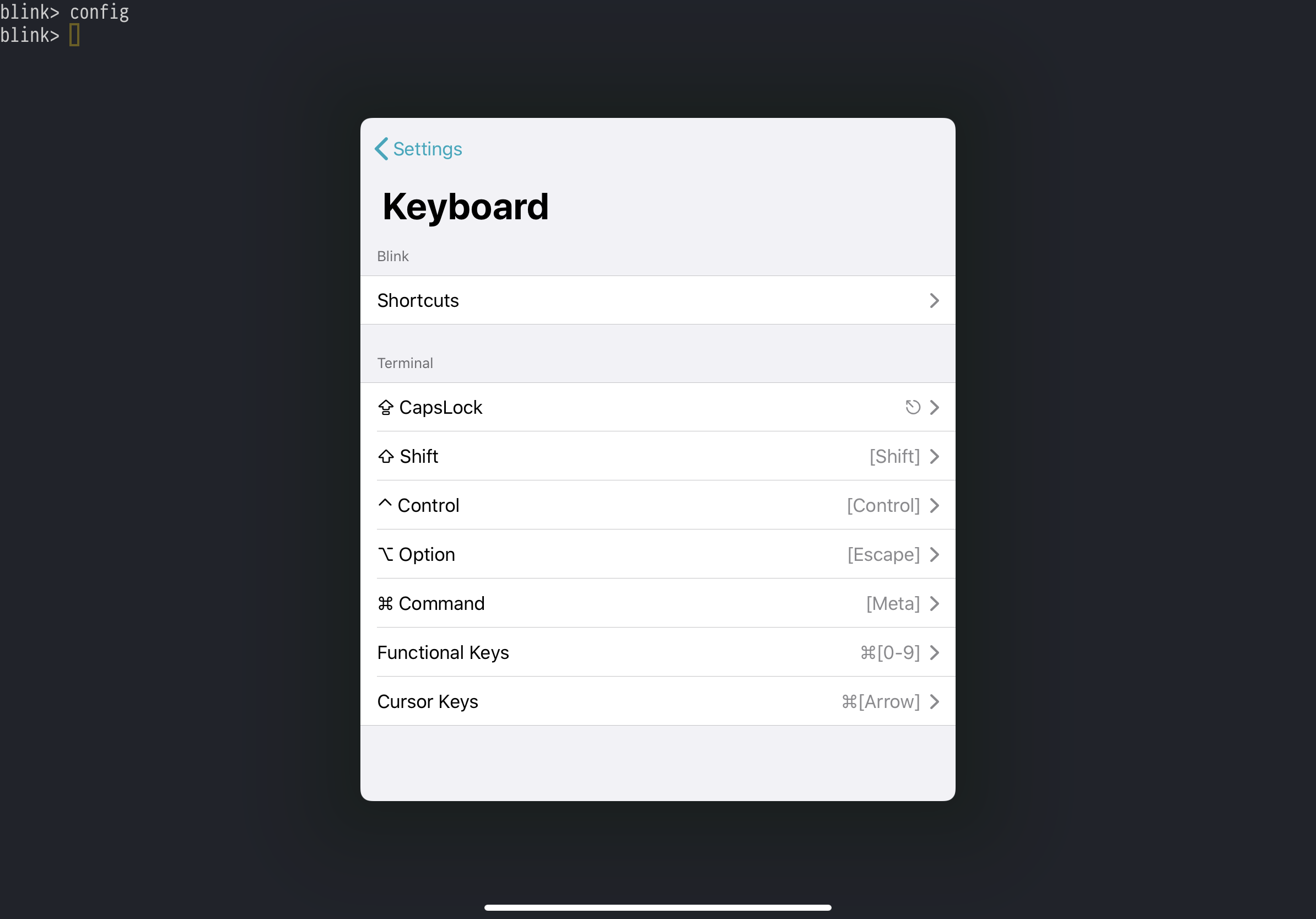
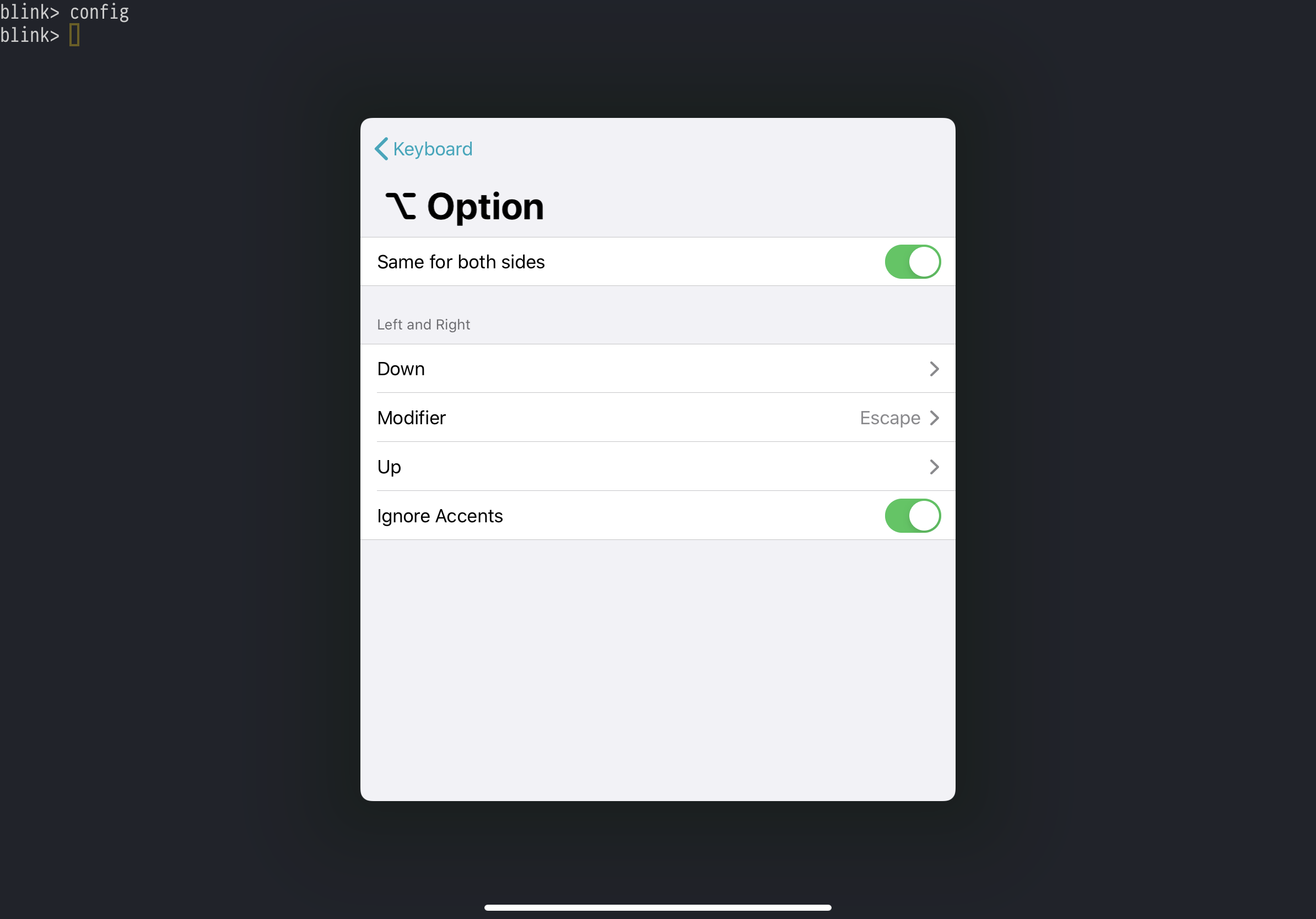
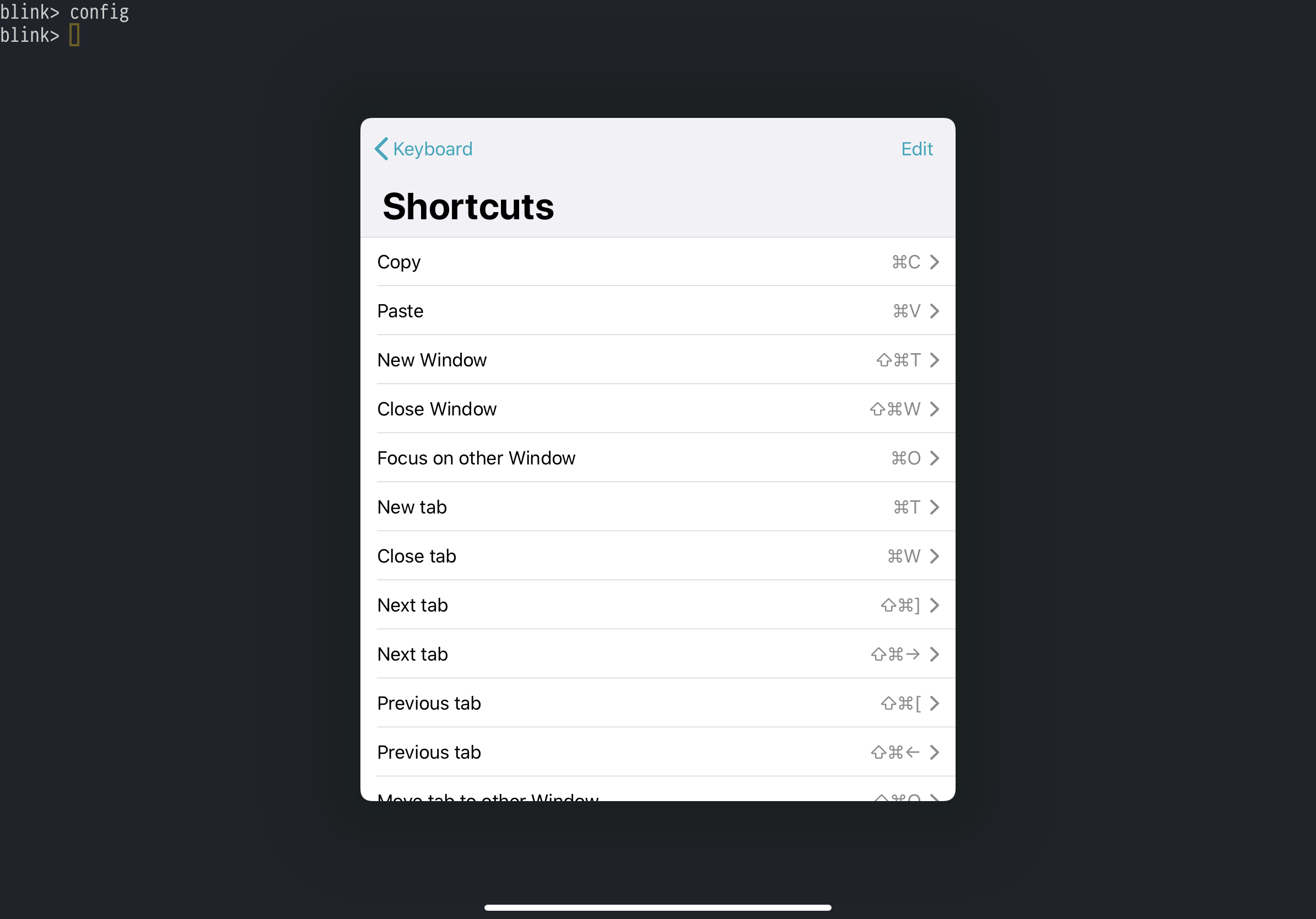
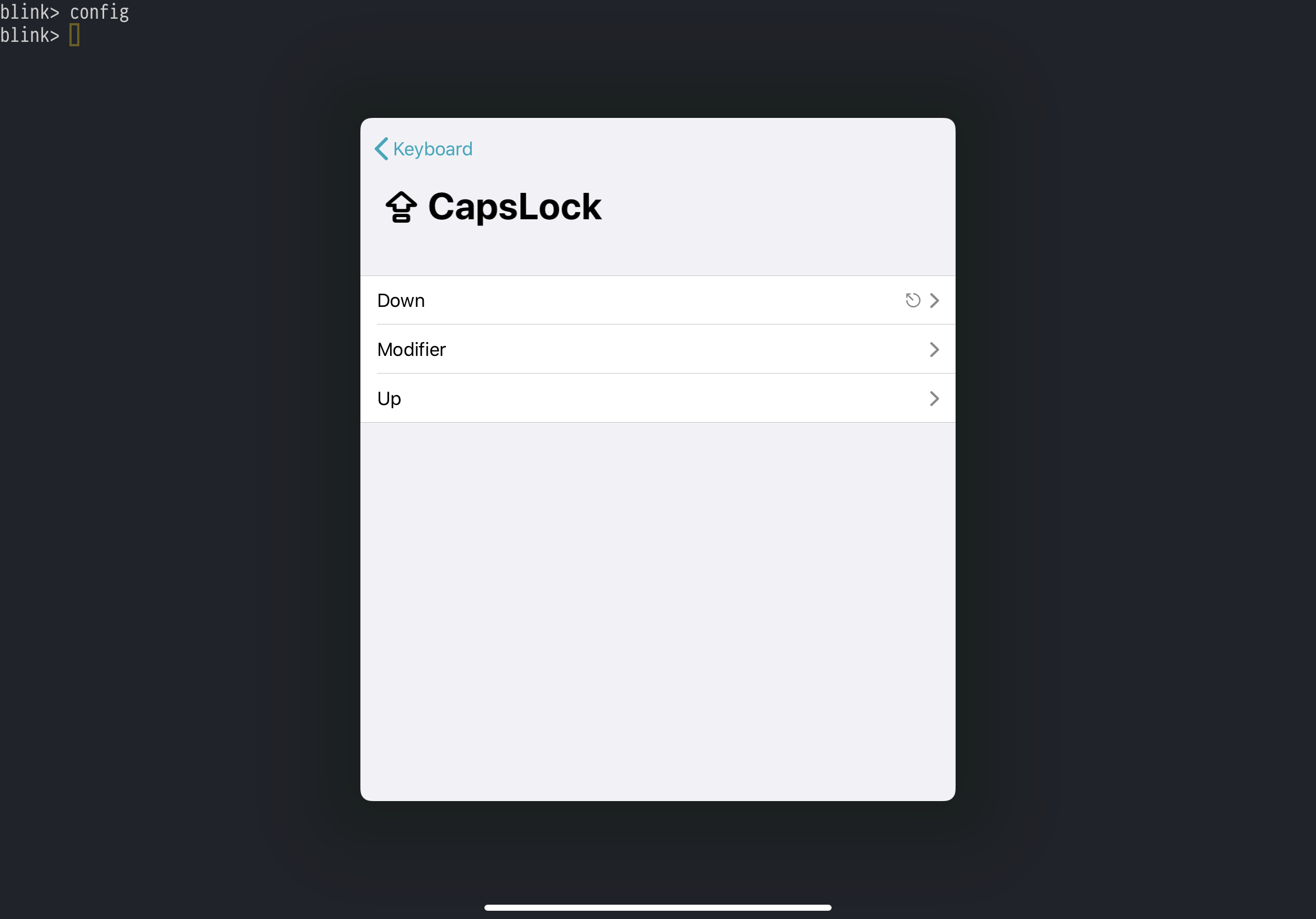
We have almost complete integration with new KB. I know, I promised to push TestFligh version last week, but turns out it is a lot.
One thing left, I will push TF on Monday.
yury
on 8 Dec 2019
Any chance I could get onto the TestFlight?
On Sun, Dec 8, 2019 at 3:04 AM Yury Korolev notifications@github.com
wrote:
Hi @cwis-public https://github.com/cwis-public,
We have almost complete integration with new KB. I know, I promised to
push TestFligh version last week, but turns out it is a lot.One thing left, I will push TF on Monday.
[image: 2706F5E1-C533-4E3E-BE7D-C8EFC8890405]
https://user-images.githubusercontent.com/5250/70388487-9063d400-19c3-11ea-95e5-502af317fd64.png
[image: FB4DEAD4-8280-49A0-9DD2-A4F2BA0F02F1]
https://user-images.githubusercontent.com/5250/70388488-9063d400-19c3-11ea-8354-0d2c844556b2.png
[image: 70E4DDD4-5FB6-416B-91E1-108AEC3EA62D]
https://user-images.githubusercontent.com/5250/70388489-9063d400-19c3-11ea-9a0a-afbfc2a30e3a.png
[image: 0ED40C16-6525-4207-801C-C995CC117F0C]
https://user-images.githubusercontent.com/5250/70388490-90fc6a80-19c3-11ea-8813-9f826459fb70.png—
You are receiving this because you commented.
Reply to this email directly, view it on GitHub
https://github.com/blinksh/blink/issues/855?email_source=notifications&email_token=AAAE4A6IQTS5ZY73ESBUMADQXTIE5A5CNFSM4JIDFA42YY3PNVWWK3TUL52HS4DFVREXG43VMVBW63LNMVXHJKTDN5WW2ZLOORPWSZGOEGG3LDA#issuecomment-562935180,
or unsubscribe
https://github.com/notifications/unsubscribe-auth/AAAE4A6J4DD4S25LEN24EWTQXTIE5ANCNFSM4JIDFA4Q
.
chrismetcalf
on 9 Dec 2019
Me too?
jerryabramson
on 9 Dec 2019
@chrismetcalf, @jerryabramson if you don't have previous TF access. Please send me your Apple IDs at [email protected].
I will push TF release later today.
yury
on 9 Dec 2019
@yury Sent! Thank you!
chrismetcalf
on 9 Dec 2019
Any update?
jerryabramson
on 18 Dec 2019
@jerryabramson
We got it working and testing it right now.
Sad, bu we have some blockers: #893, #887.
We have plan to simplify UI for keys config and release ASAP.
Expect release next week.
yury
on 18 Dec 2019
Hi Yury,
I was finally able to get the code to compile, and deployed to my iPad.
Apple sure makes this incredibly tough, I really hate xcode.
I see most of the stuff is done at the command-line, which is good.
But I think Xcode is required to deploy to a connected device.
[I do have a developer account].
I have been using build 189 for a couple of days, and it seems pretty good.
The control key mostly works, most of the time.
I am not having the issues with the command key that others are.
I am on iPadOS 13.3, using smart keyboard.
_Thank you,_
- Jerry Abramson
- [email protected] jerry@jabramson.com
- +1(603)888-1988 [home]
+1(603)566-3092 [cell]
*jerry.jabramson.com http://jerry.jabramson.com
*Jerry Abramson
On 12/18/19 1:08 PM, Yury Korolev wrote:
>
@jerryabramson
https://urldefense.jabramson.com/?url=https%3A%2F%2Fgithub.com%2Fjerryabramson&id=f918&[email protected]&tss=1576692531&msgid=70d15e6b-21c1-11ea-9257-61f107265a54&html=1&h=c65aa902
We got it working and testing it right now.
Sad, bu we have some blockers: #893
https://urldefense.jabramson.com/?url=https%3A%2F%2Fgithub.com%2Fblinksh%2Fblink%2Fissues%2F893&id=f918&[email protected]&tss=1576692531&msgid=70d15e6b-21c1-11ea-9257-61f107265a54&html=1&h=bcc70f4c,887
We have plan to simplify UI for keys config and release ASAP.
Expect release next week.—
You are receiving this because you were mentioned.
Reply to this email directly, view it on GitHub
https://urldefense.jabramson.com/?url=https%3A%2F%2Fgithub.com%2Fblinksh%2Fblink%2Fissues%2F855%3Femail_source%3Dnotifications%26email_token%3DAFAWGW6SGFBYZ2SI3AN6OXTQZJRLBA5CNFSM4JIDFA42YY3PNVWWK3TUL52HS4DFVREXG43VMVBW63LNMVXHJKTDN5WW2ZLOORPWSZGOEHG7PWA%23issuecomment-567146456&id=f918&[email protected]&tss=1576692531&msgid=70d15e6b-21c1-11ea-9257-61f107265a54&html=1&h=544a6d9f,
or unsubscribe
https://urldefense.jabramson.com/?url=https%3A%2F%2Fgithub.com%2Fnotifications%2Funsubscribe-auth%2FAFAWGW4WT5O35YGZAS4QZT3QZJRLBANCNFSM4JIDFA4Q&id=f918&[email protected]&tss=1576692531&msgid=70d15e6b-21c1-11ea-9257-61f107265a54&html=1&h=c9a96116.
jerryabramson
on 26 Dec 2019
@yury Generally the latest builds have been great, with the exception of one thing I'm not even sure is a "bug" - after using "caps as control", sometimes when I tab out into other apps, my capslock is on, even though it wasn't on in Blink.
chrismetcalf
on 27 Dec 2019
@chrismetcalf
https://github.com/blinksh/blink/issues/895
 dmitryzykov
on 28 Dec 2019
dmitryzykov
on 28 Dec 2019
Related issues
 rekendahl
·
4Comments
rekendahl
·
4Comments
 toph-allen
·
3Comments
toph-allen
·
3Comments
 zaptrem
·
4Comments
zaptrem
·
4Comments
 proportional
·
3Comments
proportional
·
3Comments
 dlasky
·
4Comments
dlasky
·
4Comments
Most helpful comment
Hi @cwis-public,
We have almost complete integration with new KB. I know, I promised to push TestFligh version last week, but turns out it is a lot.
One thing left, I will push TF on Monday.